Printer ink is sold by volume and priced by the page. A cartridge says it prints some number of pages, you divide the price by that number, and you have a cost per page.
The number of pages, however, is not a property of the cartridge. It is a property of the pages themselves, and one checkbox in the print dialogue changes the ink by more than a factor of ten.
What the rating actually means
A cartridge's yield is measured against standard test documents that average about 5 per cent ink coverage, meaning five parts in a hundred of the sheet are inked and ninety-five are bare paper.
That figure is where every cost-per-page calculation starts, and almost nobody prints it. Your own documents have their own coverage, so your real cost is the rated cost scaled by how different your pages are from that 5 per cent standard.
So we measured our own pages. We printed them to A4 on the spot, rasterised them, and weighed how much of each sheet ended up carrying ink.
The checkbox
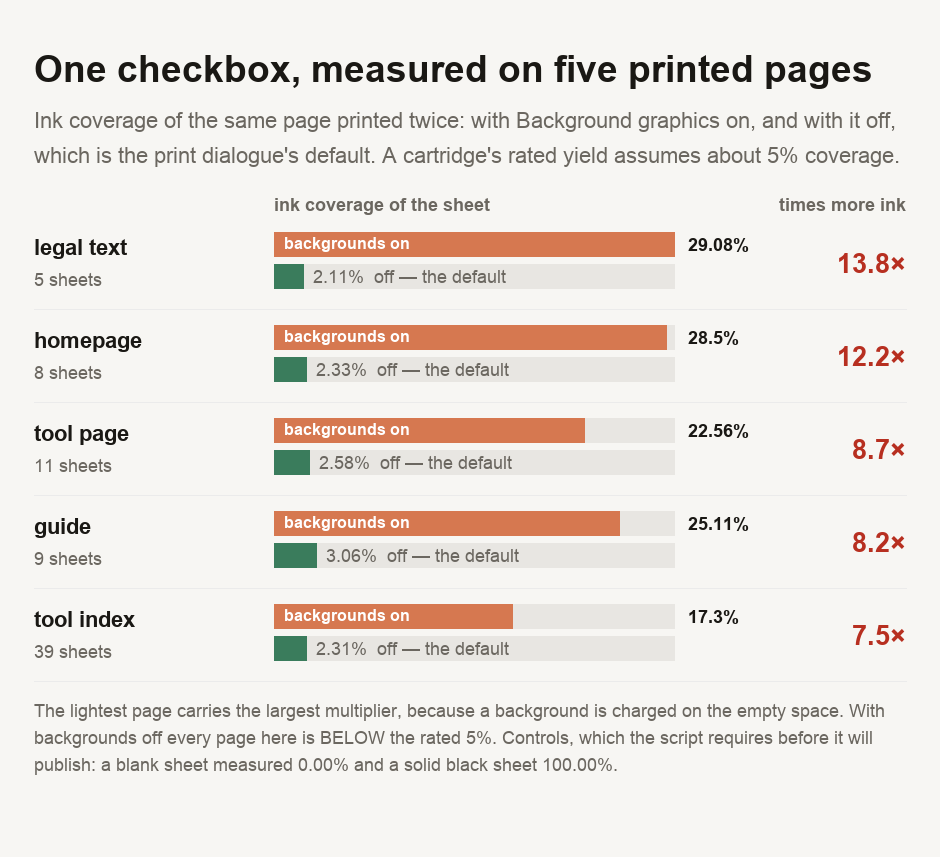
With Background graphics switched on, these pages cover between 17.3 and 29.08 per cent of the sheet in ink. With it off — which is what your print dialogue does unless you change it — the same pages cover between 2.11 and 3.06 per cent.
The multiplier runs from 7.5 times to 13.8 times, on identical documents.
Nothing about the content changed. What changed is whether the printer lays down the page's background colour across every part of the sheet the text does not occupy.
Two controls ran before any of it, because a low coverage figure and a broken measurement look identical: a blank sheet measured 0.00 per cent and a solid black one measured 100.00 per cent. The script will not report anything unless both hold.
The lightest page has the worst multiplier
Look at which page suffers most. It is the privacy policy — plain text, no photographs, the most restrained page we measured. It carries the largest multiplier at 13.8 times.
That inverts the intuition, and once you see why it is obvious. Background is charged on the empty space, and a sparse page is mostly empty space. A dense page has less bare sheet for the background to fill, so switching backgrounds on costs it proportionally less.
Which means the pages you would expect to be cheap to print are exactly the ones the checkbox punishes.
The reassuring half
With backgrounds off, every page we measured came in under the 5 per cent the rating assumes — between 0.42 and 0.61 times a rated page.
So a cartridge rated for 500 pages should manage rather more than 500 pages of ordinary web article, printed normally. The rating is not the marketing exaggeration it is often assumed to be. It describes a page denser than most text you will print, and lighter than anything with a photograph or a filled background in it.
If your own experience does not match the rating, it is not because the manufacturer is misleading you. It is because your documents do not resemble the test suite, in either direction.
Then there is the paper
One page in the set printed to 39 sheets. It is a listing page, and it is not unusual; a long web page becomes a great many pieces of A4 without warning you first.
People watch the cost of ink because cartridges are conspicuously expensive. They do not count the cost of paper, and a single 39-sheet job uses more of it than a month of ordinary printing. Before printing anything from a browser, glance at the page range in the preview. The sheet count is frequently a surprise.
The single largest lever on a print job's ink is the Background graphics checkbox, and leaving it off is both the default and the right habit. On our own pages, turning it on multiplied coverage by between 7.5 and 13.8 times for no change in what the document says. Switch it on deliberately, for a chart, a map or a coloured table where the colour carries information. Always check the sheet count in the preview before you commit; a page that reads as short ran to 39 sheets in this measurement. A cartridge's rated yield is not marketing fluff either — printed normally, every page here used less ink than the rated page. And if your real cost per page is running well above the rating, the culprit is almost always coverage, meaning photographs, filled backgrounds and dark headers, rather than the cartridge.
Measuring your own
The script is committed with this guide and prints any page you point it at, twice, to compare the two states. For the arithmetic around it, our unit price comparator is the tool for choosing between cartridge sizes — cost per millilitre rather than per box — and the percentage calculator handles the scaling between a rated page and yours. If you want to see how much of a file is the images rather than the words, why your PDF is so big takes a document apart by component, and comparing unit prices covers the shelf-label version of the same trap.
- Every coverage figure comes from a script committed alongside this guide. Each page is printed to A4 twice through Chrome DevTools, once with background printing on and once off, rasterised at 150 dpi greyscale, and coverage taken as mean ink density — the fraction of full black the sheet would lay down.
- ⚠️ CONTROLS RUN BEFORE THE MEASUREMENT and the script refuses to publish without them: a blank white sheet must read 0.00 per cent and a solid black sheet 100.00 per cent. Both did. A low coverage figure from a broken rasteriser looks exactly like a light page.
- ⚠️ THE FIRST VERSION OF THIS MEASUREMENT WAS WRONG, and the correction is the guide. Chrome's headless print flag always prints backgrounds, while the print dialogue a person uses has them off by default. Measuring only the flag would have reported our pages at five to six times a rated page, when printed normally they are about half of one — an error of roughly twelve times, in the direction that makes the more alarming story.
- ⚠️ THE 5 PER CENT RATING IS QUOTED, NOT MEASURED. Cartridge yields are rated against a standard test suite whose pages average about that coverage. Our coverage and the ratio to it are measured; the rating itself is taken from the standard.
- ⚠️ THIS MODELS A MONOCHROME PRINTER. Coverage is ink density on a greyscale render. A colour printer draws from four cartridges in proportions this method does not resolve, so a colour cost per page does not follow from these numbers.
- ⚠️ ONLY OUR OWN PAGES WERE MEASURED, five of them, rendered on the spot. No document belonging to anyone else was opened. Five pages from one site is a small sample and the specific percentages are ours; what generalises is the mechanism, which is a property of the print dialogue rather than of this site.
- ⚠️ NO CARTRIDGE PRICES ARE QUOTED and no brand is compared. Prices vary by market and by week, and a figure we published today would be wrong by the time you read it. The ratio is the durable part.
This describes ink coverage measured on five web pages printed from one browser. Your printer, driver and documents will produce different figures; the method is reproducible and the numbers it gives you will be yours.

View author profile → · Editorial policy