A colleague sends you a two-page document and it will not attach. Twelve megabytes, for two pages of what looks like ordinary text. Meanwhile a fifty-page report someone else sent came in under a megabyte.
The page count is a red herring, and compression tools cannot fix it. The bloat was baked in when the file was created.
The one question that settles it
Try to select a sentence in the document. If the text highlights word by word, the PDF contains text. If your cursor draws a rectangle across the page instead, it contains a photograph of text, and the size follows from that.
A text-based PDF stores compact instructions for drawing letters — glyph references for a given font. A scanned PDF stores several million pixels, none of which it recognises as text.
We built the same page both ways
Rather than compare two unrelated documents, we generated one A4 page of 34 lines as text, then rasterised that exact page at 200 dpi — a typical office scanner setting — and rebuilt it as an image. Same content, same layout, weighed on the same scales.
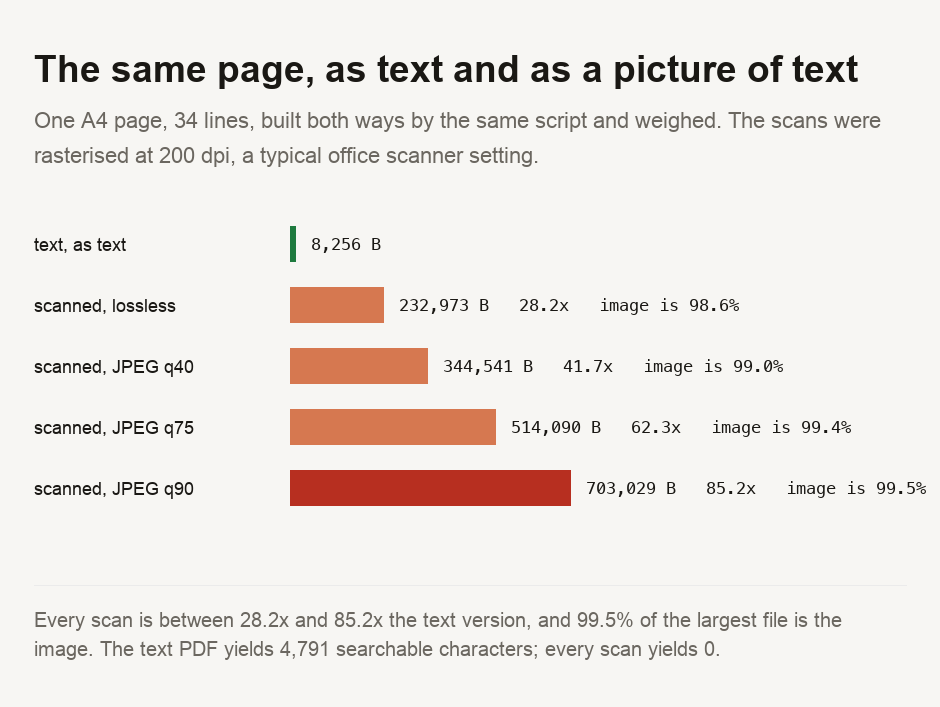
The text version is 8,256 bytes. Scanned at a middling JPEG quality, the same page is 514,090 bytes, or 62.3 times larger. At quality 90 it reaches 703,029 bytes — 85.2 times the text version, for a page nobody could tell apart on screen.
In that largest file, the image accounts for 99.5 per cent of the bytes. There is no "PDF overhead" to trim. The document is the picture, wrapped in about three kilobytes of paperwork.
What that costs you beyond the megabytes
The text version yields 4,791 searchable characters. Every scanned version yields 0.
Not "fewer" — none. The words are not in the file in any form a computer can read. It cannot be searched, a screen reader cannot announce it, the text cannot be copied, and no amount of compression will bring any of that back.
The surprise, which contradicts the usual advice
Storing the scan losslessly produced 232,973 bytes — smaller than every JPEG we tried, including the heavily degraded quality-40 version at 344,541.
This result is counterintuitive, but it is about the material. Lossless compression excels at the flat colour and hard edges of a text page; JPEG is notoriously bad at both. JPEG spends bytes describing the ringing artefacts it creates around every letter. We measured the same effect on screenshots in our guide on taking a screenshot, and it holds here for the same reason.
So "compress the PDF" applied to a scanned document often means "re-encode the image as JPEG", which on a page of text can make the file larger while permanently damaging the letters.
Fix it at the source rather than afterwards. If a document started as text — a word processor, a spreadsheet, a web page — export it directly to PDF instead of printing and scanning it, and a 700 KB file becomes an 8 KB one that is also searchable. If you have only a scan, the honest options are to scan at a lower resolution next time, or to run OCR so the words exist as text alongside the image. And do not reach for a JPEG-based compressor on a page of text: we measured it producing a file larger than lossless while visibly damaging the letters. If the file must be smaller today and it is genuinely a scan, dropping the scanning resolution is the lever with the best ratio of size saved to quality lost.
Checking your own file
The select-a-sentence test takes two seconds and tells you which kind you have. If you want the numbers, our data storage converter turns a reported file size into the units an attachment limit is actually expressed in, and the image format converter lets you test the lossless-versus-JPEG comparison above on one of your own pages before committing a whole document to it. For the general question of what compression does to an image of text, what JPEG quality actually means covers the mechanism.
- Every file was built and weighed by a script committed alongside this guide. The same page is produced as text and as a scan at four settings, so the comparison is like for like rather than between two unrelated documents. Character counts come from extracting text out of the finished PDFs, not from what was put in.
- ⚠️ The embedded image size is read back OUT of each finished PDF rather than taken from the bytes handed to the writer. Our first run measured the input and reported an image occupying 115 per cent of its own file — an impossible number, and the thing that exposed the error. The PDF writer re-compresses on insert.
- ⚠️ One page, one font, one scanner resolution, on synthetic content. Real scans carry paper texture, shadows and skew, all of which make images larger and none of which make the text version larger. The ordering is a property of the formats; the exact ratios are this page's.
- ⚠️ We did not test OCR quality, which is recommended above as an option. Whether a given scan OCRs well depends on resolution and legibility, and that is a claim we have not measured.
File sizes depend on content. A PDF full of photographs is large for a good reason, and nothing here suggests otherwise — the comparison is specifically about pages of text stored as pictures.

View author profile → · Editorial policy