There is exactly one quality setting at which re-saving a JPEG is nearly free. It is not 100, and it is not the number in any guide's recommended range. It is the number the file was already saved at — and two points either side of it, the same operation costs you roughly forty times as much.
That trade-off is unusual. Most quality dials are monotonic: turn them up for a better, bigger result, or down for a worse, smaller one. The JPEG quality dial has a dip in it. And the dip sits at a value you cannot see by looking at the picture. The ordinary advice — save it at 85 to be safe — therefore reliably produces a file that is both larger and further from the original than saving it at 80 would have been.
The one quality that is nearly free
A 640 × 427 photograph was re-saved at a range of qualities. The error column measures the mean absolute difference per colour channel, on a scale where each channel runs from 0 to 255, against the source — every pixel compared.
| Saved at quality | Bytes | Mean error per channel |
|---|---|---|
| 72 | 41,765 | 1.5237 |
| 74 | 43,244 | 1.2394 |
| 76 | 43,755 | 1.0686 |
| 78 | 45,022 | 0.6622 |
| 80 | 45,698 | 0.0169 |
| 82 | 46,775 | 0.6214 |
| 84 | 48,609 | 0.8250 |
| 86 | 51,316 | 0.9400 |
| 88 | 58,183 | 0.7285 |
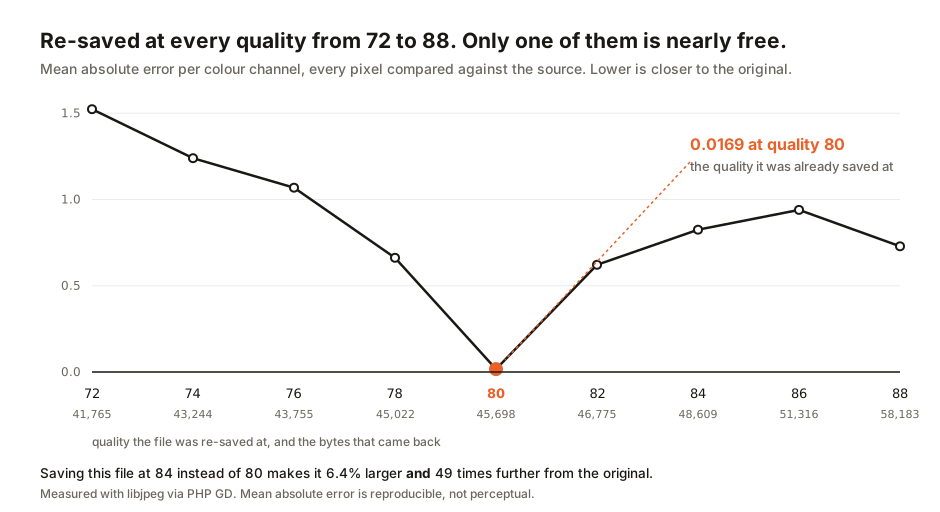
The file had been saved at quality 80. Re-saving it there moved the average channel by 0.0169 — about one part in fifteen thousand of the available range, which is another way of saying nothing happened. Two points down, at 78, the error is 39 times larger. Two points up, at 82, it is 37 times larger. At 84 it is 49 times larger and the file has grown by 6.4%.
Now take the common advice literally. Saving this file at 85 — the round number that sits in the middle of every recommended range — produces 49,209 bytes against 45,698, which is 7.7% bigger, with an error somewhere between the 0.8250 measured at 84 and the 0.9400 measured at 86. Bigger file, worse picture, for choosing the safer-sounding number.
Raising the quality to 100 does not rescue it either. The same photograph at quality 100 is 126,343 bytes — 2.8 times the size — and still not identical to the source. Quality 100 disables aggressive quantisation, but not the colour-space conversion or the transform itself.
It is not a quirk of one photograph
This was not a quirk of one file. We encoded two fresh source images at qualities chosen in advance, 65 and 92, and swept them the same way. The minimum error followed the chosen quality in both cases.
| Source saved at | −4 | −2 | at the source quality | +2 | +4 |
|---|---|---|---|---|---|
| quality 65 | 1.2390 | 0.9998 | 0.0059 | 0.7372 | 1.0607 |
| quality 92 | 0.6504 | 0.5431 | 0.0613 | 0.3200 | 0.2104 |
It follows both times. The reason is mechanical. JPEG compression divides the frequency coefficients of each block by a table of numbers and rounds the result. The quality setting is that table. When you re-encode at the same quality, the coefficients are already whole multiples of the same divisors — the rounding step has nothing left to round, and the file comes back almost unchanged. Re-encode at a different quality and every coefficient is snapped onto a grid that does not line up with the one it is sitting on.
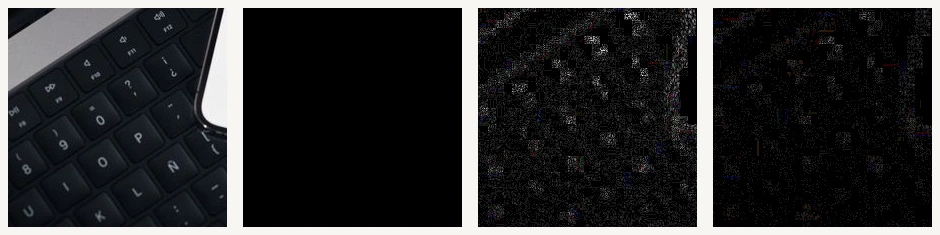
The second panel above shows this effect directly. Re-saving the crop at its original quality changed not one of its 47,961 pixels; the panel is black because the difference is zero everywhere. Four points higher, at 84, 47.23% of the same pixels moved.
One row deserves attention rather than smoothing over. In the quality-92 case, the error at +4 is 0.2104, which is lower than the 0.3200 at +2. The curve away from the minimum is not clean, and we will not pretend it is. The data shows a narrow, sharp dip at the source quality, not an orderly slope.
Generation loss is not quite what you were told
The standard warning about JPEG is that every save degrades it, so the damage piles up over repeated edits. Our own image compressor said exactly that in its explanatory copy until this guide was written: "Each re-encoding pass introduces a new round of quantisation errors that compound the previous pass."
That warning is half right, and the half people act on is wrong. We fixed one of our own 940 × 627 photographs at quality 80 and re-encoded it ten consecutive times, feeding each pass's output into the next.
| Pass | Error added by this pass | Total drift from the start | Bytes |
|---|---|---|---|
| 1 | 0.0267 | 0.0267 | 59,661 |
| 2 | 0.0162 | 0.0385 | 59,650 |
| 3 | 0.0116 | 0.0461 | 59,651 |
| 5 | 0.0071 | 0.0565 | 59,644 |
| 8 | 0.0034 | 0.0628 | 59,663 |
| 10 | 0.0010 | 0.0644 | 59,671 |
The damage does not compound. It converges. Each pass adds less than the one before — the tenth pass moved the image 27 times less than the first did — and after ten round trips the total drift is 0.0644. Across all ten generations the file size varied by 39 bytes. The encoder is walking toward a fixed point and then standing on it.
For scale, a single re-encode of that same file at quality 94 costs 0.2140 in error — 3.3 times the total damage of ten passes done correctly. One wrong-quality save is worse than ten right ones.
Change the quality between passes, though, and the warning becomes true immediately. Alternating between 94 and 80 for ten passes, the per-pass error never decays at all — it sits between 0.18 and 0.25 from the first pass to the last — and the file size swings between 59,423 and 93,114 bytes depending on which generation you happen to stop at.
The real rule, then, is not avoid re-saving. It is avoid changing the quality number. Generation loss is a symptom of inconsistency, not of repetition.
"Quality 80" is not a unit
This all assumes the quality number means the same thing everywhere, which it does not.
The same photograph was handed to macOS's own sips encoder and asked for quality 80. It came back at 84,059 bytes. The same picture through libjpeg at quality 80 is 58,723 bytes — Apple's "80" is 43% larger, and inspecting the table it actually wrote shows it corresponds to libjpeg's quality 94.
Neither encoder is wrong. The quality number is not a property of the image and never was; it is an index into whatever table that particular encoder happens to use, which makes guessing a bad strategy.
The file already tells you what it was saved at
The quantisation table is not a secret. It is written into every JPEG in a marker segment called DQT, immediately available in the first few hundred bytes, and the standard tables are generated from the quality number by a published formula that can be run backwards.
Tested across qualities 50 to 98 in steps of two — 25 files — reading the table back and searching for the quality that generates it recovered the correct value 25 times out of 25, with the reconstructed table matching the stored one exactly, not approximately.
Run against eight real photographs we serve on this site, whose encoding history nobody recorded: six came back at quality 80 and two at quality 92, all with an exact table match.
The method has one limit: encoders that use custom tables rather than the standard scaled ones, like Photoshop's export path or mozjpeg with trellis quantisation, will not produce an exact match. That is what the residual is for: it was zero on every standard-encoder file above, and 68 on the sips file, which is how we knew Apple was using a table of its own before we knew anything else about it. A non-zero residual means do not trust the number, and that is a far better outcome than a confident wrong answer.
What this audit found in our own tools
Reading the source of our own tools, as we do for every guide, turned up a problem smaller and more specific than a broken calculator.
Two of our tools strip metadata from a photograph by decoding it and writing a new file from the pixels. This is the right technique, a stronger guarantee than editing metadata in place because the new file simply never had any. But both then had to choose a quality to write at, and when this audit read their source both chose a fixed one. Our EXIF viewer hard-coded 0.94, with no control offered to the reader at all. Our EXIF stripper defaulted to 0.92, which the reader could change. Both were fixed the day this guide published, and the correction in the sources card below records what changed.
Applied to the quality-80 photograph above, that is what those two choices cost:
| Written at | Bytes | Change in size | Error |
|---|---|---|---|
| 80 — the quality it already was | 59,661 | −0.1% | 0.0267 |
| 92 — the stripper's old default | 82,127 | +37.6% | 0.2939 |
| 94 — the viewer's old fixed value | 93,114 | +56.0% | 0.2140 |
Both tools described the loss as slight, and on that narrow point they were right — 0.2 to 0.3 of a channel level is not something an eye will find. The claim neither of them made, and the one that mattered, is about size. Stripping the GPS coordinates out of a photograph returned it between a third and half again larger than it arrived, on tools whose users are usually trying to prepare an image for somewhere else. Writing at the quality the file already carried would have produced a file that was both smaller and closer to the original.
Neither tool read the DQT marker. The EXIF viewer was the sharper case. It was already a marker parser, walking the file's segments to find EXIF, IPTC and XMP, but it passed straight over the one table that would have told it what to do.
The two strip tools were logged for their next review rather than quietly patched mid-guide, and both were fixed later the same day. Each now recovers the quality from the source file's own DQT marker and re-encodes at it, falling back to a constant only when that table cannot be inverted exactly. The compressor's explanatory paragraph has been corrected to state that passes compound when the quality changes between them and converge when it does not. The page now carries a dated note recording the original text, which is the right way to change a published claim.
The rest of the audit came back clean. The compressor's and resizer's quality sliders do what they claim, the format converter's feature detection for AVIF encoding is now correctly wired after an earlier fix, and the stripper's lossless PNG mode really is lossless. Nothing else here is a defect.
Prefer the quality the file already has. If you are re-saving a JPEG without resizing it, matching the original quality is nearly free and every other value costs you. Never round upward "to be safe" — a higher number gives you a bigger file and a worse one, which is the opposite of what it sounds like it does. Treat the quality number as encoder-specific: 80 in one tool is 94 in another, so a setting copied between tools means nothing. Resize and compress in one operation rather than two, because a resize discards the block grid anyway and there is no original quality left to match. And keep an uncompressed master where the work matters — matching the quality makes re-saving cheap, not free, and the cheapest edit is still the one made from the original.
Run your own numbers
To see the size curve from this guide on your own photograph, our image compressor shows the resulting size as you drag its per-file quality slider. For comparing formats rather than qualities, the image format converter does the same across JPEG, PNG, WebP and AVIF. And when the dimensions are the real problem — as they usually are — reach for the image resizer. To see what metadata a file is carrying before deciding anything, our EXIF viewer lists every tag it finds, and the EXIF stripper removes them in a batch, matching each file to its own quality by default, with the field still there when you want to override it.
- Every figure in this guide was measured rather than quoted. The quality sweep and the two controlled sources were encoded with libjpeg through PHP's GD extension in this site's own application container, comparing every pixel of each re-encoded file against the source decode; the error statistic throughout is the mean absolute difference per colour channel on a 0–255 scale. The size curve was sampled every fourth pixel and agrees with the full per-pixel measurement where they overlap — 0.89 against 0.8825 interpolated at quality 85.
- The repeated-pass experiment, the encoder comparison and the quantisation-table recovery were run for this guide against
pexels_29502356.jpg, a 940 × 627 photograph from this site's own image library, fixed at quality 80 before the first pass so that the starting quality was known rather than inferred. The macOS comparison used the systemsipsencoder at its own quality 80. - Quantisation-table recovery inverts the scaling defined in the JPEG standard's Annex K and implemented in libjpeg's
jpeg_add_quant_table: the standard luminance table is scaled by a factor derived from the quality value, so searching all 100 qualities for the table that reproduces the stored one recovers the original setting. The stored table is written in zig-zag scan order, not row-major — comparing against a row-major table returns answers that are close but wrong, which is a mistake this guide made first and caught by checking the residual. - The mean absolute error used here is computable and reproducible, which is why it was chosen. It is not a perceptual metric and does not claim to be: it measures how far the numbers moved, not how much an eye would notice. Every source in these measurements is an already-compressed JPEG, so what is being measured throughout is re-encoding — which is what a web workflow actually does, but it is not the same as compressing an original.
- Correction, 8 August 2026. This guide reported that our EXIF viewer wrote every stripped copy at a hard-coded 0.94, and our EXIF stripper at a default 0.92. Both were true when the audit read their source, and both were fixed the same day in response to this guide. Each tool now recovers the quality from the source file's own DQT marker and re-encodes at it, falling back to a constant only when that table cannot be inverted exactly. Measured across twelve photographs, matching the source costs 1.3% in size at 0.41 mean absolute error, against 44.4% and 0.76 at the viewer's old fixed 0.94, and 28.5% and 0.82 at the stripper's old 0.92. The findings are left standing in the past tense rather than deleted, because the measurement that produced them is the reason the tools changed.
- The two strip-tool behaviours reported above were read from the shipped source on 8 August 2026, not inferred from documentation, and both were queued for fix at the time of writing — see the correction above. The compressor's wording was corrected the same day, in response to the measurement in this guide:
public/tools/exif-viewer/app.jspassed a fixed 0.94 tocanvas.toBlob, andpublic/tools/image-exif-stripper/app.jsread a user-editable field defaulting to 0.92. Browsers encode JPEG through the same libjpeg family used for these measurements.
This guide is about lossy image encoding, not archival practice. For anything that will be printed, edited further, or kept as a record, keep the original file — no re-encoding strategy is a substitute for not re-encoding.

View author profile → · Editorial policy