Key points
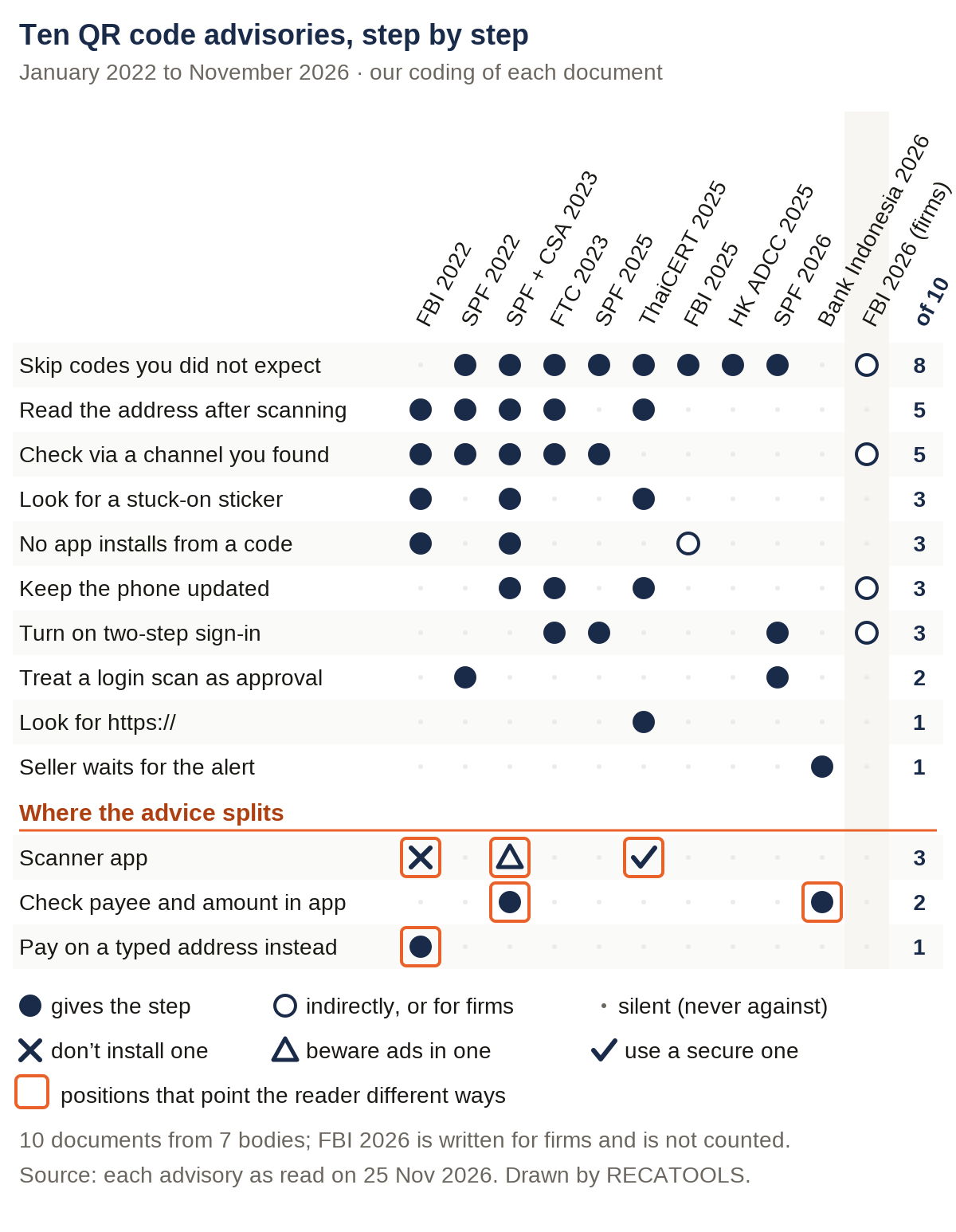
- Scanner apps get three answers from the three advisories that mention them: don’t install one (FBI), beware the ads inside one (Singapore police and CSA), use a secure one (ThaiCERT). The other seven of the 10 we coded, January 2022 to November 2026, are silent.
- Payment advice splits on what reads the code. The FBI says not to pay on a page a code opens; Singapore’s joint advisory and Bank Indonesia say to check the payee and amount the payment app shows.
- A code scanned to sign in or link a device can approve someone else’s session. Singapore police described a Singpass case in 2022 and a WhatsApp case in February 2026.
- Our test codes for a lookalike link and a login session both came out at 33 × 33 modules. The printed square gives no clue which action a scan will start.
- The widest agreement is on one step: 8 of the 10 documents warn against scanning a code that arrives unasked or from a doubtful source.
QR code phishing, which the FBI calls quishing, hides a harmful web address or request inside the square pattern a phone camera reads. Police and cyber agencies agree you should not scan a code you were not expecting, and split on two practical points. We set the protective steps in 10 advisories side by side. The three that mention scanner apps take three different positions. On paying, the FBI says to avoid paying through a page a code opens, while Singapore’s police and Bank Indonesia tell you to read the payee in the payment app. A code that signs you in or links a device needs a different check again.
Scanner apps get three different answers
The FBI’s public service announcement of 18 January 2022, I-011822-PSA, says “Do not download a QR code scanner app.” An extra app raises the risk of malware, it says, and “Most phones have a built-in scanner through the camera app.” The Singapore Police Force (SPF) and Cyber Security Agency (CSA) “Joint Advisory on Protecting Yourself from Malicious QR Codes” (22 May 2023) lists malicious ads inside third-party scanner apps among four attack types, and asks readers to stay alert when using one. ThaiCERT’s “Warning: Scammers Use QR Codes to Deceive and Steal Personal Information” (4 March 2025) recommends a secure scanner, since some apps can detect malicious links, and lists one technology news article as its source. The other seven documents say nothing about scanner apps.
The US and Singapore documents both point at the risk of an added app, and the phone makers’ help pages describe the built-in camera. Apple’s “Scan a QR code with your iPhone or iPad” says to hold the device so the code appears, “then tap the link to open the content.” Google’s Pixel help page says the camera “shows a bubble or link on the screen” for you to tap. Neither says what the preview shows for a phone number, a contact card or an authenticator account, or whether it shows the full address.
Payment advice turns on which app reads the code
The same FBI notice says: “Avoid making payments through a site navigated to from a QR code. Instead, manually enter a known and trusted URL to complete the payment.” The Singapore joint advisory assumes you pay by scan, and asks you to check the amount and recipient’s name your payment app shows before confirming. Bank Indonesia’s “Cara Memastikan Pembayaran QRIS Benar-Benar Masuk” (How to make sure a QRIS payment has really gone through, 11 November 2026) gives buyers the same step for codes in QRIS, Indonesia’s national QR payment standard, which it says had reached 44.86 million merchants by June 2026, 96.68% of them micro, small and medium businesses (UMKM). Sellers, it adds, should wait for the system’s own notification, since a payment screenshot is only a picture.
They describe different codes. The FBI means a code that opens a web page asking for card details; the Singapore and Indonesian advice covers a code your banking or wallet app reads itself, which then shows who will be paid. Why a printed shop code carries no amount is covered in our guide to what is inside a payment QR.
Login codes approve a session when you scan them
The SPF’s “Police Advisory On Scam Survey Leading To The Misuse Of Singpass Access To Digital Services” (22 February 2022) describes survey scams in which victims scanned a Singpass QR code screenshotted from a real website and approved it. The access was then used to register businesses, take up mobile lines and open bank accounts in their names. Singpass’s “Security” page says it never sends links or QR codes by SMS or WhatsApp, and asks you to check the service name in the app before continuing.
The SPF’s “Police Advisory Involving The Compromise Of WhatsApp Accounts” (10 February 2026) describes messages from known contacts asking for a vote for a friend’s child in a dance competition. Victims who verified by one-time password or by scanning a QR code were authorising the scammers’ devices on their WhatsApp accounts. No losses had been reported by then. WhatsApp’s undated help page “How to link a device” says your primary phone can link “up to four devices” by scanning the code shown on the other screen.
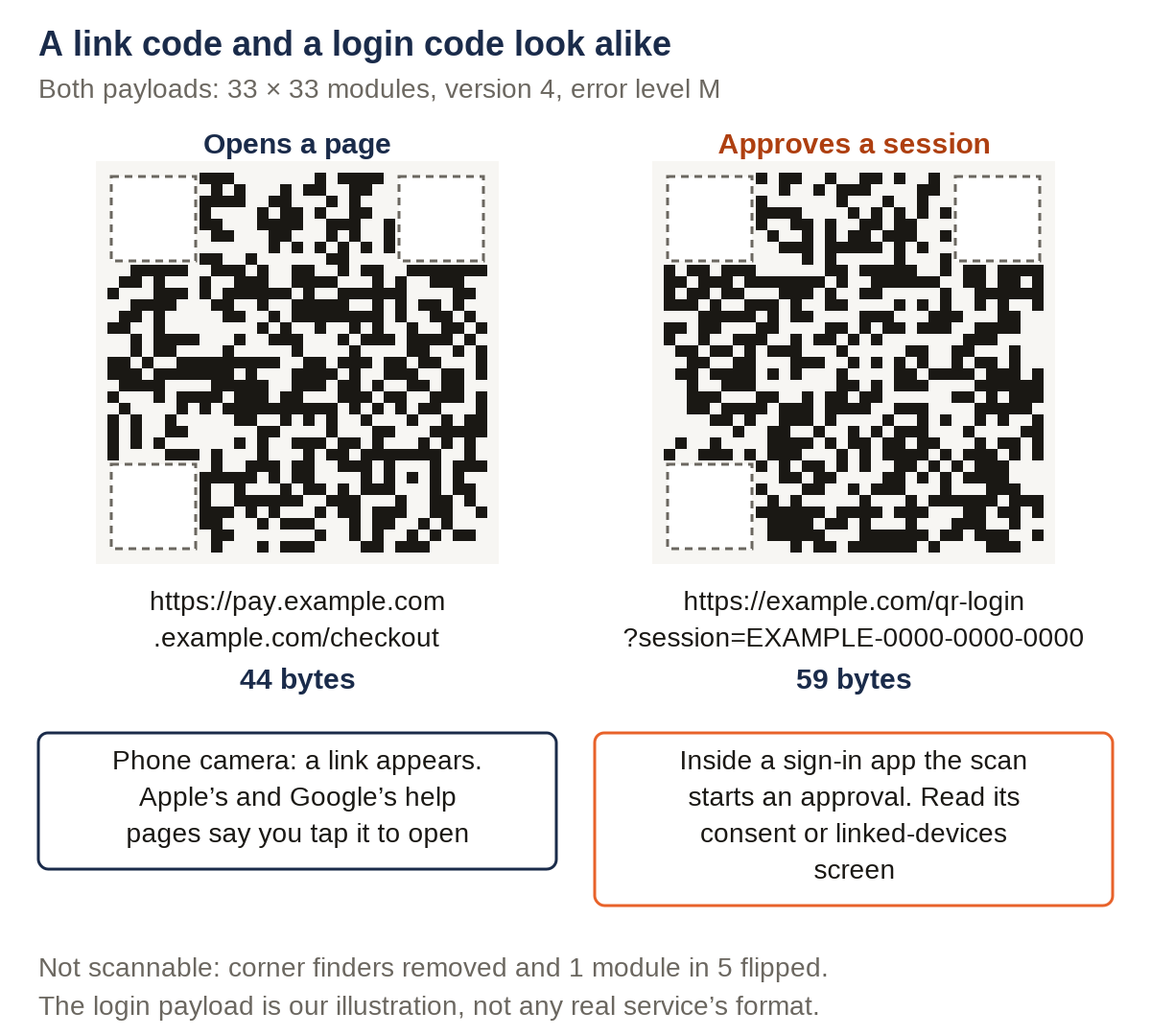
We made 13 harmless test codes with segno 1.6.6, every web and email address in them under example.com, which RFC 2606 reserves, and every phone number a string of zeros; zbarimg 0.23.95 decoded all 13 back byte for byte. A lookalike checkout link, a login-style address, a Wi-Fi join and an email draft all came out as version 4 codes of 33 × 33 modules. The login payload is our illustration, since neither Singpass nor WhatsApp publishes its format.
Stickers come before the scan and addresses after it
Three documents, from the FBI, the Singapore agencies and ThaiCERT, say to check a printed code for a sticker pasted over the original before you scan. The US Federal Trade Commission’s alert “Scammers hide harmful links in QR codes to steal your information” (6 December 2023) notes “reports of scammers covering up QR codes on parking meters with a QR code of their own.” Five documents say to read the destination after scanning and before opening it.
Our guide on what a QR code stores argues that nobody can check a code by its pattern, so the check moves to after the scan. The two fit. A pattern cannot be read by eye; a sticker is an object you can see and feel. Look at the object first, then read the text the phone offers, the link that appears for you to tap, as Apple and Google put it. ThaiCERT also asks readers to look for https://; what the padlock proves covers how little that settles.
Parcels and messages bring codes nobody asked for
Eight of the 10 documents warn, in their own words, against scanning a code that arrives unasked or from a doubtful source. Five, four of those eight and the FBI’s 2022 notice, say to verify through a channel you find yourself. The FBI’s I-073125-PSA (31 July 2025) covers unordered parcels with a QR code inside, a scheme it calls “not as widespread as other fraud schemes”. Hong Kong Police’s Anti-Deception Coordination Centre (ADCC), in “Received an Unsolicited Courier Package Claiming You’d Won a Prize? Beware of Scams. Don’t Scan the QR Code!” (25 November 2025), described parcels delivered by SF Express that held a lucky-draw ticket bearing Taobao’s name and a code, and told recipients not to scan it rashly.
No Singapore, Hong Kong, Thai or Indonesian page we read gives a loss figure for QR codes alone. The SPF’s “Police Advisory On Phishing Scams Involving Fake Buyers On Online Marketplaces” (12 February 2025) counts at least 189 victims and at least S$303,000 lost since 1 January 2025, across email links and QR codes together.
Our scam awareness check has no QR scenario. Its 22 made-up scenarios, 14 everyday and 8 on deepfakes and voice clones, are each answered from an official advisory, and practise the habit these documents share: stop, and check through a route you choose.
How we coded ten documents
We coded each advisory’s protective steps into 13 classes, keeping its own words in every cell. The 10 counted documents come from 7 bodies: the FBI (two), the SPF (four, one jointly with CSA), CSA, the FTC, ThaiCERT, the ADCC and Bank Indonesia. The FBI’s FLASH AC-000001-MW (8 January 2026), which defines quishing, is written for organisations and shown apart. Silence counts as silence, never disagreement, and a later document does not replace another body’s earlier one. All pages were read on 25 November 2026; those from SPF, CSA, Singpass, ThaiCERT, ADCC and Bank Indonesia are paraphrased. No phone was tested; what the built-in cameras do is described only as Apple’s and Google’s help pages put it.
Each step with the advisory behind it
WhatsApp’s “How to unlink a device” gives the path: Linked devices, tap the device, then Log out. Recovery after a full takeover is in our guide to recovering a hijacked messaging account.

View author profile → · Editorial policy
Go further
Relevant tools
More from Cybersecurity