The padlock has been taught as a safety signal for twenty years. Look for the padlock. Never enter your details without the padlock. It became the one piece of security advice everybody could remember, which is unfortunate, because what it actually certifies is much narrower than what people were told.
Being precise matters. The gap between what the padlock means and what people think it means is where the fraud lives.
Three things it proves, and they are all about plumbing
A certificate binds a name to a key. When your browser shows the padlock, it has confirmed that the connection is encrypted, that the name in the address bar matches a name inside the certificate, and that some issuer was willing to vouch that whoever holds the key controls that name.
That is the entire claim, and all of it is about the connection, not the company at the other end.
Which icon you are looking for depends on the browser
The padlock itself is on the way out, and Chrome went first. Google replaced it with a variant of the tune icon, the sliders glyph that opens site settings, in Chrome 117, released in early September 2023. Its stated reason was the one this guide is about: a lock does not imply trustworthiness. Android changed at the same time, and on iOS, where the icon was not tappable, it was dropped altogether. Firefox folded its own padlock and its privacy shield into a single shield icon in version 149, in March 2026. Apple's Safari guide no longer sends readers to an icon at all; it tells them to open Connection Security Details.
None of that touches the argument, only the picture. Where this guide says padlock, read whatever your browser shows for a valid certificate. The three things a certificate proves are unchanged, and so is the gap between them and what people expect.
We read six real certificates to see what they name
We fetched the certificates from six sites and read the subject field, which names the entity the certificate was issued to.
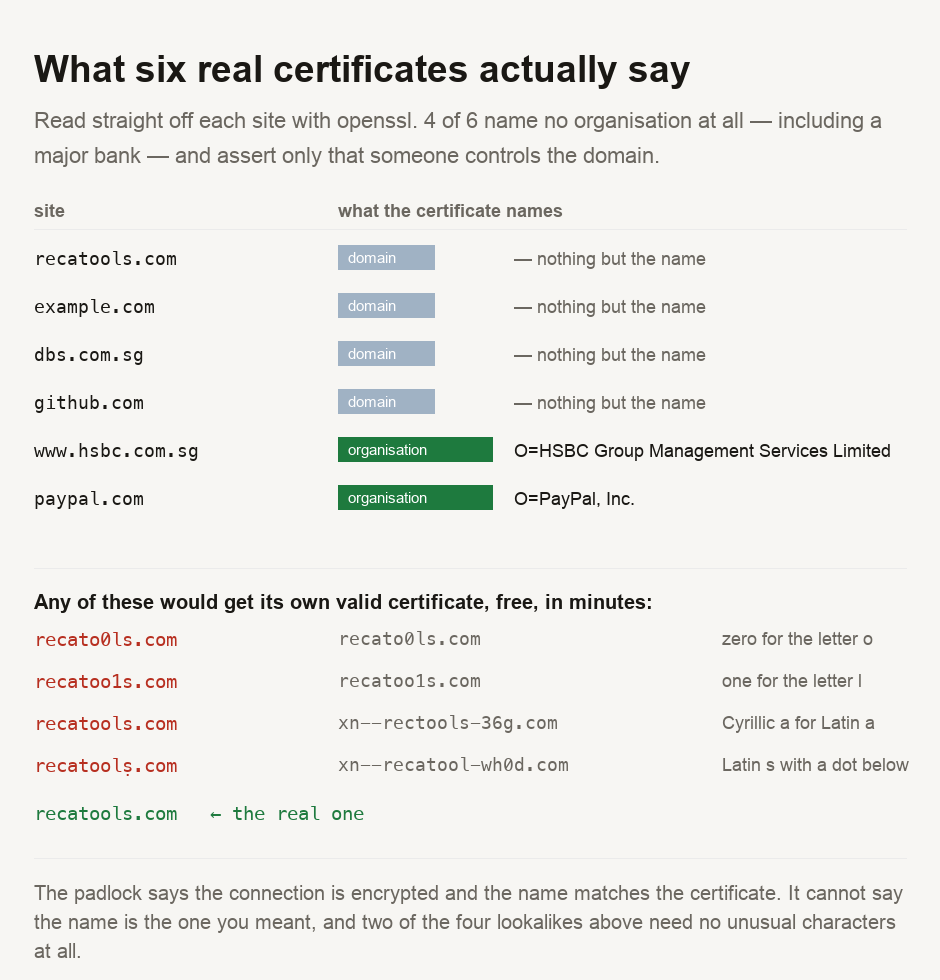
4 of the 6 name no organisation whatsoever. Their subject is just the domain — CN=github.com, CN=dbs.com.sg. The second one belongs to a major Singapore bank, yet its certificate asserts no more than ours does — that somebody proved control of the name.
Only 2 carried a company: PayPal, Inc. and HSBC Group Management Services Limited, the latter with a jurisdiction and a business category attached. Getting one of those requires a different validation, costs real money, and involves a human checking corporate records.
Your browser shows the same indicator for all six. The distinction that took HSBC an identity check and left DBS with a name-only certificate is invisible in the interface where you make the decision.
Our own certificate cost nothing, and that is the norm
The certificate serving this page was issued by Let's Encrypt, free, automatically, in seconds. Nobody checked who we are. A machine confirmed we control the DNS for the name and issued on that basis alone.
That is not a criticism of Let's Encrypt — automatic free certificates are why almost the whole web is encrypted now, which is an enormous security win. The padlock, in other words, has stopped being a scarcity signal. It marks the presence of encryption, and encryption is now the default rather than an achievement.
Which is exactly what a lookalike domain exploits
A fraudster does not need to break the padlock. They register a name that reads like yours and get their own perfectly valid certificate for it, free, in minutes.
Look at the red lines in the figure. Two of them use nothing more exotic than a zero for an o (recato0ls.com) and a one for an l (recatoo1s.com). They are ordinary ASCII. No trick encoding, no special characters, nothing a filter would notice.
The other two are stranger. Replacing the Latin a with a Cyrillic one produces a domain your browser stores as xn--rectools-36g.com — a completely different name that can render identically to ours. A Latin s with a dot beneath it has the same effect, becoming xn--recatool-wh0d.com.
Every one of those four would show whatever your browser shows for a valid certificate. Each certificate would be entirely genuine, correctly issued for the name the visitor is actually on. The padlock is not failing here. It is working exactly as designed, but answering a question the visitor was not asking.
Read the domain, not the padlock — and read it right to left, because the part immediately before the first single slash is the only part that identifies who you are talking to. A padlock on a name you did not intend to visit is a padlock on someone else's site, and it will look completely normal, because the certificate is real. Four of the six certificates we read name no company at all, including a bank, so the presence of a padlock tells you nothing about who is behind it. If money or credentials are involved, reach the site the way you already know — a saved bookmark, or typing the name yourself — rather than through a link that arrived asking you to.
Looking at this yourself
Everything above came from one command against a live host, and the script is committed with this guide. If you want to see what a name resolves to before you visit it, our DNS lookup shows the records behind a domain, and the IP lookup shows where the server actually sits — which is often the first sign that a familiar-looking name is hosted somewhere unfamiliar. For domain owners rather than visitors, the DMARC and SPF checker covers the email side of the same impersonation problem. Our guide on encrypted DNS explains what is protected before the connection is even made.
- All six certificates were fetched from the live hosts with
openssl s_clientand read withopenssl x509on 11 August 2026. Subjects and issuers are quoted from that output, not from any vendor's documentation. The script is committed alongside this guide and can be re-run against any host. - The lookalike domains were encoded with a standard IDNA implementation to obtain their ASCII form. They are illustrations built for this article — we have not registered any of them, and none is known to exist.
- An Update on the Lock Icon — Chromium Blog, 2 May 2023 (accessed 13 Sep 2026). States that the lock icon is replaced by a variant of the tune icon, scheduled for Chrome 117 in early September 2023, that Android changed at the same time, and that on iOS the icon was removed entirely.
- Firefox 149.0 release notes — Mozilla, 24 March 2026 (accessed 13 Sep 2026). Records the TrustPanel, which combines the privacy and security panels reached from the address bar. Mozilla's own support articles now describe that address-bar icon as a shield rather than a padlock.
- Avoid fraud by using encrypted websites in Safari on Mac — Apple, Safari User Guide for macOS Tahoe (accessed 13 Sep 2026). Tells the reader to choose Safari > Connection Security Details to determine whether a site is encrypted, and does not point at an address-bar icon.
- ⚠️ Those three lines are what each vendor documents, not what we observed by running each browser. Indicators differ by version and by platform, and yours may not match the current release.
- ⚠️ A certificate's contents can change at any renewal. DBS and GitHub named no organisation on the date we looked; either could issue differently tomorrow, and the point stands regardless of which specific sites are in which column.
- ⚠️ We did not test how any particular browser renders a mixed-script domain. Modern browsers apply their own rules, and several would display the punycode form rather than the lookalike. That mitigation is real, it varies by browser and by script combination, and it is not something this guide measured.
This describes what a TLS certificate asserts in ordinary web browsing. It is not a judgement about the security of any site named, all of which were chosen as familiar examples of certificates in current use.
View author profile → · Editorial policy