
Every website visit starts with a question nobody encrypts by default: a DNS query asking which IP serves the name you typed. RFC 9076, the IETF's privacy analysis of the DNS, puts it plainly: "almost all this DNS traffic is currently sent unencrypted" (§1), and "For unencrypted transports, DNS traffic can be seen by an eavesdropper like any other traffic" (§5.1). Coffee-shop Wi-Fi, corporate LAN, your ISP — no exploit required, the queries cross port 53 in the clear.
Encrypted DNS — DoT, DoH and DoQ — closes that gap, and in 2026 it ships in every major browser and OS. It's also one of the internet's most oversold privacy features, because it only changes who can read your queries, not whether they can be read at all. Fourth in our cybersecurity series — after passkeys, TOTP apps and building a password system — with every claim traced to the RFCs, vendor docs, or the operators' own policies.
What DNS leaks by default
The nature of the leak is often misunderstood. DNS records are public — anyone can look up what example.com resolves to. What is not public is that you asked: "The DNS data and the results of a DNS query are public… However, the same is not true of a single transaction" (RFC 7626 §2.1). Your query stream is a timestamped log of every site, app and background service your devices touch, tied to your IP.
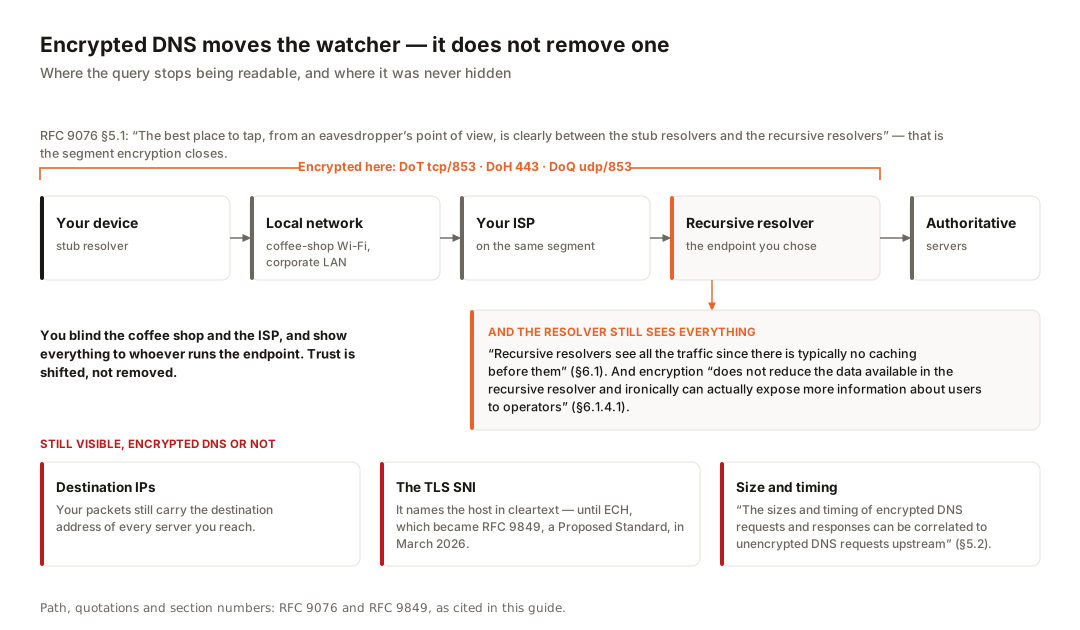
On the unencrypted path, everyone between you and the resolver can read it. RFC 9076 names the choicest spot: "The best place to tap, from an eavesdropper's point of view, is clearly between the stub resolvers and the recursive resolvers, because traffic is not limited by DNS caching" (§5.1) — exactly the segment your network operator and ISP sit on. And at the far end, no wiretap is needed: "Recursive resolvers see all the traffic since there is typically no caching before them" (§6.1). Hold that thought.
The three protocols, precisely
| Protocol | Spec | Transport & port | On-the-wire profile |
|---|---|---|---|
| DoT — DNS over TLS | RFC 7858, May 2016 | TCP port 853 | Dedicated port — identifiable; CISA calls port-853 blocking routine |
| DoH — DNS over HTTPS | RFC 8484, Oct 2018 | HTTPS, port 443 | Shares the web's port — not separable by port alone |
| DoQ — DNS over QUIC | RFC 9250, May 2022 | UDP port 853 | Dedicated port; QUIC transport; padding mandatory |
DoT wraps DNS in TLS on its own port: a supporting server "MUST listen for and accept TCP connections on port 853" (RFC 7858 §3.1). RFC 8310 added two profiles: Strict Privacy hard-fails without an encrypted, authenticated connection; Opportunistic offers "varying protection… including no attack mitigation at all" (§5) — it may silently fall back to cleartext.
DoH carries DNS queries as ordinary HTTPS requests. Its defining property is stated by the RFC itself: "the use of the HTTPS default port 443 and the ability to mix DoH traffic with other HTTPS traffic on the same connection can deter unprivileged on-path devices from interfering with DNS operations and make DNS traffic analysis more difficult" (RFC 8484 §8.1). DoH encrypts DNS and, crucially, makes it look like ordinary web traffic.
DoQ runs DNS over dedicated QUIC connections on UDP port 853, with encryption that "has similar properties to those provided by TLS" minus TCP's head-of-line blocking (RFC 9250, abstract); it also covers resolver-to-authoritative traffic and zone transfers, and mandates anti-analysis padding (§5.4). The asymmetry matters most: DoT and DoQ announce themselves, DoH hides in the crowd — driving both the privacy case for DoH and the enterprise headache below.
What encrypted DNS does not hide
Destination IPs stay visible. Encrypting the lookup does nothing to the connection that follows: your packets still carry the destination address of every server you reach. Hosting, ISP and network details for any address (try our IP Lookup tool) recover much of what the query would have revealed.
The TLS SNI names the site anyway — unless ECH is in play. The Server Name Indication field in the TLS ClientHello carries the hostname in cleartext, encrypted DNS or not. The fix crossed a milestone this year: Encrypted Client Hello became RFC 9849, a Proposed Standard, in March 2026. Deployment predates it — Cloudflare says ECH has been "available on all Cloudflare plans" since September 2023; Mozilla said in October 2023 that "ECH is now rolling out to Firefox users worldwide", respecting DoH opt-outs (both vendors' own claims). The 2026 summary: spec done, client support broad, server-side adoption partial — on many connections the SNI still names the site.
Traffic analysis survives encryption. Per RFC 9076 §5.2, "the sizes and timing of encrypted DNS requests and responses can be correlated to unencrypted DNS requests upstream"; the same section notes TTL, Hop Limit and TCP window values can fingerprint client OSes. Padding narrows this channel; it does not close it.
And the resolver still sees everything. The key sentence comes from RFC 9076's discussion of DoT and DoH:
"Use of encrypted transports does not reduce the data available in the recursive resolver and ironically can actually expose more information about users to operators." — RFC 9076, §6.1.4.1
Why more? Enabling encrypted DNS usually means switching resolvers — toward one large operator who now receives your complete query stream. You're simply shifting who you have to trust, not eliminating the need for trust: you blind the coffee shop and the ISP, and show everything to whoever runs the endpoint.
Who you are trusting instead
The major public resolvers publish privacy commitments — their own claims, not independently verified facts, all accessed 22 July 2026.
| Resolver | Retention (their claim) | Filtering | Notes (their claims) |
|---|---|---|---|
| Cloudflare 1.1.1.1 | Logs deleted "within 25 hours"; source IPs "not… stored in non-volatile storage" | None by default | No selling or sharing of resolver users' personal data; audited by "one of the top four accounting firms" (unnamed) |
| Google 8.8.8.8 | Temporary logs (incl. IP) deleted "within 24-48 hours"; permanent logs keep city/region only | None by default | No correlation with other Google services "except for addressing security and abuse"; no ad targeting |
| Quad9 9.9.9.9 | "Does not collect or record user IP addresses" at all | Malware blocking + DNSSEC on 9.9.9.9; unfiltered 9.9.9.10 "for experts only!" | Swiss foundation, c/o SWITCH, Zürich; policy dated 24 June 2026 |
Quad9's no-IP claim is the strongest of the three; Google's abuse caveat is worth reading as written. A useful yardstick is Mozilla's Trusted Recursive Resolver policy, the bar for becoming a Firefox default: retention capped at 24 hours, no sale or transfer of identifiers or "user query patterns", no default blocking unless legally required, yearly transparency report.
Browser and OS state, 2026
Firefox has shipped DoH by default in the US since February 2020 (Cloudflare default, NextDNS optional) and in Canada since 2021 through CIRA. Under the hood, network.trr.mode spans off (0), TRR-first with native fallback (2), and TRR-only (3).
Chrome took the opposite trust philosophy, described by the Chromium team in 2020: it upgrades you to your current provider's DoH endpoint if that provider is on its known list, preserving "any extra services offered by the DNS service provider, such as family-safe filtering". On any hiccup it silently falls back to regular DNS, and it disables Secure DNS on managed devices and under Windows parental controls. Firefox moves your queries to a vetted third-party resolver; Chrome tries to keep them with your existing provider.
Apple platforms support system-wide encrypted DNS (DoH and DoT) since iOS 14 and macOS 11 via the NetworkExtension framework (NEDNSSettingsManager) — no plain Settings toggle; it arrives through an app or configuration profile.
Windows gained a DoH client with Windows 11 and Server 2022 — three modes in Settings and a known-server list of exactly the three resolvers above. Freshest of all: per Microsoft Learn, the 2026-06 Security Update (KB5094125) for Windows Server 2025 enables DoH "on the DNS Server service" — server-side DoH landed in June 2026.
The filtering tension
The same feature that lets DoH evade a hostile network also lets it bypass legitimate monitoring in a corporate office or a home with parental controls. CISA's Encrypted DNS Implementation Guidance (April 2024) lays out the asymmetry: agencies can block unauthorised plaintext DNS at port 53 and DoT/DoQ at port 853, but for DoH can only block "port 443 to external well-known DNS-over-HTTPS providers" and "should consider mechanisms that can block the traffic independent of destination", such as break-and-inspect. Port-filtering is futile when a service shares its port with the entire web.
The browser vendors built in escape hatches. Mozilla's is the canary domain use-application-dns.net: "If Firefox determines that our canary domain is blocked, this will indicate that opt-in parental controls are in effect on the network, and Firefox will disable DoH automatically" (September 2019). Firefox also disables DoH under detected enterprise policies or OS parental controls, and falls back to system DNS on split-horizon lookup failures. CISA's checklist itself recommends agencies serve "the canary domains for Firefox". Chrome's valve is its same-provider design: resolver-side filtering keeps working. On a network that filters traffic on your behalf, encrypted DNS to an outside resolver bypasses that protection. On a network you do not trust, the bypass is the point.
Enabling it: the settings that exist
Settings paths per vendor documentation, accessed 22 July 2026.
Firefox (DoH)
Settings, then General, then scroll to Network Settings — the location Mozilla's rollout post points to. Enable DNS over HTTPS and pick a provider or supply a custom endpoint. Labels shift across releases.
Chrome (DoH)
Settings, then Privacy and security, then Security, then "Use secure DNS" — keep your current provider or "select your current or another service provider". Managed devices and parental controls rule the feature out, per Google's help page.
Windows 11 (DoH)
Settings, then Network & internet, your adapter, then DNS settings and Edit. Switch to Manual, enter a known-list resolver (1.1.1.1, 8.8.8.8 or 9.9.9.9 and pairs), and set "Preferred DNS encryption" to "Encrypted only (DNS over HTTPS)" — or "Encrypted preferred, unencrypted allowed" for fallback.
Android (DoT via Private DNS)
Settings, then Network & internet, then Private DNS. "Automatic" already upgrades to DoT when the network resolver supports it, as it has since Android 9. To pin a provider, choose "Private DNS provider hostname" and enter one.one.one.one (Cloudflare's documented value), dns.google, or dns.quad9.net. It applies device-wide; hostname mode marks the network unusable rather than fall back.
iOS and macOS
As noted above — install an app or configuration profile from your chosen resolver operator; several ship both.
Where our tools fit
Full disclosure that doubles as a demonstration: our own DNS Lookup tool is a DoH client. It queries Cloudflare's public endpoint (cloudflare-dns.com/dns-query, JSON wire format) directly from your browser for A, AAAA, MX, TXT, CNAME, NS and SOA records — every lookup you run in it is an encrypted DNS transaction, visible to Cloudflare under the policy quoted above and to nobody on the path. And IP Lookup shows the other side: what a bare destination IP still reveals to an on-path observer.
FAQ
Does encrypted DNS stop my ISP from seeing which sites I visit?
No — only from reading the queries themselves. Traffic still carries destination IPs, and without ECH the TLS SNI names the host in cleartext; unpadded encrypted DNS is also open to size-and-timing correlation (RFC 9076 §5.2).
Should I use DoT or DoH?
They encrypt equally well; they differ in visibility. DoT and DoQ use dedicated port 853, so an operator can see and manage them, while DoH shares port 443 with the web. On a network that filters on your behalf, the identifiable option is the cooperative choice; DoH suits networks you don't trust.
Is encrypted DNS a substitute for a VPN?
No — it encrypts only the name-lookup channel. A VPN tunnels all traffic, hiding destination IPs and SNI from the local network and ISP — at the cost of full-traffic visibility for the VPN operator, where the trust-shift logic of RFC 9076 §6.1.4.1 applies even more strongly.
Do I need to configure my router?
Know what each layer covers. Browser DoH protects that browser only; Android's Private DNS and Windows' setting cover the device; router-level configuration covers every device but typically encrypts only the router-to-resolver hop — devices still speak plaintext port 53 to the router.
- RFC 9076: DNS Privacy Considerations (§1, §5.1, §5.2, §6.1, §6.1.4.1) — IETF (accessed 22 Jul 2026)
- RFC 7626: DNS Privacy Considerations (§2.1, §2.5.1) — IETF (accessed 22 Jul 2026)
- RFC 7858: Specification for DNS over TLS (§3.1) — IETF (accessed 22 Jul 2026)
- RFC 8310: Usage Profiles for DNS over TLS and DTLS (§5) — IETF (accessed 22 Jul 2026)
- RFC 8484: DNS Queries over HTTPS (§4.1, §8.1) — IETF (accessed 22 Jul 2026)
- RFC 9250: DNS over Dedicated QUIC Connections (§4.1.1, §5.4) — IETF (accessed 22 Jul 2026)
- RFC 9849: TLS Encrypted Client Hello — IETF (published March 2026) (accessed 22 Jul 2026)
- Encrypted DNS Implementation Guidance, v1.0 (April 2024) — CISA (accessed 22 Jul 2026)
- Firefox continues push to bring DoH by default for US users — Mozilla (Feb 2020) (accessed 22 Jul 2026)
- Firefox by default DNS over HTTPS rollout in Canada — Mozilla (Jul 2021) (accessed 22 Jul 2026)
- What's next in making Encrypted DNS-over-HTTPS the Default — Mozilla (Sep 2019) (accessed 22 Jul 2026)
- Trusted Recursive Resolver policy — Mozilla Wiki (accessed 22 Jul 2026)
- Say (an encrypted) hello to a more private internet — Mozilla (Oct 2023) (accessed 22 Jul 2026)
- Encrypted Client Hello — the last puzzle piece to privacy — Cloudflare (Sep 2023) (accessed 22 Jul 2026)
- A safer and more private browsing experience with Secure DNS — Chromium Blog (May 2020) (accessed 22 Jul 2026)
- Use secure DNS in Chrome — Google Chrome Help (accessed 22 Jul 2026)
- DNS-over-HTTPS client support — Microsoft Learn (accessed 22 Jul 2026)
- DNS Encryption using DNS over HTTPS in Windows and Windows Server — Microsoft Learn (updated Jun 2026) (accessed 22 Jul 2026)
- DNS over TLS support in Android P — Android Developers Blog (Apr 2018) (accessed 22 Jul 2026)
- 1.1.1.1 setup: Android — Cloudflare Docs (accessed 22 Jul 2026)
- NEDNSSettingsManager — Apple Developer Documentation (accessed 22 Jul 2026)
- 1.1.1.1 Public DNS resolver privacy commitments — Cloudflare (accessed 22 Jul 2026)
- Google Public DNS privacy — Google (accessed 22 Jul 2026)
- Privacy policy (v1.1, 24 Jun 2026) — Quad9 (accessed 22 Jul 2026)
- Service addresses and features — Quad9 (accessed 22 Jul 2026)
- Mozilla wiki — Trusted Recursive Resolver (network.trr.mode values) (accessed 22 Jul 2026)
- Google — Configure Private DNS on Android (Settings path) (accessed 22 Jul 2026)

View author profile → · Editorial policy