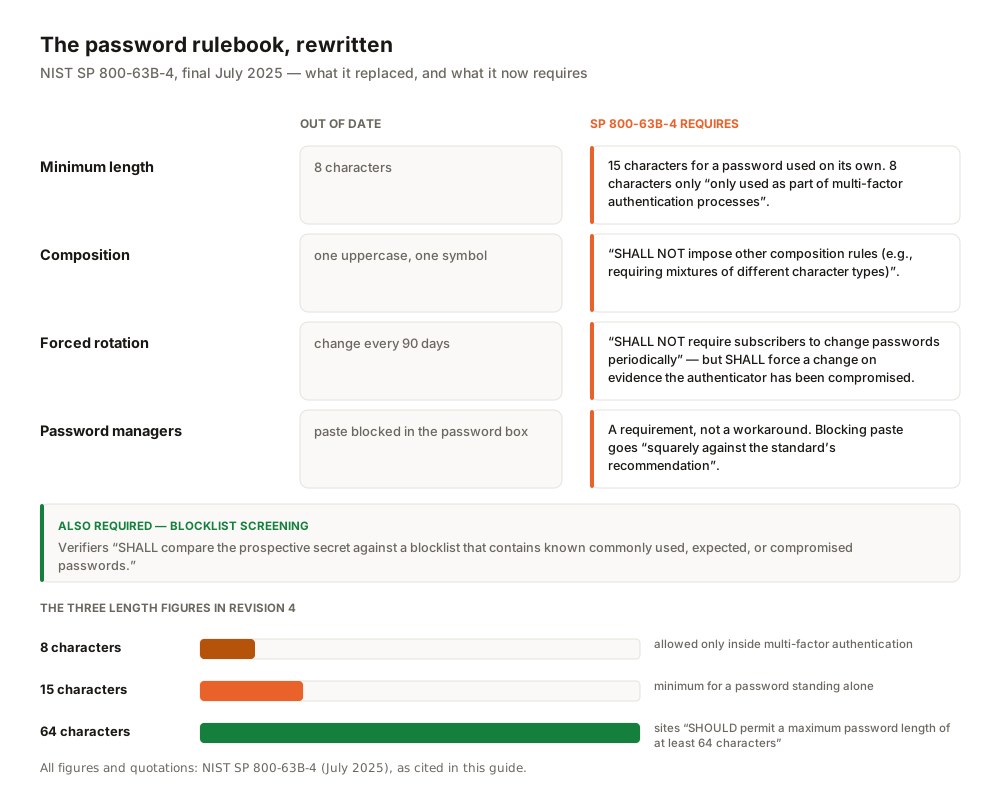
In July 2025, the US standards body NIST published the final Revision 4 of SP 800-63B, the document that tells websites and services how login security is supposed to work. It quietly rewrote the password rulebook. A password used on its own must now be "a minimum of 15 characters in length." Forced 90-day changes are banned. So are the old "one uppercase, one symbol" composition rules. If your bank or office still makes you rotate an 8-character password every quarter, the policy is not strict — it is out of date.
SP 800-63B is written as requirements for sites, not for you, but it is the clearest public statement of what actually protects accounts in 2026. This guide turns it into a five-step personal system: one memorable passphrase, a password manager for everything else, passkeys where offered, app-based two-factor authentication elsewhere, and a breach-monitoring habit for the day something leaks.
We wrote this for a general audience in the ASEAN region. You do not need a security background, and we are not here to scare you. No system makes an account impossible to break into; NIST itself notes that "Passwords are not phishing-resistant." The goal is a setup that holds up well and fails gracefully.
The 2026 rules, per NIST
Five requirements in Revision 4 define the modern baseline. These are rules for the sites checking your password, but each one carries a lesson for your own habits.
Length beats complexity. The standard requires 15 characters minimum for a single-factor password, and says sites "SHOULD permit a maximum password length of at least 64 characters", accepting spaces and Unicode. The rationale, from its own appendix: "Length and complexity requirements beyond those recommended here significantly increase user frustration and the difficulty of using passwords. As a result, users often work around these restrictions counterproductively." Make passwords long, not baroque.
No forced rotation. Verifiers "SHALL NOT require subscribers to change passwords periodically. However, verifiers SHALL force a change if there is evidence that the authenticator has been compromised." Scheduled changes push people toward predictable patterns — Password2026! becoming Password2027!. Change a password when there is a reason, not because a calendar said so.
No composition rules. Sites "SHALL NOT impose other composition rules (e.g., requiring mixtures of different character types)". A long random passphrase in plain lowercase is stronger than a short string tortured into "complexity".
Blocklist screening. When you set a password, verifiers "SHALL compare the prospective secret against a blocklist that contains known commonly used, expected, or compromised passwords." The standard assumes leaked passwords will be replayed — a password that appeared in any breach is finished, even if it looks strong.
Managers are a requirement, not a workaround.A site that blocks paste in its password box is now going squarely against the standard's recommendation — and if it breaks autofill too, it is flatly out of compliance with the guideline it once cited at you.
Step 1: Build one passphrase you can actually remember
You need exactly one memorised password: the master password for your manager. Everything else gets generated and stored. For that one, the well-studied method is diceware — picking random words from a fixed list.
The Electronic Frontier Foundation maintains a long wordlist of "7,776 words (6⁵)", chosen so that five dice rolls select one word. Because the choice is random, the math is simple: "Each additional word will strengthen the passphrase by about 12.9 bits." EFF's advice: "For most uses, we recommend a generating a six-word passphrase with this list, for a strength of 77 bits of entropy." Six random words means roughly 2.2 × 10²³ combinations — about 2⁷⁷ — far beyond any online guessing attack against a rate-limited login, and comfortably past NIST's 15-character floor.
Government advice converges on the same idea at different lengths. The UK's NCSC tells the public to "Combine three random words" for passwords that are memorable but strong. Singapore's Cyber Security Agency goes further: "String together five different words that relate to a memory that is unique to you", noting that a long, random passphrase is harder to guess. The common thread is words, not symbols — coral ferry mango turbine plaza drift is easier to type on a phone than X#9k!qR2, and vastly stronger.
The one rule diceware depends on is genuine randomness — words you "just think of" cluster around common phrases. Physical dice work; so does our passphrase generatorTreat it as a convenience for producing candidates, not a guarantee — and never adopt a passphrase that has appeared in print or been typed into someone else's demo (that includes the example six words above). For a feel of how length changes strength, our password strength tester gives a client-side estimate — nothing you type leaves the page, but a "strong" score is an educated guess, not a certificate, and it cannot tell you whether a password has already leaked or been reused.
Step 2: Put everything else in a manager
Unique passwords matter because of credential stuffing: "the automated injection of stolen username and password pairs ('credentials') in to website login forms, in order to fraudulently gain access to user accounts", as OWASP defines it. When one site leaks, attackers replay those pairs against hundreds of others. Reuse is the fuel; a manager removes it by generating a different random password for every account.
The trust question—all your eggs in one basket—deserves a straight answer. Reputable managers use end-to-end, zero-knowledge encryption. Your vault is encrypted and decrypted on your device with a key derived from your master password; the company only ever stores the encrypted blob. If the provider's servers are breached, attackers get ciphertext they can't read. Your master passphrase from Step 1 is a single point of failure, but one designed to be extremely strong while keeping the vendor blind to your data.
Three widely used options, described by their own security documentation rather than any ranking of ours:
- Bitwarden states that "Bitwarden team members cannot see your passwords. Your data remains end-to-end encrypted with your individual email and master password", using AES-256 with PBKDF2 (600,000 iterations by default) or Argon2id key derivation. Its source code is public on GitHub for anyone "to review, audit, and contribute".
- 1Password says "Everything in your 1Password account is always end-to-end encrypted" with AES-GCM-256, plus a 128-bit Secret Key combined with an account password that is "never stored alongside your 1Password data or transmitted over the network".
- KeePassXC is the local, offline option: a free, open-source (GPLv3) manager that keeps your vault in an encrypted file on your own machine — AES-256 or Twofish — with no vendor cloud. You handle syncing and backups yourself, which suits people who want zero third-party involvement.
Official bodies back the category. The NCSC says "A password manager stores passwords safely for you, meaning that you can have unique passwords for each service" — with the sensible caveat to turn on two-step verification for the manager account itself. CISA's Secure Our World campaign carried the same message: "Create long, random, unique passwords with a password manager for safer accounts." (That campaign page is now marked archived on CISA's site; the load-bearing requirement stands in NIST's current standard.)
Step 3: Layer 2FA — but know the ladder
Two-factor authentication is not one thing; the methods differ sharply in what they survive. CISA's fact sheet on phishing-resistant MFA is the reference: "any form of MFA is better than no MFA", but "phishing-resistant MFA is the gold standard". Its ranking, strongest to weakest:
| Method | Strength | Why |
|---|---|---|
| Passkeys / FIDO security keys (WebAuthn) | Gold standard | Phishing-resistant by design. Per CISA: "Push bombing, SS7, and SIM swap attacks are not applicable." The FIDO Alliance reported 5 billion passkeys in use worldwide on World Passkey Day, 7 May 2026. |
| Authenticator-app codes, push with number matching | Strong | Codes can still be phished, but the method is "Resistant to push bombing". CISA calls app- or token-based OTP the best option where phishing-resistant MFA is not yet available. |
| Push approval without number matching | Weaker | "Vulnerable to push bombing attacks as well as user error" — attackers spam approval prompts until someone taps yes. |
| SMS or voice codes | Last resort | "Vulnerable to phishing, SS7, and SIM swap attacks." CISA: this form "should only be used as a last resort MFA option" — but it still beats a bare password. |
The SIM-swap risk behind that bottom row is social engineering against your telco: attackers convince "cellular carriers to transfer control of the user's phone number to a threat actor-controlled SIM card", after which your codes arrive on their phone. The practical order, then, is to turn on a passkey wherever a site offers one. CISA notes "The only widely available phishing-resistant authentication is FIDO/WebAuthn authentication". Use an authenticator app everywhere else, and keep SMS only where nothing better exists. A passkey, in the FIDO Alliance's definition, lets you "sign in to apps and websites with the same process that they use to unlock their device (biometrics, PIN, or pattern)" — the key material stays on your device, and there is no code to phish.
Step 4: Know what to do when a breach hits
The system above assumes breaches will happen, because they will. The standard early-warning tool is Have I Been Pwned (HIBP), a free service run by security researcher Troy Hunt since 2013 that lets anyone check whether their email address appears in known breach datasets. As of 21 July 2026 its counters listed 1,020 breached websites and roughly 17.76 billion compromised accounts — moving numbers that grow with each incident.
Its password-checking feature is safe to use because of a design called k-anonymity: your password is hashed locally and only the first five characters of that hash are sent to the service, so your device does the matching and the full password never leaves your machine. If a password you use shows up, retire it everywhere.
When an account of yours is caught in a breach, the response is short. Change that password immediately—the one case where NIST mandates it ("verifiers SHALL force a change if there is evidence that the authenticator has been compromised"). Then change it anywhere you reused it and check the account for unfamiliar activity. If you followed Steps 1–3, the reuse list is empty and the whole exercise takes two minutes in your manager.
Step 5: The ASEAN angle — what regional agencies say
Regional guidance largely matches the NIST picture. Singapore's Cyber Security Agency (CSA) campaigns on exactly the pair this guide is built around — strong passphrases plus 2FA. On the second factor, CSA's framing is clean: "This second layer of security ensures that even if hackers obtain your password, your account is still protected if they are unable to get hold of the second factor." SingCERT keeps a standing advisory (AD-2022-008) on strong passwords, and CSA's Internet Hygiene Portal hosts an official password checker — a government-run analogue of the strength-estimation idea.
Malaysia's MyCERT, in a February 2026 ransomware advisory (MA-1429.022026), tells organisations to "Promote the use of secure password managers and encourage employees to create strong, unique passphrases, avoid reusing passwords, and update them regularly", alongside enabling multi-factor authentication.
An honest tension sits in that quote. "Update them regularly" is the old periodic rotation, which NIST now tells verifiers not to require. The positions are less opposed than they look. MyCERT is writing enterprise ransomware-hardening advice, where firms often cannot tell whether credentials have already been stolen, so rotation limits how long a stolen password stays useful. NIST's reasoning is that forced rotation pushes ordinary users into predictable, weaker patterns, while blocklists, rate limiting, and breach-triggered changes do the job better. For personal accounts, build on the NIST position: rotate on evidence, not on schedule. If your employer mandates rotation, follow policy — and let your manager generate each replacement so the rotation is not costing you strength.
The system, in five steps
- Create one strong master passphrase — six random words, diceware-style (~77 bits). The only password you memorise.
- Move every account into a password manager — one whose security model you can read (end-to-end encrypted, or fully local like KeePassXC), protected by the master passphrase, with 2FA on the manager itself.
- Enable passkeys wherever offered — email, banking, and major platforms first. Phishing-resistant, nothing to remember.
- Use app-based 2FA everywhere else — authenticator codes or number-matching push; SMS only where nothing better exists.
- Monitor for breaches — check your email on Have I Been Pwned and rotate what a breach actually touched, including anywhere the same password was reused.
None of this needs to happen in one evening. Do steps 1 and 2 this week, then upgrade accounts to passkeys and app-based 2FA as you log in to them naturally. The same account-hygiene thinking applies to new sign-ups — our guide on checking what AI tools do with your data covers that side, and the rest of our guides go deeper on individual tools.
FAQ
Is an 8-character password still acceptable?
Only inside multi-factor authentication. NIST's current standard allows passwords as short as eight characters when they are "only used as part of multi-factor authentication processes"; a password standing alone must be at least 15 characters. If a site offers no second factor, use a long passphrase there.
Are password managers actually safe?
The reputable ones encrypt your vault on your device, so the vendor stores only ciphertext it cannot read — Bitwarden, 1Password, and KeePassXC all document this model publicly, and NIST, NCSC, and CISA endorse manager use. The caveat is that your master password becomes a single point of failure. Make it a strong passphrase and enable 2FA on the manager account; that concentrated risk is far smaller than the reuse risk it replaces.
Should I use passkeys instead of passwords?
Where offered, yes — passkeys are phishing-resistant by design and immune to SIM-swap and code-interception attacks, which no password can claim. With 5 billion in use as of May 2026, support is mainstream. In practice you will run both for years: passkeys where supported, manager-generated passwords on the rest.
Do I still need to change my passwords every 90 days?
No. NIST now bars sites from requiring periodic changes, because scheduled rotation drives predictable, weaker passwords. Change a password on evidence of compromise — a breach notification, a suspicious login — and otherwise leave it alone. If your workplace still mandates rotation, follow policy and let your manager generate each replacement.
- SP 800-63B-4, Digital Identity Guidelines: Authentication and Authenticator Management — NIST (July 2025, final) (accessed 21 Jul 2026)
- SP 800-63B-4 publication record — NIST CSRC (accessed 21 Jul 2026)
- EFF's New Wordlists for Random Passphrases — Electronic Frontier Foundation (accessed 21 Jul 2026)
- EFF Dice-Generated Passphrases — Electronic Frontier Foundation (accessed 21 Jul 2026)
- Three random words — NCSC UK (accessed 21 Jul 2026)
- Password managers — NCSC UK (accessed 21 Jul 2026)
- Implementing Phishing-Resistant MFA (fact sheet, Oct 2022) — CISA (accessed 21 Jul 2026)
- Use Strong Passwords — CISA Secure Our World campaign (page marked archived as of access date) (accessed 21 Jul 2026)
- Passkeys — FIDO Alliance (accessed 21 Jul 2026)
- FIDO Alliance reports accelerating global passkey adoption, World Passkey Day 2026 — FIDO Alliance (accessed 21 Jul 2026)
- Bitwarden Security Whitepaper — Bitwarden (accessed 21 Jul 2026)
- About 1Password security — 1Password (accessed 21 Jul 2026)
- KeePassXC documentation and FAQ — KeePassXC (accessed 21 Jul 2026)
- Pwned Passwords and k-anonymity — Have I Been Pwned (accessed 21 Jul 2026)
- About Have I Been Pwned — Troy Hunt (accessed 21 Jul 2026)
- Credential stuffing — OWASP Foundation (accessed 21 Jul 2026)
- Enable 2FA and Use Strong Passphrases — Cyber Security Agency of Singapore (accessed 21 Jul 2026)
- Advisory AD-2022-008: Importance of Using Strong Passwords — SingCERT / CSA (accessed 21 Jul 2026)
- Advisory MA-1429.022026: ransomware best practices — MyCERT, Malaysia (accessed 21 Jul 2026)
View author profile → · Editorial policy