
Most account-security advice fails for the same reason most gym advice fails. It is a list of twenty things, all presented as equally urgent, so nobody starts.
This is four jobs, ordered by how much loss each one prevents. An afternoon is enough. Where the advice is contested — and a surprising amount of standard password guidance is now contradicted by the standard everyone cites — we quote the document rather than repeating the folklore.
One disclosure up front. Writing this meant re-reading the source of our own security tools, and one of them was wrong. Our passphrase generator shipped a default that its own crack-time model rates at ninety seconds, while printing the word "Reasonable" beside it. It is fixed, the arithmetic is below, and we would rather show you that than quietly correct it.
Job one: a password manager, because the alternative is reuse
Every other item on this list assumes you are not reusing passwords. Almost everyone is, because remembering ninety distinct strong passwords is not a thing humans do.
A manager solves the memory problem, which in turn solves the reuse problem that costs people their accounts. Credential-stuffing attacks do not crack anything — they take a password that leaked from a forum in 2019 and try it against your email. Reuse is what makes that work.
You then need exactly one strong secret: the master password. This is the one place for a generated passphrase, and it is the tool we had to fix.
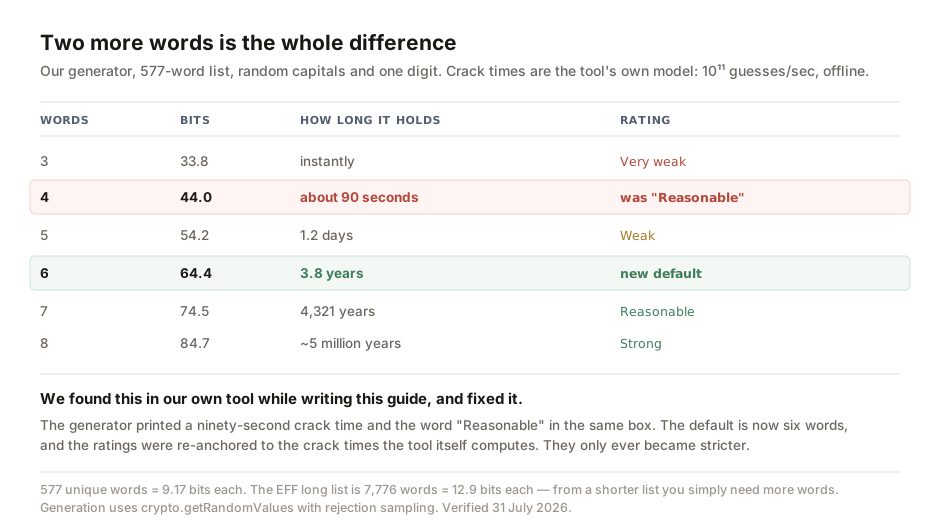
The arithmetic explains why the advice is "add words" and not "add symbols".
Our generator draws from a list of 577 unique words. Each word you add multiplies the search space by 577, which is 9.17 bits of entropy. Four words plus random capitals and a digit came to 44 bits. Under the model the tool itself uses — ten to the eleventh guesses per second, offline — that falls in about ninety seconds.
Six words is 64 bits, and the same attack takes 3.8 years. Two more words, no extra difficulty in remembering, roughly a million times harder to break.
So the default is now six words, and the strength ratings have been re-anchored to the crack times the tool computes rather than to a generic scale. The ratings only ever became stricter. This is the safe direction for a security tool to err: it can push someone toward a stronger passphrase, but never a weaker one.
Two things we checked and left alone, because they were right. Generation uses crypto.getRandomValues — a cryptographic random source, never Math.random — with rejection sampling so that no word is slightly likelier than another. And the word list contains six accidental duplicates, but the tool removes them before computing entropy, so the strength it reports is honest rather than flattering.
A shorter word list is not a problem, provided the tool counts honestly and you use enough words. The well-known EFF list has 7,776 words, worth 12.9 bits each. Ours is worth 9.17. That is exactly why six words here does the job four words would do there.
Job two: two-factor, in the order that actually matters
Turn it on for your email first, then your password manager, then your bank. Email comes first because it is the reset channel for everything else — whoever holds your inbox holds every account that can email you a reset link.
The methods are not equivalent, and the order you should prefer them in matters.
- Passkeys — the strongest option. Bound to the site that created them, so a convincing fake login page cannot use one. This is the only method on this list that resists phishing rather than merely making it harder.
- App-based codes (TOTP) — the practical default. Available almost everywhere, no phone number involved, and works offline. A phishing site can still capture a code if you type it in, which is the gap passkeys close.
- SMS — better than nothing, and only that. Vulnerable to SIM-swap, where somebody persuades a carrier to move your number. Worth enabling if it is the only option offered; worth replacing the moment something better appears.
- Email codes — barely a second factor. If your email is what an attacker already has, a code sent to that email is not an independent check. It protects against a stolen password alone and very little else.
Job three: recovery codes, offline, today
This is the step everyone skips, and it is the one that turns a bad afternoon into a lost account.
When you enable two-factor, the service shows you a set of one-time recovery codes. They exist for the case where you lose the phone. Most people close that screen.
Print them, or write them out, and put them somewhere physical. do not put them in the password manager they unlock. That is a loop, and it closes at the worst possible moment. A drawer at home is fine. The threat you are defending against here is a lost or dead phone, not a burglar, and the failure mode of having no codes is permanent.
Job four: what to do in the first hour
If you learn that a password has leaked, the order matters more than the speed.
1. Email first. Change that password before anything else, because it is the reset channel for everything else. 2. Sign out all other sessions. Every major service has this button; changing a password alone often leaves existing sessions alive. 3. Then the accounts that share that password — and be honest with yourself about which those are. 4. Check the recovery settings on your email. Attackers often add their own recovery address or a forwarding rule to keep access after you change the password. People often miss this step.
Only after those four is it worth working through the rest of your accounts.
The advice that is now backwards
A large amount of standard password policy is contradicted by NIST Special Publication 800-63B, the very document those policies usually claim to follow.
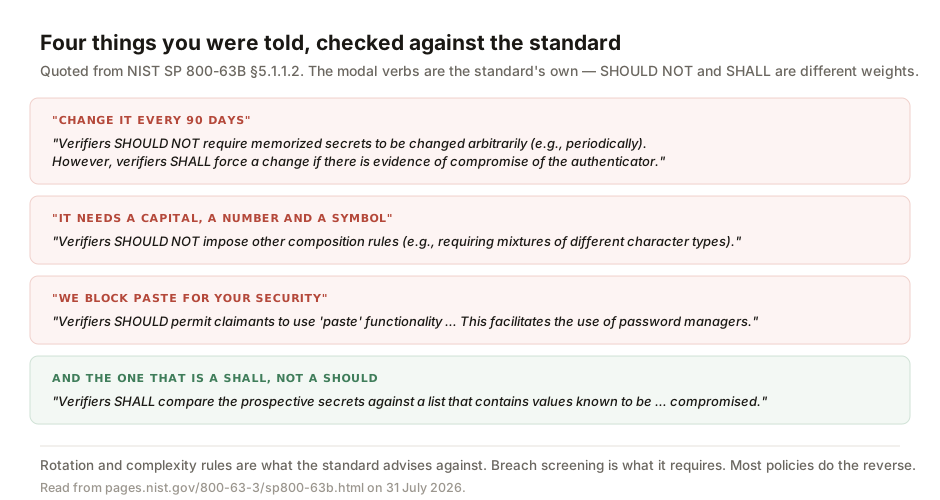
On rotation: "Verifiers SHOULD NOT require memorized secrets to be changed arbitrarily (e.g., periodically). However, verifiers SHALL force a change if there is evidence of compromise of the authenticator." The standard advises against ninety-day expiry, and requires a forced change when there is evidence of compromise.
On complexity: "Verifiers SHOULD NOT impose other composition rules (e.g., requiring mixtures of different character types…)." The capital-number-symbol rule mostly produces Password1!, which is why it is discouraged.
On blocking paste: "Verifiers SHOULD permit claimants to use 'paste' functionality when entering a memorized secret. This facilitates the use of password managers." The standard names password managers as the reason. A site that blocks paste for "security" has it precisely inverted.
And the one written as a SHALL rather than a SHOULD: "Verifiers SHALL compare the prospective secrets against a list that contains values known to be commonly-used, expected, or compromised." Breach screening is the one requirement, while rotation and symbols are discouraged. Most policies get this backwards, enforcing the discouraged habits while skipping the requirement.
The modal verbs matter and we have kept them: SHOULD NOT is guidance, SHALL is a requirement, and collapsing both into "must" is how the folklore spread in the first place.
Checking your own work
Our passphrase generator now defaults to six words and shows the bits and the crack time together, so you can see what you are getting rather than trusting a label. The password strength tester runs entirely in your browser — nothing you type is transmitted — and was itself corrected in July after it rated predictable patterns like a season and a year far too generously.
That is two defects found in our own security tools in two months, both disclosed. We keep publishing them for a reason. A tool with a review date on it has been looked at; it has not necessarily been checked. The passphrase generator carried no review date at all, and the arithmetic error sat there in plain sight in a function twenty lines long. If a security tool gives you a result but not a date for its last verification, treat that result as a starting point. That includes ours.
If you run a small business rather than only your own accounts, the companion piece on security for a small ASEAN business covers the organisational half: shared accounts, departing staff, and what to do when the person who set everything up has left.
- NIST Special Publication 800-63B, Digital Identity Guidelines: Authentication and Lifecycle Management, section 5.1.1.2 (Memorized Secret Verifiers), read from pages.nist.gov on 31 July 2026. All four quotations — on arbitrary change, composition rules, paste functionality and breach-list comparison — are verbatim, with the standard's own SHALL and SHOULD NOT wording preserved.
- The passphrase arithmetic is computed from our own tool's source and is reproducible: 577 unique words after de-duplication, 9.17 bits per word, plus one digit and per-word random capitalisation. Crack times use the model the tool itself applies — 10¹¹ guesses per second offline, expected guesses 2^(bits−1).
- The defect described, its fix, and the regression test that now guards it are recorded in commit 43ff696f of 31 July 2026. The rating bands were re-anchored so that no rating contradicts the crack time displayed beside it, and the generator default was raised from four words to six.
- The password strength tester correction referenced was made in July 2026 and is described in the small-business security guide linked above.
General guidance on securing personal accounts, not a security assessment of any specific system. Threat models differ: someone at risk of targeted attack needs advice beyond an afternoon's work, and should seek it. Crack-time figures are illustrative of relative strength under one stated attack model and are not predictions.

View author profile → · Editorial policy