
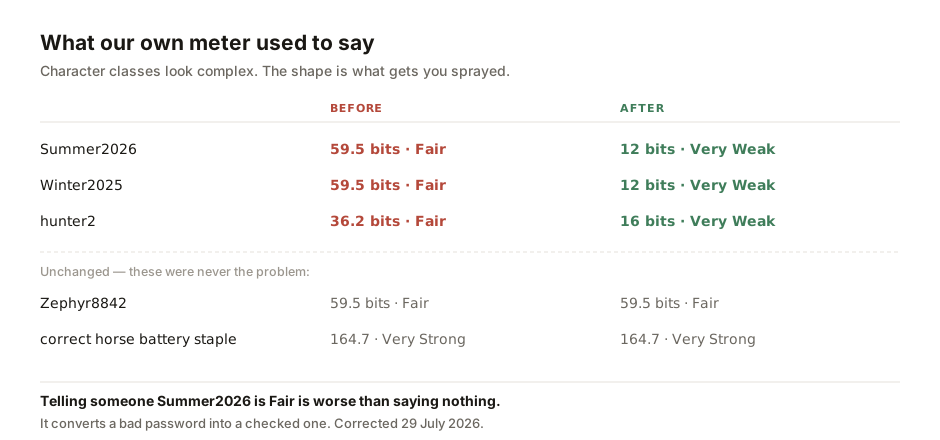
Until this week, our own password checker would tell you that Summer2026 was Fair.
It is not fair. It is one of the first few hundred guesses in any password-spraying run, and it appears in every wordlist anyone has ever assembled. Our tool rated it at 59.5 bits because it counted the character classes — upper, lower, digits, ten characters long — and never asked what shape the password was.
Our own mistake is the whole problem in miniature. Small-business security advice usually fails by measuring what is easy to measure. It produces a reassuring number but leaves the actual risk untouched.
This guide is a list of unglamorous things, in the order I would actually do them, for a company of five to fifty people with no security staff and no plans to hire any.
None of it is a product.
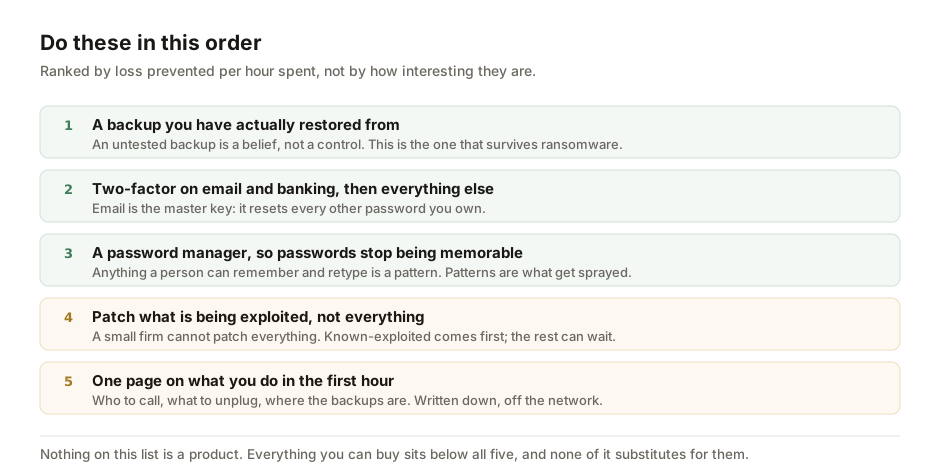
The order matters more than the list
Most security advice is a flat list, which is useless when you have one afternoon. What a small business needs is a ranking by loss prevented per hour spent — and that ranking is not intuitive, because the most valuable items are the least interesting.
1. A backup you have actually restored from
Not a backup. A restore.
Almost every small company has backups. A large fraction have never tried to bring data back from them. That is not a backup strategy; it is a belief about a backup strategy. The failure modes are mundane and they only surface when you try: the job has been silently failing for eight months, the retention window is shorter than the time it takes to notice a problem, the backup is on a drive mapped to the same machine that ransomware will encrypt, or nobody knows the password to the backup account because the person who set it up has left.
The test is simple. Pick a file from three weeks ago. Restore it to a different machine. Time how long it takes. Write the time down.
A tested restore comes first because it is the only item that helps after everything else has failed. Ransomware, a deleted database, a departing employee with a grudge, a laptop in a taxi — a tested restore covers all of them.
2. Two-factor authentication, starting with email
Email first, then banking, then everything else. There is a reason for that order: your email account is the master key, able to reset the password on almost everything else you own. An attacker with your inbox does not need your other passwords. They can request them.
Use an authenticator app rather than SMS where you have the choice — SIM swapping is a real technique in this region, not a theoretical one — and understand that the trade-off is you now own the recovery problem. This leads to the part most guides skip: print the recovery codes and put them somewhere physical. A safe, a locked drawer, a home. Not a file on the laptop whose loss is the scenario you are protecting against.
If you want the detail, we have written separately on choosing an authenticator app and on what passkeys change.
3. A password manager, so passwords can stop being memorable
The argument is simple: anything a human can remember is, by construction, a pattern. And patterns are what get sprayed.
Which is where our own tool was going wrong. A model that scores length × log₂(alphabet) assumes every character was chosen at random. Real passwords are not chosen at random; they are chosen by people who have to remember them. So the model saw ten characters across three character classes and reported 59.5 bits, when the actual search space is roughly "a few thousand common base words × about a hundred plausible year and number suffixes" — call it twenty bits, and generous at that.
The fix, now live, penalises the structure rather than trying to enumerate every bad password. A base word followed by a year or a short digit run now caps out at 12–16 bits and reads Very Weak, with the reason named. A truly random string of the same length is untouched, because it is not the same shape.
You can test your own on the password strength tester — it runs entirely in your browser and the password is never sent anywhere. If it comes back Very Weak with "password-spraying staple" attached, that is the new check doing its job. For generating replacements, the passphrase generator produces the long, boring, unmemorable kind that a manager will remember for you.
A password manager does concentrate risk. That is the trade, and it is a good one; the alternative is not "no concentrated risk" but "the same password on forty sites". The master password is the one thing you still have to choose well, and it is the one place a long passphrase beats a short, complex string.
4. Patch what is being exploited, not everything
A company of twenty people cannot patch everything, and telling them to is how they end up patching nothing. The realistic instruction is to patch the things that are known to be under attack, and to let the rest follow the ordinary update cycle.
The source of truth for that distinction is public: CISA's Known Exploited Vulnerabilities catalogue lists vulnerabilities observed being used against real targets, each with a remediation due date. An entry on that list is not a severity score but an observation: something is being exploited right now. That is a more useful fact than a high CVSS number.
Our KEV remediation deadline calculator will tell you the due date for a given entry. For a small business the practical rule is simpler than any framework: if something you run appears on that catalogue, it goes to the front of the queue this week.
The rest of patching is turning on automatic updates for operating systems, browsers and phones, and then leaving them on. Nearly all of the value is in defaults nobody has switched off.
5. One page on what happens in the first hour
The last item costs an afternoon and is the one nobody does.
Write a single page. Decide who to call — the bank, the IT contractor, the insurer — and which staff member makes that call. Decide what to physically unplug, and who has the authority. Know where the backups are and who can reach them. Which regulator has to be told, and within how long. What we tell customers, and who signs it off.
Print it. Keep a copy somewhere that does not depend on the network or the systems being available, because the scenario in which you need it is exactly the scenario in which they are not.
This matters more than it looks because almost all avoidable damage in a small-business incident happens in the first hours, caused by people improvising — paying something they should not have paid, wiping evidence, telling customers something that turns out to be wrong, or waiting three days to tell anyone because nobody was sure whose job it was.
The new part: your staff are now pasting things into chat boxes
The advice so far would have been true in 2015. What follows would not.
The same twenty-person company now has staff pasting customer lists into chat assistants to summarise them, and — increasingly — running agents that hold credentials and act without anyone watching. We set out why prompt injection is structural rather than a bug in our plain-English AI vocabulary guide, and the short version is that a system which reads untrusted text and can also take actions has no reliable way to tell instructions from data.
For a small business, this translates to three rules that do not require understanding the mechanism.
- Decide what may be pasted. One line in writing: customer data, payroll, contracts and credentials do not go into a chat box unless the account is a business tier whose terms you have actually read. Everything else is fine. A rule people can follow beats a policy they cannot.
- Anything unattended gets its own credentials. If an agent runs on a schedule with access to email or files, it needs its own account with the narrowest permissions that work — never a person's login. When it misbehaves you want to switch off one account, not a director's.
- Nothing that moves money runs unattended. Payments, supplier bank-detail changes and anything irreversible keep a human approval step, whatever the tool promises. This is also the control that catches the oldest fraud in the region, which is an email asking you to update a supplier's account number.
The most expensive attack on a small ASEAN business is usually not sophisticated; it is a convincing email about an invoice. Two-factor authentication and a payment approval step rank high because together they defeat the commonest attack: someone reads your email, then asks your finance person for money in your voice.
What I have deliberately left out
No antivirus comparison, no firewall recommendation, no security-awareness training platform, no framework. It is not that those things are worthless. For a company this size, they are simply downstream of the five items above. A business with a firewall but no tested backup is less safe than one with the backup and no firewall.
The uncomfortable version: most of what is sold to small businesses as security is sold because it is sellable, not because it is the next most valuable thing you could do.
Do five things, in this order. Restore a file from backup to a different machine and time it — an untested backup is a belief, not a control. Turn on two-factor everywhere, starting with email, and print the recovery codes. Use a password manager so passwords can be unmemorable; anything memorable is a pattern that gets sprayed, which is how our own tool misjudged Summer2026. Patch what's being exploited first. Write one page on the first hour and keep it offline.
The new risk is staff pasting company data into chat assistants, and agents running unattended with credentials. Decide in writing what's allowed. Give any unattended agent its own, limited account. Keep a human approval step for anything that moves money — a control that also defeats the commonest expensive attack in the region: a well-written email about an invoice.
None of this is theoretical. Attacks on the infrastructure around small businesses are getting cheaper to run — see our reporting on a grid attack that needs no grid access, and on an AI agent turned on a finance ministry. Neither of those was aimed at a twenty-person company. Both used techniques that will be.
- CISA — Known Exploited Vulnerabilities catalogue, the basis for the "patch what is being exploited" rule and for our KEV deadline calculator. Accessed 29 July 2026.
- Our own audit of the password strength tester, 29 July 2026. It rated
Summer2026andWinter2025at 59.5 bits andhunter2at 36.2, all labelled Fair. A predictable-structure penalty now caps those at 12–16 bits; genuinely random strings and passphrases are unchanged. The before-and-after figures above are reproducible against the shipped tool. - Companion guides on the specifics: building a password system, authenticator apps, passkeys, and why prompt injection is structural.
This is general guidance for a small business, not a security assessment of yours, and it is deliberately opinionated about ordering. Regulatory notification obligations differ across ASEAN jurisdictions — check the one you operate in before you need to.