
The advice about public Wi-Fi has not changed since roughly 2012. Do not do your banking on it, do not log in to anything important, and use a VPN if you must.
The threat that advice was written for has largely been fixed. Something else has taken its place, and it is not the thing the advice tells you to worry about.
What the old warning was about
It was about reading your traffic. On an open network, anyone within range could pick up the pages you loaded and the forms you submitted, because the pages were sent in the clear. That is what made a café network dangerous.
So we checked whether it still is. For eight public sites — a bank, a government portal, a broadcaster, a search engine, a retailer, an encyclopaedia, an infrastructure company and this one — we followed the whole chain from a plain http:// address to wherever it ended up.
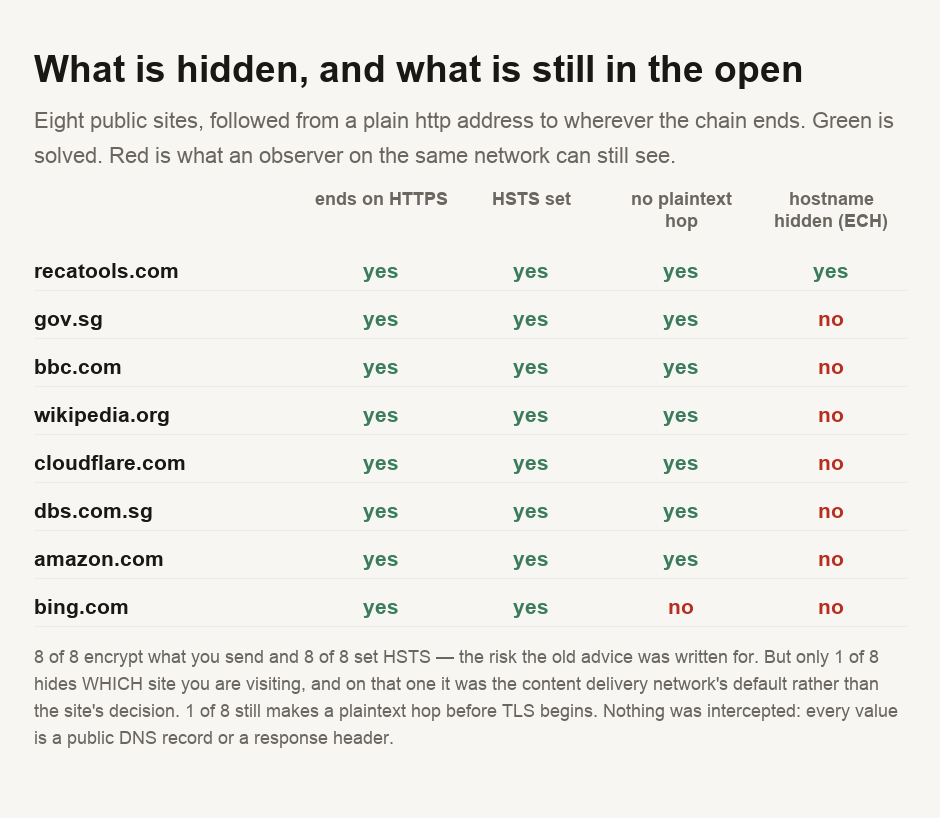
All 8 ended on HTTPS and all 8 set an HSTS policy on the host they finished at, which tells a browser never to try the plain version again.
The old advice, then, is out of date. A person sitting in the same café cannot read what you send to any of these sites, and that includes the bank.
What they can still see
Encryption hides the contents of a connection. It does not hide who the connection is to.
Every TLS connection opens by naming the site it wants, in the clear, before any encryption is negotiated — the server needs to know which certificate to present. The DNS lookup that preceded it is usually in the clear as well. So an observer on the café network cannot read your bank statement, but can see that you spent eleven minutes at your bank.
For a great many purposes that is the more sensitive fact. The contents of a page about a medical condition matter less than the fact that you read it.
The fix exists, and almost nobody has it
There is a standard for this. Encrypted Client Hello puts the server name inside the encrypted part of the handshake, so the hostname stops being visible. It requires the site to publish a key in DNS, which is a thing you can check from outside.
So we checked. Of the 8 sites, 2 publish the DNS record at all, and 1 carries an Encrypted Client Hello key.
The one is this site — and we are not claiming credit for it. Our content delivery network turns it on for the zones it fronts, and nobody here made a decision about it. The finding is straightforward: where ECH exists at all, it is usually because an infrastructure provider switched it on, not because a site chose it.
The bank in our set does not have it. Neither does the government portal, the broadcaster, the retailer or the search engine.
One site still starts in the clear
One site was an exception, which is why we followed whole redirect chains rather than just checking the first hop.
Typing bing.com gets you a redirect to the www host over ordinary HTTP first, and only that second request upgrades to HTTPS. It ends up encrypted, and there is 1 plaintext hop before it does.
That hop is an opportunity. Someone controlling the network can answer it themselves, and send you somewhere else before any encryption exists to prevent it. HSTS closes the window on later visits, because the browser remembers, but the first one is exposed.
Our own first pass measured only the first hop, which reported this site as failing to upgrade at all and another as having no HSTS. Both readings were wrong. What matters is the chain, and we would have published two false claims about named organisations had we not followed it.
So what should you actually do
Type addresses rather than following links when you are on a network you do not control, since the exposed moment is the first request to a host your browser has not seen before. Check that a site you care about has been visited at least once on a network you trust, so HSTS is already remembered.
And be honest about what a VPN does here, because the standard advice oversells it. It moves the observer. Instead of the café seeing which sites you visit, your VPN provider sees it. That is an improvement only if you trust the provider more than the café — a judgement about a company, not a technical fact.
In 2026 the old public Wi-Fi risk is largely gone. All 8 sites we checked end on HTTPS and all 8 set HSTS, so the contents cannot be read by anyone else on the network — the bank included. What replaced it is metadata: anyone on the network can still see which sites you visit, because TLS names its destination before it encrypts anything. A fix exists, and 1 of our 8 sites has it — not the bank, not the government portal, and on the one that does it was the content delivery network's decision rather than the site's. The first request to a new host is worth watching too, since 1 of the 8 still starts in plaintext and that hop can be answered by whoever runs the network. As for VPNs, they do not solve this; they move it, and your provider sees what the café would have.
Checking a site yourself
The script is committed with this guide and takes any list of hosts. Every fact it reports comes from a public DNS record or a response header, so you can verify any line of it. Our DNS lookup shows the records a site publishes, including the HTTPS record this measurement reads, and IP lookup shows where the connection actually goes. Our other guides cover the identifiers that persist across every network. What an IP address reveals explains the one you cannot turn off. What the padlock actually proves sets out what a certificate does and does not guarantee. And first-party against third-party cookies covers what the sites themselves store once you arrive.
- Every figure comes from a script committed alongside this guide: for each host, the full redirect chain from a plain http address, the HSTS header on the host the chain ends at, and the domain's HTTPS (TYPE65) DNS record read for an Encrypted Client Hello key.
- ⚠️ A CONTROL GATES THE RUN and the script exits rather than publish without it.
dig +short -t HTTPSreturns the A records from the additional section, which made every site look as though it published no HTTPS record — including hosts that demonstrably do. The control queries a host known to publish both the record and an ECH key. - ⚠️ THE FIRST VERSION MEASURED ONE HOP and would have published two false statements about named organisations: that one site fails to upgrade to HTTPS, and that another sets no HSTS. Both are artefacts of stopping at the apex. The published measurement follows the whole chain.
- ⚠️ NOTHING WAS INTERCEPTED AND NO NETWORK WAS JOINED. No Wi-Fi network was probed, no traffic belonging to anyone else was captured, and no attack was performed or simulated. Every fact is a public DNS record or a header on a public page.
- ⚠️ THE RESOLVER WAS SPECIFIED EXPLICITLY rather than using whatever the machine had. A resolver holding a cached negative would report an absent record for a domain that publishes one, which is the same class of error that produced a false finding in an earlier guide.
- ⚠️ EIGHT SITES IS A SMALL SAMPLE and it is not a survey. The counts describe these eight on one day. What generalises is the mechanism — that TLS does not conceal the hostname without ECH — which is a property of the protocol rather than of this sample.
- ⚠️ ECH ON THIS SITE WAS NOT OUR DECISION. Our content delivery network enables it for the zones it fronts. Presenting it as a choice we made would be taking credit for a default.
- ⚠️ NO SITE IS BEING ACCUSED OF ANYTHING. Publishing no ECH key is the ordinary state of the web in 2026, not a failing, and a plaintext redirect hop is a common configuration rather than evidence of negligence.
This describes what is visible to an observer on a shared network, measured from public records for eight sites on one day. It is not a security assessment of any organisation named, and it is not advice for a situation where you have reason to believe you are specifically targeted.

View author profile → · Editorial policy