You point a camera at a printed square on a restaurant table, a parking meter or a payment terminal, and something happens. Most people could not tell you what was in the square, because nobody can.
That is not a failure of attention. A QR code is machine-readable and nothing else. There is no partial credit, no gist, no glance that gets you halfway. Which makes the usual advice — "check before you scan" — impossible.
The comparison that shows why
We built two codes. One points at a page on this site. The other points at the same path on a domain that swaps a digit zero for the letter o — the plain-ASCII trick we measured in what the padlock actually proves, which needs no unusual characters at all.
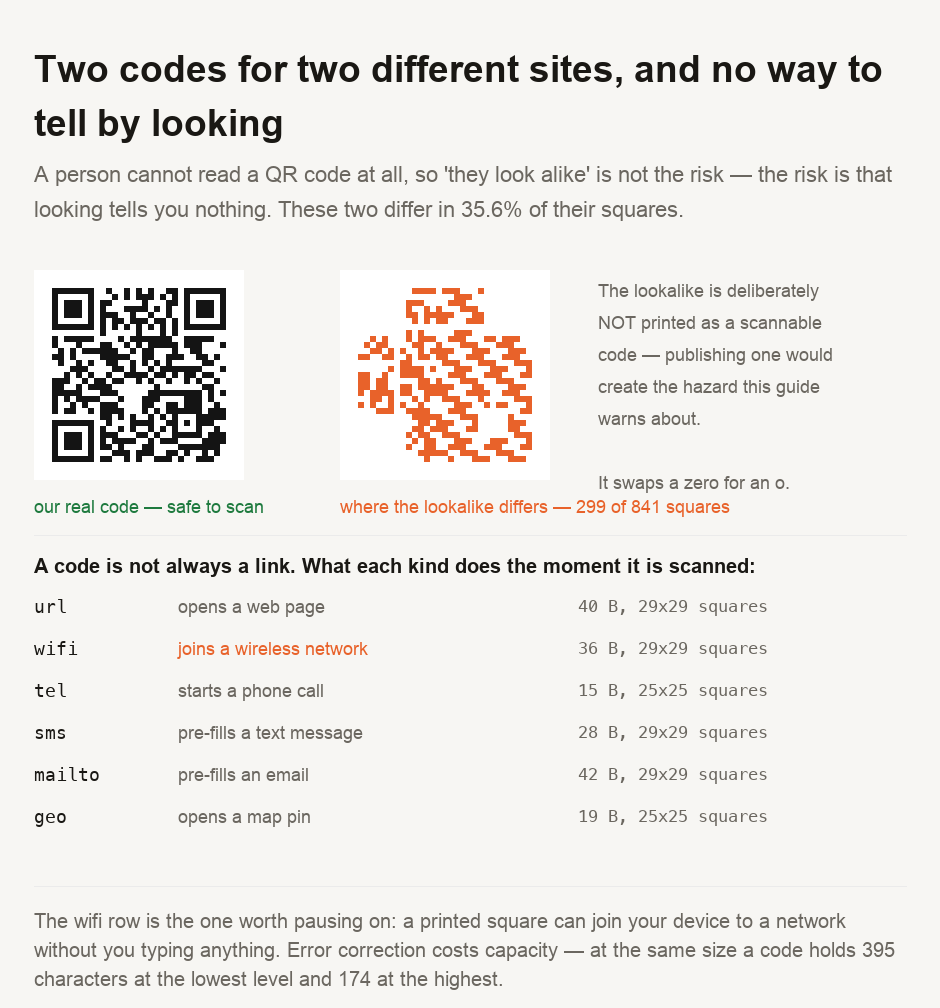
Both are 29 squares on a side. And 299 of the 841 squares differ — 35.6 per cent of the pattern.
That number surprised us, and it reframes the problem. The two codes are not subtly different; more than a third of the image has changed. A person still cannot tell, because a person was never reading it. "They look alike" is the wrong worry. The right worry is that looking conveys nothing, no matter how similar two codes appear.
We have deliberately not printed the second code. Publishing a scannable square pointing at a domain someone could register later would be manufacturing the exact hazard this page is about.
It is not necessarily a link
The assumption underneath "check before you scan" is that a code is a web address you could inspect. Often it is not.
The same square can hold a phone number that starts a call, a message body that pre-fills a text, an email with the subject already written, a map coordinate, or — the one worth pausing on — a wireless network name and password.
A wifi payload is 36 bytes and fits in the same 29 by 29 grid as an ordinary link. Scan it and your device can join a network without you typing anything or seeing the password. It is a useful feature. It is also why a printed square in public deserves more scrutiny than an emailed link, which at least declares its destination.
Error correction costs capacity
Every QR code carries redundancy so it survives being scuffed. You choose how much, and the choice is not free.
At a fixed size, the lowest level holds 395 characters. The highest holds 174 — under half. The middle levels sit at 311 and 221.
The practical rule, then, is the opposite of the instinct to max everything out. A long URL at the highest level may not fit at all, or forces a physically larger code. Pick the redundancy the printing conditions actually require: a menu behind glass needs less than a sticker on a fuel pump.
We are stating capacity rather than damage tolerance on purpose. What percentage of a damaged code still scans depends on the scanner as much as the code, and we could not measure it with an instrument we trusted — see the sources below.
You cannot inspect a QR code by looking. The advice is not actionable — two of our codes for different sites differed in 35.6 per cent of their squares, and no human could tell. So move the check to after the scan. Every reputable scanner shows you the destination before opening it; that preview is the only inspection point you have. Read the domain there, right to left. Treat a code printed in a public place with more suspicion than a link, because a sticker over the original costs nothing and a code is not always a link — the same square can join you to a wireless network without showing you a password. And if a code arrives asking you to sign in or pay, reach the site the way you already know instead.
Making your own
Our QR code generator builds codes for links, text, wifi and the other payload types above, and lets you set the error-correction level once you know what it costs you. The wifi QR generator is the specific case worth understanding before you print one for guests. If you want to see what a destination resolves to before trusting it, DNS lookup and IP lookup answer that, and our guide on whether a message is really from who it says covers the same impersonation problem arriving by email.
- Every code here was built with a committed script rather than read back through a decoder, so each payload is known by construction. Capacity figures are derived by binary-searching the largest payload each error-correction level accepts at a fixed version — not quoted from a table.
- ⚠️ AN EARLIER ATTEMPT AT A QR GUIDE WAS ABANDONED, and it is why this one avoids damage claims. That version measured how much damage a code survives, and the only decoder available put the failure point at 5 per cent against a specification figure of 30 — a six-fold contradiction that indicts the instrument, not the codes. A second decoder could not be installed to cross-check. We publish capacity, which we can derive, and not damage tolerance, which we could not measure.
- A decoder was used once, as a check on our own harness rather than as a source of any figure: it confirmed that a code we built read back the payload we put into it.
- ⚠️ The lookalike domain is an illustration built for this article. We have not registered it and it is not known to exist, which is also why its code is not printed here in scannable form.
- ⚠️ What a scanner does on reading a payload is the scanner's decision, not the code's. Most preview a link before opening it and most ask before joining a network, but that behaviour varies by app and by operating system version, and we did not test any particular scanner.
This describes what QR codes can contain and how they behave when scanned. Whether any particular code is safe depends on where it came from and what your scanner does with it, neither of which this page can determine for you.

View author profile → · Editorial policy