Both let you run AI models on your own computer instead of paying someone else's API. That is where the similarity ends, and people who assume otherwise lose a weekend finding out.
The short version: Ollama runs language models and gives you a chatbot. ComfyUI builds pipelines and gives you a picture, a video or a song. They are not competitors. Plenty of people run both.
What ComfyUI is
ComfyUI is a visual workbench for generative media. Instead of typing a command, you build a graph: boxes for loading a model, encoding a prompt, sampling, decoding, saving — wired together with cables, left to right.
The graph is not decoration. Generating an image *is* a pipeline of separable steps. Exposing them means you can change one without disturbing the rest: swap the sampler, feed one prompt into two models, run a video through a chain of processors. Its own description calls it a "modular diffusion model GUI, api and backend with a graph/nodes interface", and modular is the operative word.
The learning curve is steep. The first time you open it, you see a wiring diagram, not a text box, and nothing happens until you understand it.
What Ollama is
Ollama runs large language models locally with as little ceremony as possible. You install it, run one command, and you are talking to a model:
ollama run qwen3That is the entire experience for most users. It pulls the model, manages the weights, and gives you a prompt — plus a local API on the same machine, which is why so many apps use it as a backend.
Its own repository describes it as getting you "up and running" with a list of named models, and that phrasing is the product. Ollama's design goal is that there is nothing to design.
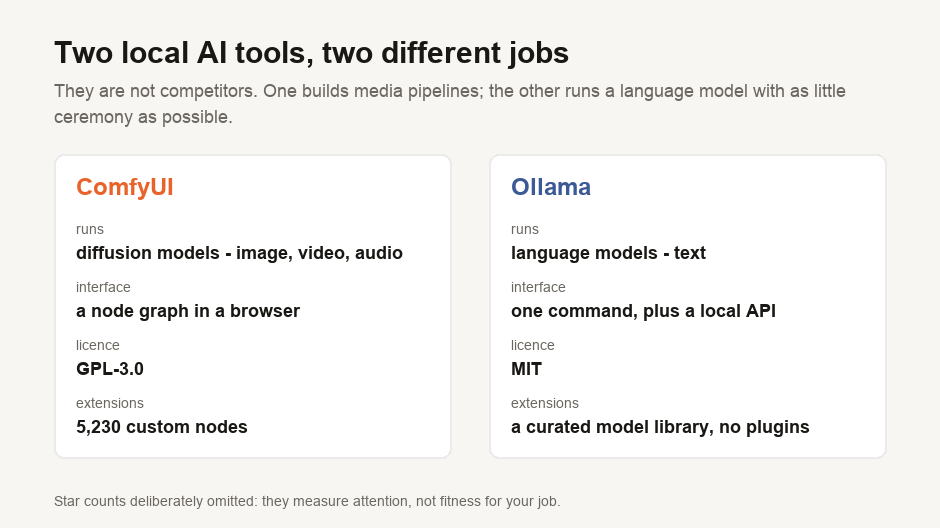
The comparison, with real numbers
| ComfyUI | Ollama | |
|---|---|---|
| What it runs | Diffusion models — image, video, audio | Language models — text |
| How you use it | A node graph in a browser | A command line, plus a local API |
| GitHub stars | 128,473 | 178,986 |
| Written in | Python | Go |
| Licence | GPL-3.0 | MIT |
| First released | January 2023 | June 2023 |
| Extension ecosystem | 5,230 custom nodes | A model library, not a plugin system |
Two rows in the table stand out.
The star counts are close and mean less than they look. Ollama leads, which reflects a much larger audience for local chatbots than for generative video pipelines. Stars measure attention, not quality, and they are not a reason to pick either tool.
The licences are different, and this one can matter. Ollama is MIT — permissive, do what you like. ComfyUI is GPL-3.0, which carries obligations if you distribute software built on it. For personal use the distinction is academic. If you are planning to ship a product with ComfyUI inside it, that is a conversation to have early rather than late.
The 5,230 nodes are the real difference
The registry figure is the number that actually separates these tools, because it describes what each one is for.
The point of a graph tool is that it can be extended. When a new model appears, someone writes nodes for it, and the tool gains a capability it lacked the week before. MiniMax released their H3 video model, and within weeks five separate custom nodes existed for chaining its clips past the fifteen-second limit — none written by the ComfyUI team, all installable from the same registry.
Ollama's equivalent is a curated model library. New models arrive as models, ready to run, without a plugin. That is a feature, not a shortfall: it is why ollama run works first time and a ComfyUI graph sometimes does not.
It is the classic trade-off. Ollama offers fewer decisions for a reliable outcome. ComfyUI gives you more control, but its capabilities—and complexity—are always expanding.
Which should you install?
Install Ollama if you want to chat with a model, run one privately over your own documents, or give a local model to an application as a backend. Text in, text out, minimal setup.
Install ComfyUI if you want to generate images, video or music, need repeatable pipelines rather than one-off results, or want to run a model the day it is released rather than when a hosted service adds it.
Install both if your work spans them, which is common. They do not conflict — different models, different ports, different jobs.
The mistake is expecting either to do the other's work. Ollama will not generate you a video. ComfyUI can technically run a language model through a custom node, and doing that as your main chat interface is building a wiring diagram to send an email.
Starting with ComfyUI without losing an afternoon
Four things that make the first hour less painful, in the order they matter:
- Install ComfyUI Manager first. Nearly every guide you find assumes custom nodes, and Manager installs them by name instead of by git clone. Doing this before you need it saves the most time.
- Load a template workflow rather than building one. ComfyUI ships defaults, and reading a working graph teaches more than assembling an empty one.
- Restart after installing any node. Custom nodes register at startup. "The node isn't there" is almost always this.
- Check the disk requirement before the download. Generative media models are large — a video or music model can be tens of gigabytes, and repositories often publish several variants, so the total size shown is usually not what one workflow needs.
Our guides on running MiniMax Music 3 in ComfyUI and making MiniMax H3 videos longer than fifteen seconds both work through real examples of exactly that.
What is measured here
The star counts, languages, licences, creation dates and the 5,230-node registry total are measured from the GitHub and ComfyUI registry APIs on 19 August 2026, by a script in our repository. Star counts move daily; the ratio is the durable part, not the figure.
Everything about how the two tools feel to use is a judgement drawn from their documentation and design, not a benchmark. We have not measured setup time, memory use or generation speed for either, and anyone offering you those numbers without naming their hardware is not telling you much.

View author profile → · Editorial policy