MiniMax Music 3 writes complete songs. Not loops or eight-bar sketches — five minutes of music with sung vocals, a verse that leads into a chorus, a bridge, an outro. And unlike most music generators worth using, the weights are public, so you can run it on your own machine instead of paying per track.
This guide walks through getting it working in ComfyUI, from the hardware you need and installation to what each node does and how to write the prompt—which turns out to be most of the skill.
One honest note before we start. We have not installed and run this ourselves. Every figure about the model is measured from the published repository, and every step below is drawn from the model card and the node's own documentation, which we say again wherever it matters. Treat the walkthrough as a well-researched map, not a trip report.
Before anything: can your machine actually run it?
Most tutorials bury the hardware requirements. Let's start there, because it decides whether you spend your afternoon downloading or making music.
| What you need | Reality |
|---|---|
| Disk space | 57.29 GB of model weights, across 58 files |
| GPU | An NVIDIA CUDA GPU with BF16 support |
| ComfyUI | An existing working install |
| Patience on first run | The loader downloads the whole model before anything generates |
The 57 GB is measured directly from the repository file listing, not estimated. BF16 support in practice means a reasonably recent NVIDIA card — the node's documentation states this requirement plainly, and the LoRA training path currently targets a single GPU.
If you are on an Apple Silicon Mac or an AMD card, this particular node is not for you today.
What you are actually installing
Two separate things, and confusing them causes most of the licence questions people ask later.
The model is MiniMaxAI/MiniMax-Music3 on Hugging Face — 13,138 downloads at the time of measurement, not gated, so no access request is needed. It ships under a custom MiniMax-Music3 Community License. Worth flagging: the repository carries a LICENSE file, but the model card's metadata declares no licence at all, so automated tooling will report this package as unlicensed. Read the file before any commercial use.
The ComfyUI node is ComfyUI-FL-MiniMaxMusic3, published by Machine Delusions, under Apache-2.0 — a different, more permissive licence than the model it loads. Version 0.2.0, dated 14 August 2026.
That date matters. This is a very new node with 98 registry downloads. You are early, and early means rough edges.
How the model works, in one diagram
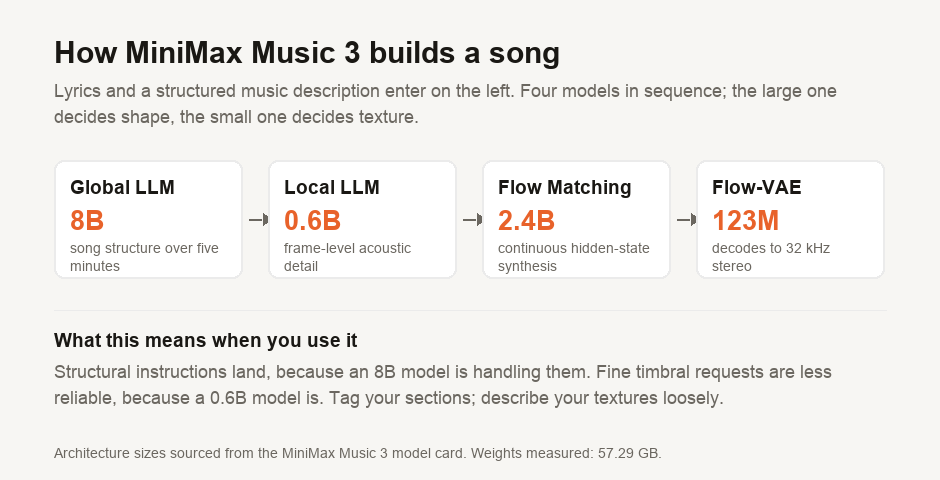
You do not need this to use the tool, but it explains the behaviour you will see. The 8B Global LLM — initialised from Qwen3-8B — decides the shape of the song across five minutes. The 0.6B Local LLM fills in frame-level acoustic detail. Their hidden states are fused, passed through a 2.4B Flow Matching stage and a Flow-VAE, and decoded by a 123M decoder into 32 kHz 16-bit stereo.
The practical consequence: structural instructions land, because a large model is handling them. Fine timbral requests are less reliable, because a much smaller model is.
Installing it
Two routes, per the node's documentation.
Through ComfyUI Manager — search for FL MiniMax Music 3 and install. This is the route to prefer if Manager is already set up.
Manually, if you would rather see what is happening:
cd ComfyUI/custom_nodes
git clone https://github.com/filliptm/ComfyUI-FL-MiniMaxMusic3.git
cd ComfyUI-FL-MiniMaxMusic3
pip install -r requirements.txt
Restart ComfyUI afterwards. Custom nodes are only registered at startup, and "the node isn't showing up" is almost always a missed restart.
The model weights are not fetched at install time. The loader node downloads them on first use, with per-file progress, and verifies them as it goes.
The eight nodes, and which three you need
The pack ships eight nodes, which looks intimidating until you notice that five of them exist only for LoRA training. For generating music you need three.
| Node | What it does | Needed to generate? |
|---|---|---|
| FL MiniMax Music 3 Loader | Downloads and loads the model, text encoder and decoder VAE | Yes |
| FL MiniMax Music 3 Audio VAE Loader | Loads the full waveform encoder/decoder | Yes |
| FL MiniMax Music 3 Dataset Preprocessor | Captions, transcribes and segments your own music library | Training only |
| FL MiniMax Music 3 Dataset | Validates audio, captions, lyrics and durations | Training only |
| FL MiniMax Music 3 Train Config | LoRA rank, precision, optimizer, steps | Training only |
| FL MiniMax Music 3 Validation Config | Deterministic validation caption, seed, CFG | Training only |
| FL MiniMax Music 3 Training Run | Loads a saved run to inspect or resume | Training only |
| FL MiniMax Music 3 LoRA Trainer | Trains, monitors, checkpoints and exports a LoRA | Training only |
Start with the Loader and the Audio VAE Loader. Ignore the rest until you have a song you like.
The part that actually decides your output
Music 3 takes two inputs, and the second one is where the quality lives.
Lyrics are the words to be sung. They accept explicit structure tags, and using them is the difference between a song and a sketch:
[Intro]
[Verse]
The last bus pulls away from the terminal
...
[Pre-Chorus]
[Chorus]
[Bridge]
[Instrumental]
[Outro]
The documented tags include [Intro], [Verse], [Pre-Chorus], [Chorus], [Post-Chorus], [Bridge], [Instrumental], [Solo] and [Outro]. Because an 8B model is handling structure, these are followed reasonably well — which is why tagging is worth the two minutes.
The music description is the other half, and MiniMax recommends a structured caption in three parts rather than a sentence:
- Global metadata — genre, subgenre, BPM, key, scale, emotional progression, listening scenario, production profile
- Vocal details — vocal gender, timbre, performance style, harmony, backing vocals, vocal effects
- Arrangement — primary and secondary instruments, how instruments evolve section by section, groove, bass, percussion, textures, spatial effects
Compare "sad indie song with piano" against a caption that names 92 BPM, A minor, a breathy female lead with doubled harmonies on the chorus, felt piano and brushed drums, with strings entering only at the bridge. The second one gives a model with section-level awareness something to act on across five minutes. The first gives it a vibe and lets it guess.
Taking the time to write a structured caption is the highest-leverage part of this process.
Training a LoRA on your own music
The remaining five nodes cover fine-tuning—unusual to find bundled with an inference wrapper.
The documented flow: the Dataset Preprocessor uses MOSS-Music to caption, transcribe, analyse and segment a local music library, reading from an absolute path at execution time rather than copying your collection into ComfyUI. The Dataset node validates the result. Train Config and Validation Config set the parameters, and the LoRA Trainer runs the job through a pinned SimpleTuner backend, with a live dashboard showing step, loss, learning rate and validation audio. Completed adapters are copied into ComfyUI's standard LoRA folder.
Two documented limits worth knowing before you plan around it: the first training release targets a single NVIDIA GPU, and multi-GPU, LyCORIS, full-rank training and several other options are not currently exposed.
If something goes wrong
- The node does not appear. Restart ComfyUI. Custom nodes register at startup.
- The download stalls or resumes oddly. The loader verifies files and reports per-file progress; 57 GB across 58 files takes a while, and interruption is likelier than failure.
- Out of memory. This is a large model with four components. Close other GPU work before blaming the node.
- The song ignores your structure. Check you used the bracket tags. Prose descriptions of structure are much weaker than
[Chorus].
What we have not told you
We have not run this. That is deliberate — the brief was to research rather than install — and it bounds what this guide can claim.
What is measured: the 57.29 GB weight total and 58 file count, the download figure, the licence identifiers, the node's publisher, version and date, and the fact that the ComfyUI registry lists exactly one Music 3 node. Those come from a script in our repository that you can re-run.
What is sourced: everything about how it behaves. The architecture, the tag list, the structured-caption recommendation, the installation commands, the training limits — all from MiniMax's model card and the node's README. We have not verified generation quality, real VRAM consumption under load, or how long a five-minute song takes on any particular card.
If you run it, the numbers worth reporting back are the ones we could not get: peak VRAM, wall-clock time per minute of audio, and whether the structured caption survives contact with an actual mix.
Our companion guide on what ComfyUI is and how it differs from Ollama covers the surrounding tool if you are new to it, and how big a "small" model really is explains why a repository total and a download size are not the same number.
Figures measured 19 August 2026.

View author profile → · Editorial policy