MiniMax H3 generates video with sound—dialogue, footsteps, room tone, in 32 kHz stereo—all produced together with the picture, not scored afterwards. It is the project's most downloaded model by a wide margin, with over three million pulls against thirteen thousand for their music model.
And it stops at fifteen seconds.
That fifteen-second ceiling is why five different ComfyUI nodes have appeared in the last few weeks to solve the problem. We will look at how each one works and which is best for your project.
We have not run these. The brief was to research rather than install, so every capability below is sourced from the model card and each node's own documentation, and every number is measured from public registries. We flag which is which at the end.
What H3 actually produces
| Specification | Value |
|---|---|
| Duration | 4 to 15 seconds |
| Frame rate | 24 FPS |
| Resolution | Shorter side 768px by default; 2K via the H3-Regenerate-2K variant |
| Audio | 32 kHz stereo, generated natively |
| Aspect ratios | 21:9, 16:9, 4:3, 1:1, 3:4, 9:16 and others |
| Dialogue languages | 11 with stable support, including Chinese, English, Japanese, Korean and Arabic |
The native audio is the part worth dwelling on. Most video models produce silence and leave you to add sound, which means lip movement and speech are generated by different systems and have to be reconciled. H3 generates them together, which is why its tag list includes things like text-to-audio-video and audio-to-audio-video rather than plain text-to-video.
It also accepts video and audio as inputs, not just text and images. That is what makes the chaining approaches below possible at all.
Why fifteen seconds, and why that is a hard wall
The limit is a property of what the model was trained to produce, not a setting someone forgot to expose. You cannot raise it in a config file.
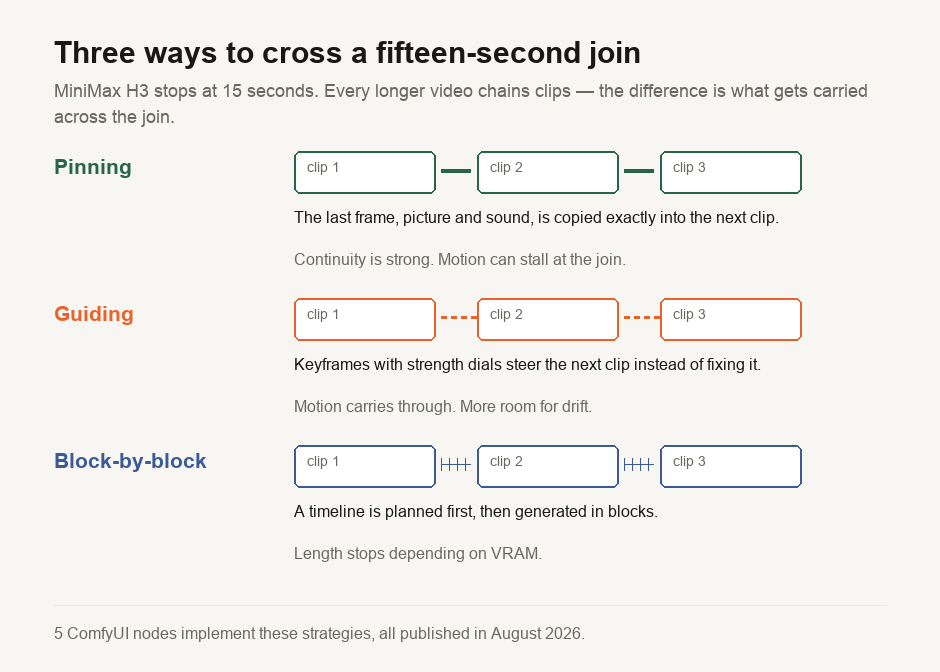
So every method of getting a longer video is some version of the same trick: generate a clip, take something from its end, and use that as the starting condition for the next clip. The differences between the five nodes are entirely about what gets carried across the join and how much it constrains what follows.
Get that wrong and you see the two failure modes that plague chained video: a visible seam where the join happens, or drift, where the character's jacket is a slightly different colour by clip four.
The five nodes, and what each one is for
All five appeared in August 2026. Download counts are small because the whole ecosystem is weeks old — treat them as a signal of what people have found first, not of quality.
minimax-h3-extend — the straightforward one
The most downloaded of the five at 232, published by kayte under MIT. It adds video continuation and extension to H3 in ComfyUI, and does that one job.
Start here if what you want is a longer version of a shot you already like, and you do not need fine control over the join.
comfyui-h3-motion-context — pinning picture and sound
Published by NikoDemon80. Its description is the most precise of the five about the actual mechanism: it pins the tail of the previous clip, picture and sound, so the next clip continues it rather than merely resembling it.
What distinguishes this node is its ability to carry the audio tail across the join. If you chain clips while only pinning the picture, the sound restarts at every boundary — room tone drops out, a held note cuts — and the join is audible even when it is invisible. The node also states that it applies runtime patches only, on first use, rather than modifying files.
Reach for it when the audio matters as much as the image — dialogue, music, anything with continuous ambience.
comfyui-h3studio — guiding rather than pinning
Published by ShootTheSound under MIT, and the most conceptually different of the five. It is a video editor inside a single ComfyUI node, with keyframes that carry independent strength dials — the documentation frames this explicitly as guiding the motion instead of pinning it — plus waypoints the clip passes through.
Guiding versus pinning is the node's entire design premise. Pinning a frame exactly gives you perfect continuity and a tendency for motion to stall at the join, because the model has to start from a fixed pose. Guiding with adjustable strength lets motion carry through, at the cost of some drift.
This is the one for a moving camera or subject, where a hard pin reads as a stutter.
comfyui-minimaxh3-flowdirector — directing a timeline
Published by vorpalblade under MIT. A WYSIWYG visual timeline director that generates continuous ultra-long videos block by block, with automated keyframe flow chaining and — the claim worth testing — low, constant VRAM usage regardless of total length.
If that claim holds, this node is the one to watch. It would mean total video length is bounded by your patience, not your GPU.
Best suited to long-form work you want to plan up front rather than decide clip by clip.
ComfyUI-H3-Multishot-Advance — chaining many shots
Published by KursatAs. Multi-shot chaining for H3 audio and video, with a resumable cache, continuity controls and unified model loading.
The resumable cache is the practical feature. A long chain is a long job, and a job that has to restart from clip one after an interruption is a job you will grow to resent.
Built for sequences of distinct shots rather than one continuous take.
Which one should you install?
A short decision path, based on what each node says it does:
- Just want a longer clip?
minimax-h3-extend. - Dialogue or continuous sound across the join?
comfyui-h3-motion-context, for the audio tail. - Motion through the join that must not stutter?
comfyui-h3studio, for strength dials rather than pins. - Planning something long?
comfyui-minimaxh3-flowdirector, for the constant-VRAM claim. - Several distinct shots in sequence?
ComfyUI-H3-Multishot-Advance, for the resumable cache.
All five install the same way: through ComfyUI Manager by name, or by cloning into ComfyUI/custom_nodes and restarting.
The two things people get wrong about H3
The repository is 498 GB, and that is not your download. H3 ships several complete pipelines in one repository — FL2VA and Ref2VA among them — so the 498.33 GB across 104 weight files is the sum of every variant, not what one generation path loads. Treating a repository total as a download requirement is a common error and we have written about why repository totals and download sizes differ in detail.
It is open weights, not open source. H3 is published under the minimax-h3-community-license-agreement — a custom licence, not MIT or Apache. The model is not gated, so no access request is needed, but "you can download it" and "you can do what you like with it commercially" are different statements. Read the licence before building a business on it.
The ComfyUI nodes and the model also carry different licences. Three of the five nodes are MIT, which says nothing about the terms on the weights they load.
What is measured here, and what is not
Measured from public registries on 19 August 2026, by a script in our repository: H3's 3,055,205 downloads and its 498.33 GB across 104 weight files, its licence identifier, that it is not gated, and the identity, publisher, licence and download count of all five ComfyUI nodes.
Sourced from documentation: every capability figure in the specification table, and every description of what the five nodes do. We have not installed them, generated a video, or verified the constant-VRAM claim.
One correction we owe you. Our first search of the ComfyUI registry used narrower terms and returned nothing for H3, and we nearly published a guide explaining that no ComfyUI support existed. It does — five nodes of it. The registry handles multi-word queries poorly and caps results, and a negative finding is only as good as the search behind it. The harness now searches wider and runs a control that proves the query can find a node known to exist.
New to ComfyUI itself? What ComfyUI is, and how it differs from Ollama covers the surrounding tool.

View author profile → · Editorial policy