You found a workflow that does exactly what you wanted. You dragged it into ComfyUI and got a row of red boxes where the interesting nodes should be. ComfyUI Manager offered to install the missing ones, you clicked, a log scrolled past faster than anyone reads, and a few seconds later the workflow ran.
Those few seconds are what this guide is about. The point is not to talk you out of the installer — this is how the ecosystem works, and it works well. But most people who use ComfyUI daily have never been told what that button does, and it is more than a download.
What the button actually does
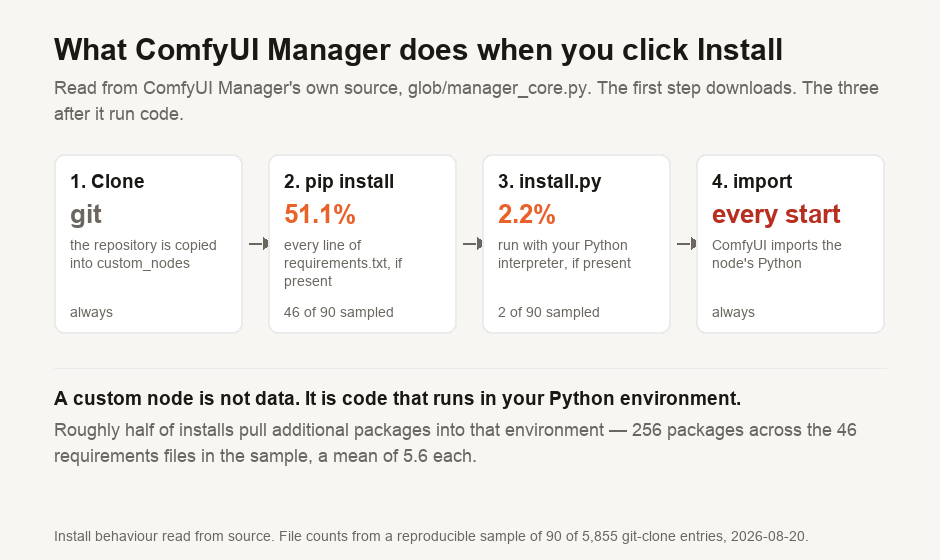
ComfyUI Manager's install path is readable in its own source, in glob/manager_core.py. The function is called execute_install_script, and it does three things in order.
First it clones the node's git repository into your custom_nodes folder. Second, if that repository contains a requirements.txt, it runs pip install on every line of it. Third, if the repository contains an install.py, it executes that file with your Python interpreter:
install_cmd = [sys.executable, "install.py"]Then, separately, ComfyUI imports the node's Python every time it starts. A custom node is not data that ComfyUI reads; it is code that ComfyUI runs in your Python environment, with your user account's permissions.
That is not a flaw someone should patch. A node that resizes an image has to contain the code that resizes the image. But it does mean that clicking Install runs a stranger's program on your machine, which is a larger thing than the word suggests.
How often nodes run code on install
The pip install and install.py steps only happen if those files exist, so we checked how often they do. From the 5,855 git-clone entries ComfyUI Manager offers we took a sample of 90 — every 65th entry of a stable sort, so it is not a hand-picked set — and looked inside each repository.
46 of the 90 shipped a requirements.txt, or 51.1%. Between them those files listed 256 packages, a mean of 5.6 per node. Two shipped an install.py, or 2.2%.
So about half of installs pull additional Python packages into the same environment ComfyUI runs in, and roughly one in fifty also runs a setup script the author wrote.
Four of the 90 repositories could not be reached at all; the listing points at an address that no longer answers.
The problem of unpinned dependencies
A line in requirements.txt does not have to specify a version, and most do not.
The ComfyUI registry publishes a dependency list for each node's current version, which lets this be counted rather than guessed. Across all 5,230 registry nodes, 1,704 of them — 32.6% — declare dependencies at all, and those nodes declare 9,955 individual requirements between them. Sorted by how tightly each one is specified:
| How the dependency is written | Specs | What it means for you |
|---|---|---|
Bare name, e.g. torch | 5,548 | Whatever version pip finds today |
A range or floor, e.g. >=1.2 | 3,067 | Anything newer, including releases published after the node was |
Exact pin, e.g. ==1.2.3 | 1,158 | The version the author tested |
| URL or environment marker | 168 | Fetched from a named location |
More than half of all dependency specifications name no version whatsoever. Counted per node rather than per line, 1,632 of the 1,704 nodes that declare dependencies — 95.8% — leave at least one of them floating. Exactly 44 nodes pin every dependency they have.
The practical consequence is that installing the same node on two machines a month apart can install different code, and neither machine is doing anything wrong. It also means a node that worked in June can break in August without its author touching it, which is the single most common cause of a ComfyUI environment that "suddenly" stopped working.
If that reasoning sounds familiar, it is the same problem we measured from the other direction in how old the code you installed really is. Floating dependencies are not a ComfyUI invention; ComfyUI just has an unusually large number of them in an unusually shared environment.
Many nodes are unmaintained
The registry records when each node last published a version. 3,742 of the 5,230 have ever published one at all — the other 1,488 are listed with no released version, so they cannot be dated and are excluded from what follows rather than counted as fresh.
Of the 3,742 that can be dated, the median node last released 191 days ago. The slowest tenth last released more than 666 days ago. 1,095 of them — 29.3% — have not published anything in over a year.
Attention is concentrated to a degree that surprised us. The ten most-downloaded nodes account for 28% of all downloads across the registry, and the top hundred account for 75.6%. At the other end, 1,310 nodes — a quarter of the registry — have never been downloaded through it at all.
That distribution is ordinary for a volunteer ecosystem: a small core in constant use, and a long tail of experiments. It matters here only because the install button presents all 5,230 identically, so a node with four downloads and no release in two years looks exactly like one with four million.
How to install nodes safely
None of this needs paranoia, only about ninety seconds of attention before installing something you have not heard of.
- Look at the repository before you click. The listing links to it. A node with recent commits, a real README and other people's issues in the tracker is a different proposition from one with a single commit two years ago.
- Open
requirements.txtif there is one. You are about to pip-install every line of it. Most are ordinary, and the occasional one that pulls something unexpected is exactly what you want to catch before it lands rather than after. - Treat
install.pyas worth reading. Only about one node in fifty has one, which makes it cheap to check on the rare occasions it exists. - Install into an environment you can throw away. A dedicated virtual environment or container for ComfyUI means a bad dependency resolution costs you a rebuild, not your working Python.
- Install one node at a time when chasing a broken workflow. Installing six at once and restarting tells you nothing about which one broke the environment.
The registry also carries a status field, and it uses it: 5,090 nodes are marked active, four are banned outright and one is deleted. Those five are removed for a reason, and the field is visible before you install.
If you are still deciding whether ComfyUI is the right tool at all, our comparison of what ComfyUI is and how it differs from Ollama covers that ground. The custom node ecosystem measured here is most of the difference between them.
What is measured here
The node counts, install types, dependency specifications, download shares, status values and release dates are measured from the ComfyUI registry API and ComfyUI Manager's published node list on 20 August 2026, by a script in our repository that refuses to emit results unless it collected every row the API said existed. All 5,230 registry nodes were collected.
The counts of requirements.txt and install.py are from a sample of 90 repositories, not from all 5,855 — probing every one would mean thousands of requests to a free host for no additional insight. The sample is every 65th entry of a stable sort, so it is reproducible, and its denominator is quoted everywhere it appears.
What ComfyUI Manager does at install time is read from its source code, not inferred from behaviour. We have not audited any individual node, and nothing here says any particular node is unsafe. Every figure moves as the ecosystem does; they describe 20 August 2026.

View author profile → · Editorial policy