
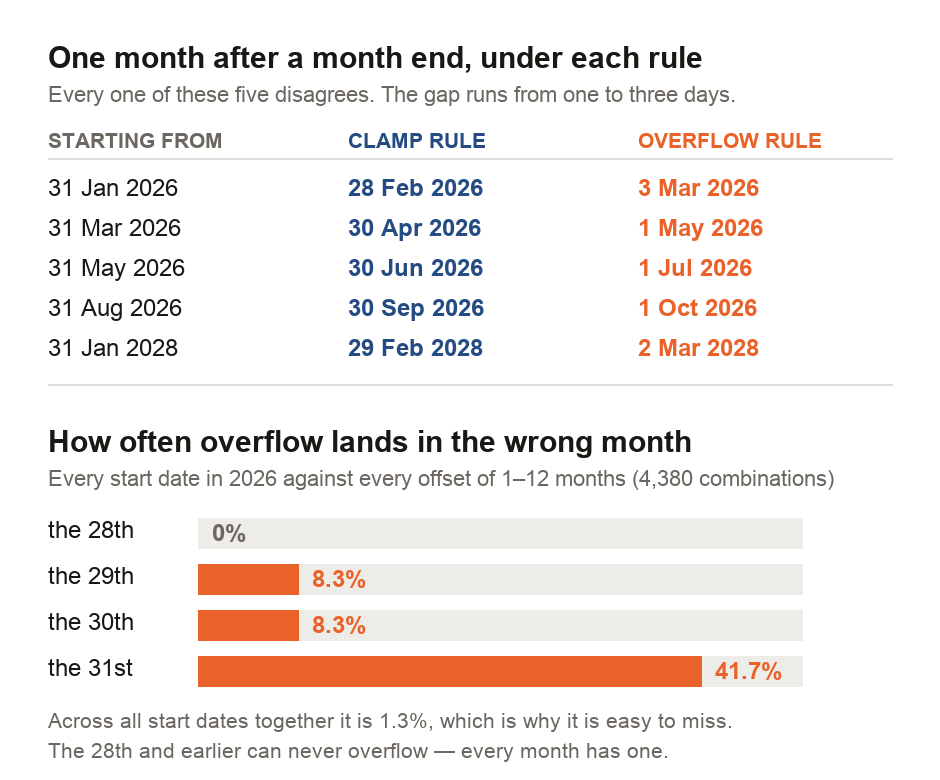
28 February, or 3 March. Both are defensible, both are in daily use, and the date calculator you asked is very unlikely to tell you which one it picked.
This matters on the day it matters. A one-month notice period served on 31 January, a lease that runs "one month from" a month end, a permit valid "for one month" — the answer decides whether you are early, on time, or three days late. The trouble is that the question has no single answer. You need to know which one your tool used.
We went looking at our own tools, because it is easy to write this as advice and harder to check whether your own software follows it. It did not. One of our calculators printed a sentence claiming it handled month ends correctly, directly above four worked examples it got wrong. Seven others had a separate, quieter fault that gave a different wrong answer to anybody living west of London. All eight are fixed, and the rest of this explains what to look for in whatever tool you use next.
Why the question has two answers
There is no 31 February. So "one month after 31 January" asks for a date that does not exist, and something has to give.
The clamp rule moves back to the last day of the intended month, landing on 28 February. This is what most contracts, notice periods and statutory time limits mean, and it is the reading a person usually has in mind, because they are thinking "the end of next month".
The overflow rule keeps counting days. February has 28, so the three left over from January's 31 push the date to 3 March. This is what JavaScript's date arithmetic does by default, which means it is what a great many web calculators do without ever saying so.
The two agree for most of the calendar and part company at the edges.
How often it actually bites
We ran every start date in 2026 against every offset from one to twelve months — 4,380 combinations — and counted how often the overflow rule ends up in a month the reader did not ask for. It landed in the wrong month 1.3% of the time. Repeated over 2028, a leap year, it is 1.3% again.
That number is honest and slightly useless, because the risk is not spread evenly. Broken out by the day you start from:
- the 28th and earlier: 0% — every month has one, so nothing can overflow
- the 29th and the 30th: 8.3%
- the 31st: 41.7%
If your date is the 31st, two of every five answers land in the wrong month. That is not an edge case for you; it is close to a coin toss. And month ends are exactly when contracts, payrolls, tenancies and notice periods are dated, which is the unlucky part.
The tool that contradicted itself
Our own date add/subtract calculator carried this line in its results panel:
adding "1 month" to Jan 31 lands on Feb 28 (or Feb 29 in leap year)… JavaScript Date math handles these correctly
Its own code used the overflow rule. Every worked example in that sentence was wrong:
| Input | The tool said | The tool did |
|---|---|---|
| 31 Jan 2026 + 1 month | 28 Feb 2026 | 3 Mar 2026 |
| 31 Jan 2028 + 1 month | 29 Feb 2028 | 2 Mar 2028 |
| 31 Mar 2026 + 1 month | 30 Apr 2026 | 1 May 2026 |
| 29 Feb 2028 + 1 year | 28 Feb 2029 | 1 Mar 2029 |
Four out of four. Worse, a few lines above that wrong claim, the panel listed what people use the tool for: notice periods, contract expirations, visa and permit expiry, loan maturity.
The tool's static page copy, meanwhile, was correct all along: it said plainly that some systems clamp, some overflow and some refuse. So the page held both a right answer and a wrong one, and the wrong one was the one that appeared next to your result.
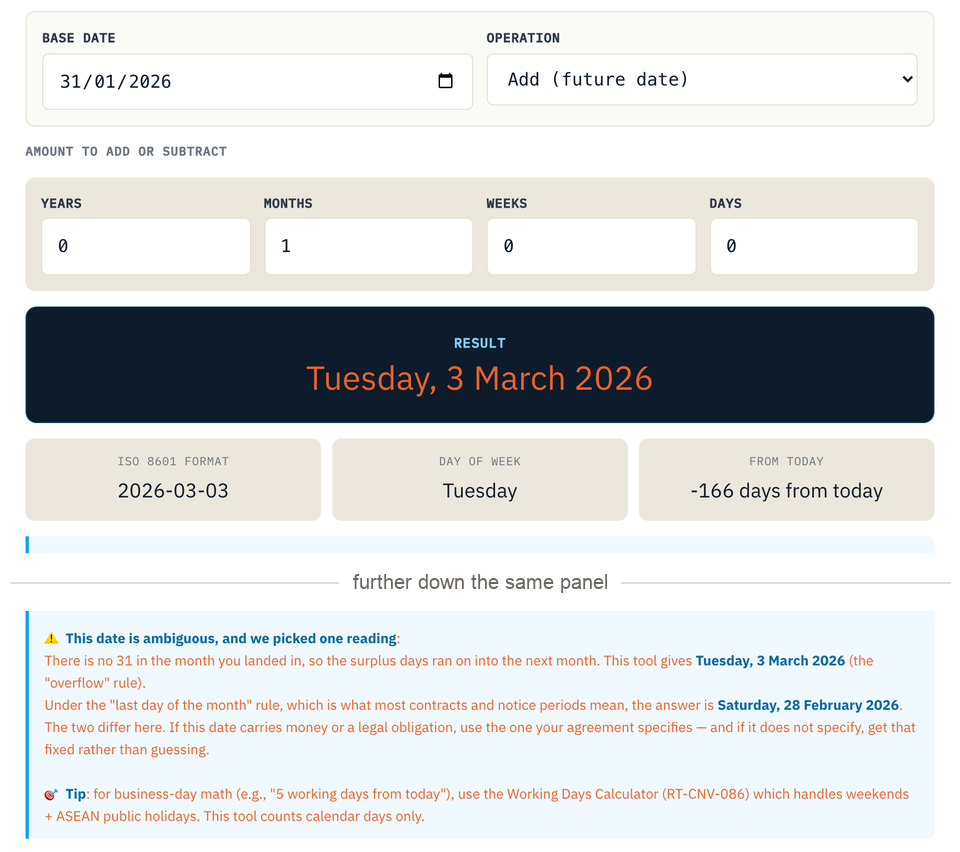
We did not change the arithmetic. Switching a calculator's convention silently would move every answer anyone had already relied on. Instead, the tool now names the rule it uses. For an ambiguous date it shows both readings, and makes clear the difference is yours to resolve.
The fault we did not go looking for
While measuring the first problem we found a second one, and for most readers it is the worse of the two.
When a web page reads a date you picked, it gets the text 2026-01-31. Handing that string straight to JavaScript's date parser is treated as UTC midnight — midnight in London. Read back in the reader's own timezone, that instant is still 31 January anywhere east of London, and 30 January anywhere west of it. The calculator quietly starts from the day before the one you clicked.
Nobody in Singapore would ever see this. That is precisely why it survived.
Eight of our 42 date-input tools did it. What it cost depended on the tool, so we ran each one under two real timezones rather than reasoning about it:
- Working days calculator: the same two dates returned 42 working days in Singapore and 43 in New York. Every date's day-of-week shifts, so weekends move.
- Week number calculator: it returned a different ISO week number for 52 of 365 dates in 2026. Every one was a Monday, which shifting back a day pushes into the previous week.
- Date difference calculator: no error. Both endpoints shift by the same amount, so the gap between them survives intact. It was worth checking rather than assuming.
All eight now read the date as local midnight. One of them needed a second fix: it echoed your date back to you through a function that converts to UTC, which would have reintroduced the same off-by-one it had just removed.
What we got wrong while measuring this
Our first pass at counting the timezone fault searched our code for date-parsing calls and reported 25 affected tools. Reading them one by one brought it down to 8.
Most of the false alarms build dates from separate year, month and day values, which never shift. One, our security deadline calculator, works in UTC deliberately and end to end, and was right all along.
We are reporting the bad count as well as the good one because the same trap is waiting for anyone who checks their own code this way. A search tells you where to look. It does not tell you what you found.
This is a familiar pattern. Our guide on the digits your calculator invents came out of a similar audit: a tool correctly applying a textbook rule that turns out to be the problem. Date arithmetic is the version of that where the rule was never agreed in the first place.
How to tell which rule you have been given
You do not need to read anybody's source code. Give the calculator a date you already know the answer to, and see what comes back.
Enter 31 January 2026 and add one month. If you get 28 February, it clamps. If you get 3 March, it overflows. If you get 28 February but suspect the tool is built on JavaScript defaults, try 31 March + 1 month as a check. An overflow tool answers 1 May; a clamping one, 30 April.
For the timezone fault, the test is even quicker: type a date and check the tool echoes back the same day you typed. If it shows the day before, it is parsing as UTC, and every answer it gives you is off by one.
And when the date carries money or a legal obligation, the calculator is not the authority in any case. Contracts, tenancy agreements and employment law generally intend the clamp reading — the corresponding date in the later month, or the last day of that month where there is none. If your agreement does not say which it means, that ambiguity is worth removing while it is still cheap.
"One month later" is not a calendar fact. It is a choice between two rules whose answers can sit up to three days apart, and only at month ends. If your date falls on the 29th, 30th or 31st, find out which rule you were given before you act on it — and if the date is contractual, take the clamp reading unless your agreement says otherwise.
What this does not cover
The 1.3% and 41.7% figures describe JavaScript's overflow rule against the day the reader asked for. They are a property of the calendar and of that rule, not a claim about how often people are harmed — we have no data on how often anyone enters a month-end date, and we have not tried to estimate it.
We have also not audited every date tool on this site for every fault. The census covered the 42 tools with a date input for the timezone problem, and the whole estate for the month-arithmetic idiom, which 9 tools use. Two of those nine — our loan amortisation schedule and our vesting schedule — still generate their date columns with the overflow rule. In the vesting calculator that produces a small internal disagreement: on 4 of 365 possible grant dates it prints a tranche date up to 2 days after the day its own vested-share count treats as the tranche. Both are on the list to fix, and neither changes a money figure.
Finally, this is not legal advice. It is an argument for treating a calculator's date with scepticism, and for clearing up the same ambiguity in your agreement.
Sources and method
- ECMAScript Language Specification, date-time string format and
Date.prototype.setMonth— the UTC-by-default parse of a date-only string, and the overflow behaviour of month setters. tc39.es/ecma262 - Our own measurement scripts, run against this repository:
measure-month-arithmetic.cjs(the census over 2026 and 2028, the estate scan, and the tool's own worked examples) andmeasure-date-parsing.cjs(the timezone census, with each tool's consequence executed under two real timezones). Every figure in this guide is read from their output. - The fixes are commit
84ad941din our repository; the state before them is pinned at7759c1ff. Both measurements re-run on every change, and fail if a fix is reverted or if the arithmetic is altered without this guide being rewritten.
RECATOOLS builds the calculators discussed here. This guide reports faults we found in our own software and what we changed; the figures are reproducible from the scripts named above.

View author profile → · Editorial policy