
Dify is the heaviest self-host in our tutorial series, and it does not pretend otherwise. Where Open WebUI is two containers, Dify's default Docker Compose stack is fifteen: a Flask API, a websocket API, two Celery processes, a Next.js console, a plugin runtime, an agent backend, two code sandboxes, Postgres, Redis, Weaviate, an egress proxy, nginx, and a one-shot permissions task. In exchange you get the most complete platform we have run on a laptop so far — chatbots, chatflows, workflows, agents, knowledge bases, and a plugin marketplace, all behind one admin login.
The project has the traction to match the ambition: 148.8k GitHub stars in our directory snapshot (RECATOOLS traction data, 21 Jul 2026), which puts Dify among the most-starred entries we track. Its own docs describe it as "an open-source platform for building AI applications" — agents, agentic workflows, and chatbots you can publish as web apps or call through APIs. The name, per the same page, stands for "Do It For You."
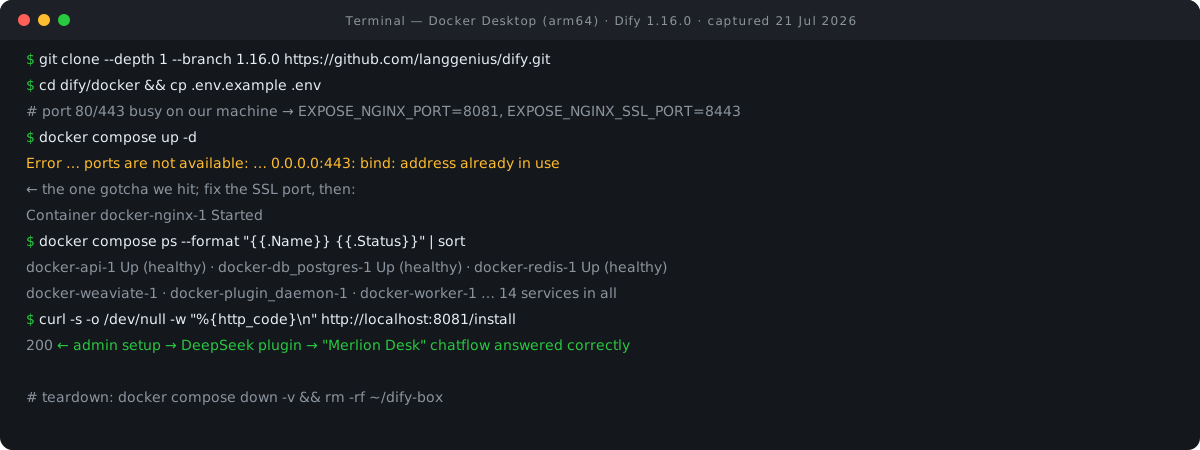
On 22 July 2026 we deployed Dify 1.16.0 (released 17 July) on Docker Desktop for macOS, Apple Silicon. Everything below with a terminal block was executed in that session, output shown verbatim; the one real snag we hit — a port 443 clash that quietly stopped nginx — is documented exactly as it happened, because you may hit it too. Total honest time from clone to a working AI app: well under an hour, most of it image pulls.
Step 1: Clone Dify at tag 1.16.0
Dify's docs clone the latest release tag dynamically via the GitHub API. For a tutorial you can reproduce next month, pin the tag instead. One trap the docs won't warn you about: the git tag is 1.16.0 with no "v" prefix — v1.16.0 does not exist as a ref, and cloning it fails. We verified this against the GitHub tags API before running.
mkdir ~/dify-box && cd ~/dify-box
git clone --depth 1 --branch 1.16.0 https://github.com/langgenius/dify.git
Cloning into 'dify'...
Note: switching to '5c6372d2f76d240265b92fd27c16bc772ffcb107'.
…
Turn off this advice by setting config variable advice.detachedHead to false
cd dify/docker
The "detached HEAD" note is normal — you checked out a tag, not a branch. Everything Docker-related lives in dify/docker/: the compose file, the .env.example, and (once running) the volumes/ directory holding all your data.
Step 2: Copy .env, pick a port, start the stack
For a plain localhost run the docs require zero .env edits — the 1.16.0 .env.example header literally says copy it and run docker compose up -d. Even SECRET_KEY ships empty on purpose: "Leave empty to auto-generate a persistent key in the storage directory."
We made one edit anyway, because port 80 was already taken on our machine — a common situation on any Mac running a local web stack. Dify's nginx publishes EXPOSE_NGINX_PORT (default 80) and EXPOSE_NGINX_SSL_PORT (default 443); we moved the first to 8081. The sed -i "" syntax below is macOS sed — on Linux drop the empty quotes.
cp .env.example .env
sed -i "" "s/^EXPOSE_NGINX_PORT=80$/EXPOSE_NGINX_PORT=8081/" .env   # port 80 is taken on our machine
EXPOSE_NGINX_PORT=8081
docker compose up -d
 Container docker-agent_backend-1 Started
 Container docker-init_permissions-1 Waiting
 Container docker-db_postgres-1 Waiting
…
 Container docker-db_postgres-1 Healthy
 Container docker-init_permissions-1 Exited
 Container docker-worker-1 Started
 Container docker-api-1 Started
 Container docker-nginx-1 Starting
Compose orders the startup itself: init_permissions (a busybox one-shot that fixes storage ownership, then exits), then Postgres until healthy, then the API tier, then nginx last. The API container also runs database migrations automatically on first boot (MIGRATION_ENABLED=true in the default .env), so there is no separate migrate step.
Step 3: Verify — 13 services up, but the front door is dark
The verification command from the docs is docker compose ps. Here is exactly what ours showed about 30 seconds in, followed by the smoke test that revealed a problem.
docker compose ps --format "{{.Name}}  {{.Status}}" | sort
docker-agent_backend-1  Up 33 seconds
docker-api-1  Up 33 seconds (healthy)
docker-api_websocket-1  Up 34 seconds
docker-db_postgres-1  Up 37 seconds (healthy)
docker-local_sandbox-1  Up 37 seconds (healthy)
docker-plugin_daemon-1  Up 34 seconds
docker-redis-1  Up 37 seconds (healthy)
docker-sandbox-1  Up 37 seconds (healthy)
docker-ssrf_proxy-1  Up 37 seconds
docker-weaviate-1  Up 37 seconds
docker-web-1  Up 37 seconds
docker-worker-1  Up 33 seconds
docker-worker_beat-1  Up 34 seconds
curl -s -o /dev/null -w "%{http_code}
" http://localhost:8081/install
000
Thirteen services up, databases and sandboxes healthy — and an HTTP code of 000, meaning curl could not connect at all. Count the list again: nginx is missing. It said "Starting" during up -d and then never appeared. That is the gotcha of this tutorial.
The port gotcha: fixing 80 is not enough. Dify's nginx binds two host ports. We had moved the HTTP port to 8081, but nginx also publishes an SSL port, and 443 was taken on our machine too. Re-running nginx alone surfaced the exact error Docker had swallowed during the bulk start:
Error response from daemon: ports are not available: exposing port TCP 0.0.0.0:443 -> 127.0.0.1:0: listen tcp 0.0.0.0:443: bind: address already in use
If ports 80 or 443 are busy on your machine, set both EXPOSE_NGINX_PORT and EXPOSE_NGINX_SSL_PORT in docker/.env before the first up -d, and you will never see this. One heads-up from repo discussions (secondary source, not the docs): if you later publish apps at a non-standard port, URL-related vars such as CONSOLE_API_URL may also need the port appended.
Step 4: Free the SSL port, start nginx, get a 200
docker compose up -d nginx
 Container docker-nginx-1 Starting
Error response from daemon: ports are not available: exposing port TCP 0.0.0.0:443 -> 127.0.0.1:0: listen tcp 0.0.0.0:443: bind: address already in use
sed -i "" "s/^EXPOSE_NGINX_SSL_PORT=443$/EXPOSE_NGINX_SSL_PORT=8443/" .env   # 443 also taken here
EXPOSE_NGINX_SSL_PORT=8443
docker compose up -d nginx
 Container docker-nginx-1 Starting
 Container docker-nginx-1 Started
curl -s -o /dev/null -w "%{http_code}
" http://localhost:8081/install
200
With EXPOSE_NGINX_SSL_PORT=8443, nginx started on the second attempt and the install page answered 200. Fourteen long-running containers, one exited init task — the full documented topology, which is worth a closer look before we open the browser.
What those 15 containers actually are
| Service | Image (1.16.0 stack) | Role |
|---|---|---|
| api | dify-api:1.16.0 | Flask API — the brain |
| api_websocket | dify-api:1.16.0 | Websocket API for workflow collaboration |
| worker | dify-api:1.16.0 | Celery worker (datasets, workflows, mail queues) |
| worker_beat | dify-api:1.16.0 | Celery beat scheduler |
| web | dify-web:1.16.0 | Next.js console frontend |
| plugin_daemon | dify-plugin-daemon:0.6.3-local | Plugin runtime (model providers live here) |
| agent_backend | dify-agent-backend:1.16.0 | Dify Agent backend — new in 1.16.0 |
| db_postgres | postgres:15-alpine | Main database |
| redis | redis:6-alpine | Cache + Celery broker |
| weaviate | weaviate:1.27.0 | Default vector store (profile-switchable) |
| sandbox | dify-sandbox:0.2.15 | Code-execution sandbox |
| local_sandbox | dify-agent-local-sandbox:1.16.0 | Agent Linux sandbox — new in 1.16.0 |
| ssrf_proxy | ubuntu/squid | Egress proxy shielding the sandbox |
| nginx | nginx | Reverse proxy — the only published web port |
| init_permissions | busybox | One-shot: chowns storage, exits |
Seven core services, seven dependents, one init task — matching the docs' enumeration exactly. Alternative vector stores (Qdrant, Milvus, pgvector and others) exist behind Compose profiles and are not started by default. If you later bolt a service of your own onto this stack, our Docker Compose converter turns a working docker run line into the compose YAML to paste beside them.
Step 5: Create the admin account
From here the work moves into the browser; the following sections narrate our same 22 July session rather than a terminal. Opening http://localhost:8081/install shows a clean "Setting up an admin account" form: email, username, and password, with the rule spelled out on-screen — the password "must contain letters and numbers, and the length must be greater than 8." The footer reads "© 2026 LangGenius, Inc." Submitting the form drops you straight into the workspace, no email verification round-trip on a self-hosted install.
The workspace lands on a Home screen with app templates, and a sidebar exposing the platform's shape: Studio (your apps), Agents (marked BETA), Knowledge (RAG datasets), Integrations, and Marketplace. This is clearly a bigger product than a simple chat UI.
Step 6: Install a model provider (the 1.x plugin way)
Dify ships no models and no provider integrations in the core image — since the 1.x series, model providers install as plugins from the Dify Marketplace, which keeps the core lean and the provider list current. Under Integrations → Model Provider, a fresh install says plainly: "Model provider not set up."
We searched "deepseek" and installed the official plugin. The Install Integration dialog showed: DeepSeek, version 0.0.19, publisher langgenius, supporting deepseek-v4-flash, deepseek-v4-pro, deepseek-chat and deepseek-reasoner — followed by "Installation successful." This matches the Marketplace listing we verified independently.
Clicking Setup on the installed provider opens an Add API Key modal: an API key field plus an optional Base URL ("e.g. https://api.deepseek.com/v1 or https://api.deepseek.com"). We pasted a DeepSeek key, saved, and got an "API KEY 1" badge — Dify validates the key against the provider before accepting it. Last wiring step: a Default Model Settings modal, where we set the System Reasoning Model to deepseek-chat and saved. This is a pure bring-your-own-key (BYOK) model, where your key and your billing relationship are stored in your own Postgres. Because the choice of provider is yours rather than Dify's, it is worth checking what the same request costs elsewhere first — our LLM price comparison ranks the major chat models cheapest to priciest.
Step 7: Build and run a first app — the Merlion test
In Studio → Create from Blank we chose Chatflow — the node-canvas chat type — and named the app "Merlion Desk." Dify scaffolds a minimal three-node graph automatically: START → LLM → ANSWER, with the LLM node pre-selecting deepseek-v4-flash from our configured provider. No prompt engineering, no wiring; for a first run the scaffold is the app.
We hit Preview and asked our standard series benchmark: "In one sentence, what is the Singapore Merlion?" All three nodes flashed green in sequence, the trace showed "Thought(0.6s)", and the answer came back, verbatim:
"The Singapore Merlion is a mythical creature with a lion's head and fish's body that serves as a national symbol and iconic tourist attraction, famously located at Merlion Park in Marina Bay."
Correct on every count. Worth the cross-guide contrast: in our Open WebUI + Ollama tutorial, sub-1B local models flubbed this exact question. The answer's quality comes from DeepSeek, not Dify. That is the trade-off in a BYOK model: you rent a frontier model's capabilities via API key instead of squeezing a small model into local RAM, and Dify handles the orchestration. If you are sizing that rent before you commit to it, our LLM cost calculator turns expected token volumes into a per-request and monthly figure.
License honesty: open source, with two strings attached
Dify is not plain Apache 2.0. The repo LICENSE at tag 1.16.0 opens: "Dify is licensed under a modified version of the Apache License 2.0, with the following additional conditions" — and the two conditions matter if you build on it:
- Multi-tenant: "Unless explicitly authorized by Dify in writing, you may not use the Dify source code to operate a multi-tenant environment" — where one tenant is defined as one workspace. Running Dify-as-a-SaaS for multiple customer workspaces needs a commercial license.
- Frontend branding: "you may not remove or modify the LOGO or copyright information in the Dify console or applications" — applying to the
web/frontend or the web Docker image. Headless/API-only use is explicitly exempt.
Beyond those, "all other rights and restrictions follow the Apache License 2.0." For a single-company internal deployment — the use case of this tutorial — none of this bites. It is not an OSI-approved license, though, and if you are comparing platforms on licensing, our n8n vs Dify vs Langflow vs Flowise comparison covers where each stands. Full profile on our Dify directory entry.
Going further — per the docs
We did not execute the following; they come from Dify's documentation and the 1.16.0 release notes, cited in the sources below.
Pinning and upgrades. Because you cloned a tag, upgrading is a git operation. The 1.16.0 release notes give the Compose upgrade sequence, including the official backup step — everything lives in docker/volumes/, so one tar is a full backup:
cd docker
cp docker-compose.yaml docker-compose.yaml.$(date +%s).bak
cp .env .env.$(date +%s).bak 2>/dev/null || true
git fetch --tags
git checkout 1.16.0
docker compose down
tar -cvf volumes-$(date +%s).tgz volumes
# review new env vars, then:
docker compose up -d
Your .env is untracked, so git checkout never touches it — but the docs tell you to "compare each .env.example with its matching .env for new or changed variables" after every upgrade. That advice earned its keep in 1.16.0, which added 28 new env vars and two whole services.
1.16.0-specific flags. The release headline is Dify Agent (Beta), and the notes carry a warning worth quoting: "You should provide Dify Agent services only to trusted, non-malicious users." Also from the notes: DIFY_AGENT_SERVER_SECRET_KEY ships with a development default — the notes say "You must replace it in production" (generate one with python -c 'import secrets; print(secrets.token_urlsafe(32))'). Likewise, for any non-localhost deployment, generate a real SECRET_KEY with openssl rand -base64 42 — changing it later logs out every user and invalidates file URLs, so do it before you invite the team.
Update check and analytics. The console pings updates.dify.ai to check for newer versions; per the docs, set CHECK_UPDATE_URL= empty to disable it for air-gapped environments. Amplitude and Sentry keys ship empty (off unless you set them). That is the extent of what the docs document — we will not claim "no telemetry" beyond it, and note the bundled Weaviate container's own upstream telemetry is not disabled by default (WEAVIATE_DISABLE_TELEMETRY=false).
For teams in Singapore and the wider ASEAN region, the self-host case is straightforward data control: prompts, uploaded knowledge files, API keys, and conversation logs all stay in docker/volumes/ on hardware you choose, under the data-residency rules you already operate — the only outbound traffic in a default install is to your chosen model provider and the disableable update check. Dify Cloud exists as the managed alternative; its current docs do not state a hosting region, so verify that directly with the vendor if residency drives your decision.
Versions, limits & cleanup
Our run: Dify tag 1.16.0 (commit 5c6372d) on Docker Desktop for macOS, Apple Silicon, 22 July 2026, ports 8081/8443. Documented minimums are 2 CPU cores and 4 GiB RAM with Docker Compose 2.24.0+ — though that figure predates the two extra services 1.16.0 added, so treat it as a floor, not a comfort zone. Chatbots keep at most 500 messages or 2,000 tokens of history per conversation, per the docs — our token counter is a quick way to see how much of that budget a typical exchange of yours actually consumes. Nothing here covers production exposure: no TLS setup, no auth hardening, no backup automation.
Removal is total because the stack keeps data in bind mounts under the clone. We counted our running services, tore down, and checked for leftovers:
docker compose ps --format "{{.Name}}" | wc -l
14
docker compose down -v
17
(containers/volumes/network removed)
rm -rf ~/dify-box && ls -d ~/dify-box
ls: ~/dify-box: No such file or directory
docker ps -a | grep -c dify
0
0
Fourteen running services in, 17 Docker objects removed by down -v, the clone directory gone, zero Dify containers left. The pulled images remain in Docker's cache; docker image prune -a reclaims that space if you want it back.
FAQ
Is Dify open source?
Yes, with a nuance: it ships under the "Dify Open Source License," a modified Apache 2.0. Free commercial use is allowed, but operating a multi-tenant service requires written authorization, and the console's logo and copyright notice may not be removed. Single-tenant internal deployments — this tutorial's use case — are unaffected. It is not an OSI-approved license.
What hardware do I need?
The docs say CPU ≥ 2 cores and RAM ≥ 4 GiB, with Docker Compose 2.24.0+. That is the documented minimum for a 15-container stack that grew again in 1.16.0, so give it more if you can. Our Apple Silicon Mac ran it comfortably, on native arm64 images throughout.
Do I need an LLM API key?
Yes, to actually run apps. Dify includes no models; you install a provider plugin from the Marketplace (DeepSeek, in our run) and paste your own API key under Integrations → Model Provider. The platform itself runs without a key — you just cannot execute an LLM node until one is configured.
How do I update Dify?
Back up first (tar -cvf volumes-$(date +%s).tgz volumes from dify/docker/ captures everything), then git fetch --tags && git checkout <new-tag>, docker compose down, review the release notes for new env vars, and docker compose up -d. Migrations run automatically on API start. Always read the target release's upgrade guide — 1.16.0 alone added two services and 28 env vars.
- Deploy Dify with Docker Compose — Dify docs (accessed 21 Jul 2026)
- Environment variables — Dify docs (accessed 21 Jul 2026)
- Self-host FAQs — Dify docs (accessed 21 Jul 2026)
- Model providers — Dify docs (accessed 21 Jul 2026)
- Key concepts — Dify docs (accessed 21 Jul 2026)
- Dify 1.16.0 release notes — GitHub (accessed 21 Jul 2026)
- docker-compose.yaml at tag 1.16.0 — GitHub (accessed 21 Jul 2026)
- .env.example at tag 1.16.0 — GitHub (accessed 21 Jul 2026)
- Dify Open Source License at tag 1.16.0 — GitHub (accessed 21 Jul 2026)
- DeepSeek provider plugin — Dify Marketplace (accessed 21 Jul 2026)
- Introduction — Dify docs (accessed 21 Jul 2026)
More executed tutorials and comparisons live on our guides index.

View author profile → · Editorial policy