
Every LLM provider speaks a slightly different dialect. OpenAI wants one JSON shape, Anthropic another, Ollama a third, and the moment your app talks to two of them you are maintaining two client layers. LiteLLM is a proxy that presents a single OpenAI-compatible endpoint and translates requests to whatever dialect the backend model speaks. BerriAI, the company behind it (YC W23, by its own README badge), says the gateway covers "100+ LLM providers" — their count, not ours.
We tested the claim with the smallest slice that could prove the idea: LiteLLM v1.93.0 in Docker, fronting a 522 MB local Qwen model served by Ollama. No cloud API key anywhere. No database. Two containers on a private Docker network, a four-line config file, and an Apple Silicon Mac.
Everything below comes from a session we ran on 21 July 2026. Command output is pasted verbatim, including the part where the model got the answer wrong. That part matters.
You need Docker Desktop (or any Docker engine) and about 9 GB of disk for the two images plus the model. That is the whole prerequisite list. If you already run Ollama from our Open WebUI walkthrough, the first step will feel familiar.
Step 1: Start Ollama and pull a small model
Both containers live on their own Docker network so LiteLLM can reach Ollama by service name instead of wrestling with host.docker.internal. We pinned Ollama to 0.32.1 and pulled qwen3:0.6b, a deliberately tiny model. The small model size keeps the download quick and, as you will see, the tutorial honest.
mkdir ~/litellm-box && cd ~/litellm-box
docker network create ll-net
c83fcced6f3a
docker run -d --name ollama --network ll-net -v ollama-models:/root/.ollama ollama/ollama:0.32.1
24430aba8d56
docker exec ollama ollama pull qwen3:0.6b
pulling manifest
verifying sha256 digest
success
docker exec ollama ollama list
NAME          ID              SIZE      MODIFIED
qwen3:0.6b    7df6b6e09427    522 MB    Less than a second ago
Half a gigabyte, running on a laptop. Keep that size in mind for the payoff section.
Step 2: Write the four-line config
LiteLLM reads a YAML file with a model_list. Each entry maps a public alias (what your clients will call) to a backend route (what LiteLLM actually dials). Ours maps reca-chat to the Qwen model on the Ollama container. The api_base is http://ollama:11434 because on our shared network the service name resolves; localhost inside the LiteLLM container would point at LiteLLM itself, which is a classic first-run failure.
A note before you copy: LiteLLM's Ollama docs recommend the ollama_chat/ prefix, which routes to Ollama's /api/chat endpoint — their words: "We recommend using ollama_chat for better responses." Their example looks like this (the keep_alive line is carried over from their example as-is):
model_list:
  - model_name: "llama3.1"
    litellm_params:
      model: "ollama_chat/llama3.1"
      api_base: "http://localhost:11434"
      keep_alive: "8m"
We used the plain ollama/ prefix, which hits /api/generate. This worked, as the transcript shows, but for a fresh deployment the docs-recommended ollama_chat/ prefix is the better default for chat models. Type the file with cat and finish with Ctrl-D, or use any editor.
cat > config.yaml
model_list:
  - model_name: reca-chat
    litellm_params:
      model: ollama/qwen3:0.6b
      api_base: http://ollama:11434
Step 3: Launch LiteLLM v1.93.0, pinned
The deploy docs tell you to "pin a version tag rather than latest or a moving tag, so rollbacks are deterministic", and the tag situation rewards reading that sentence twice. We checked the registry directly: both v1.93.0 and bare 1.93.0 exist as multi-arch manifests with native linux/arm64, so Apple Silicon runs without emulation. What does not exist is a per-version stable tag — v1.93.0-stable returns a manifest error. The only "stable" on offer today is the moving main-stable tag, which defeats the point of pinning. Use ghcr.io/berriai/litellm:v1.93.0.
We also set a master key. The config reference marks it optional, but when set, "all calls to proxy will require either this key or a valid generated token", and it must start with sk-. Generate something long and random; the key in our transcript is masked.
export LITELLM_MASTER_KEY=sk-••••••••   # generated locally, never reused
docker run -d --name litellm --network ll-net -p 4000:4000 \
    -v $(pwd)/config.yaml:/app/config.yaml -e LITELLM_MASTER_KEY \
    ghcr.io/berriai/litellm:v1.93.0 --config /app/config.yaml
5494d8292ee5
The command is also notable for what it omits: no OPENAI_API_KEY, no DATABASE_URL, no Postgres container. The quickstart's headline path is the no-database path, and the features that do need a database — virtual API keys and the /ui admin dashboard — say so plainly. The UI docs read "Requires db connected." We stayed database-free on purpose; the proxy itself never asked.
Step 4: Probe health, then list models
LiteLLM ships several health endpoints and they are not interchangeable. /health/liveliness answers from the process itself; the docs describe it as "The process is up. No dependencies are checked." It costs nothing. The bare /health endpoint runs a real test request against every configured model, spending tokens on any paid backends. Harmless against a local Ollama, expensive habit everywhere else. If you want to know what a scheduled probe against paid models would come to over a billing cycle, our monthly LLM spend projector turns a request rate and a token size into a monthly figure. Point your monitoring at liveliness.
curl -s http://localhost:4000/health/liveliness
"I'm alive!"
curl -s http://localhost:4000/v1/models -H "Authorization: Bearer $LITELLM_MASTER_KEY"
{
    "data": [
        {
            "id": "reca-chat",
            "object": "model",
            "created": 1677610602,
            "owned_by": "openai"
        }
    ],
    "object": "list"
}
The model listing is the whole product
Look at what /v1/models returned. Not qwen3:0.6b, not anything Ollama-flavoured. It lists reca-chat, the alias from our config, wearing "owned_by": "openai" because the response is shaped to match OpenAI's models endpoint field for field. Any client library written for OpenAI will parse it without knowing or caring that the "model" is a half-gigabyte Qwen running in the container next door.
The indirection is the feature. Your applications hard-code one name, reca-chat, and one base URL. Tomorrow you can repoint the alias at a bigger Ollama model, a cloud provider, or a load-balanced pool by editing the YAML and restarting one container. If you have not settled on which provider the alias should eventually point at, our LLM price comparison ranks the same request across the major providers, cheapest first. No application changes, no SDK swaps. The proxy is a seam you get to cut once.
Step 5: The payoff — an OpenAI-shape chat call
We asked the model a self-referential question. We asked the model, through an OpenAI-compatible proxy, what an OpenAI-compatible proxy is.
curl -s http://localhost:4000/v1/chat/completions -H "Authorization: Bearer $LITELLM_MASTER_KEY" \
    -H "Content-Type: application/json" -d '{"model":"reca-chat","messages":[{"role":"user","content":"In one short sentence: what is an OpenAI-compatible proxy?"}]}'
{
  "model": "reca-chat",
  "content": "An OpenAI-compatible proxy is a service designed to use AI for network traffic routing.",
  "usage": {
    "completion_tokens": 234,
    "prompt_tokens": 26,
    "total_tokens": 260
  }
}
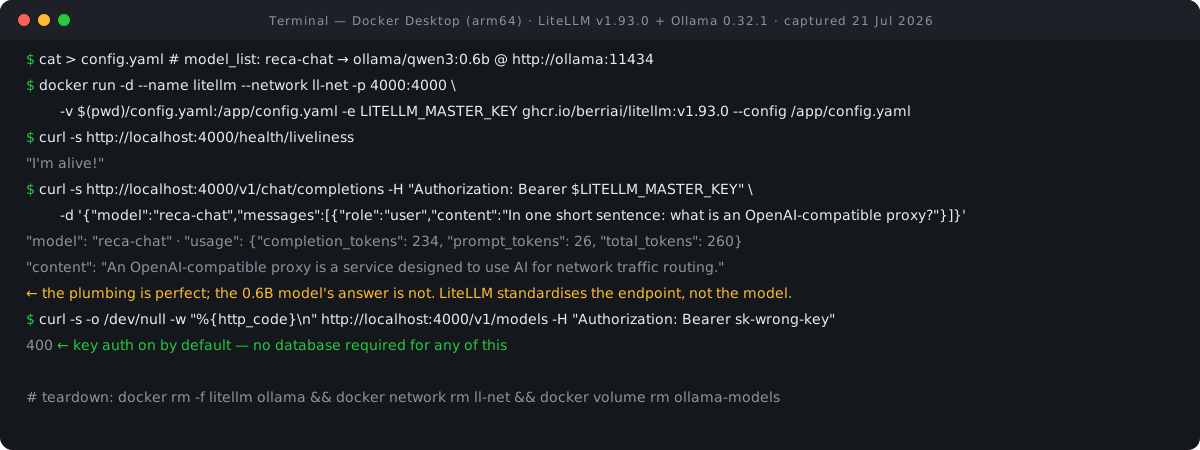
Study that output for a moment. The request went in as OpenAI-format JSON, the alias resolved, and LiteLLM translated to Ollama's protocol and back. What you see above is our display filter at work — the pipe in the command reduces the full completion object to three fields — but the parts that matter came through: the alias echoed as the model name, and a usage block metering 26 prompt tokens plus 234 completion tokens, 260 in total, the accounting you would build cost tracking on. Those two numbers are what every provider bills against, and you can work with them before a call as easily as after one: our token counter measures a prompt exactly, and our LLM cost calculator turns a prompt-and-completion pair into a per-request price at published rates.
And the answer is wrong. An OpenAI-compatible proxy has nothing to do with routing network traffic with AI; the 0.6B model pattern-matched "proxy" to networking and confidently produced nonsense. Our tiny-model runs keep teaching the same lesson. Infrastructure quality and answer quality are independent. LiteLLM standardises the endpoint and meters the tokens. It does not, and cannot, upgrade the model behind it. If you front a weak model with perfect plumbing, you have built a very reliable way to receive weak answers.
Step 6: Confirm the lock actually locks
A master key you never test is a decoration. We replayed the models request with a wrong key.
curl -s -o /dev/null -w "%{http_code}
" http://localhost:4000/v1/models -H "Authorization: Bearer sk-wrong-key"
400
It was rejected with an HTTP 400, not the 401 you might expect from an auth failure. Since v1.93.0 returned an HTTP 400 in our run, write your client-side error handling against the proxy's actual behaviour, not convention. The docs mark the master key optional; we did not test the no-key configuration and will not speculate about its behaviour. Set the key. Always.
Gotchas we hit or verified so you don't have to
The tag maze. Covered above, worth repeating in list form: v1.93.0 and 1.93.0 both exist, main-v1.93.0 and v1.93.0-stable do not, and "stable" today means only the moving main-stable tag. The docs' own quickstart now pulls from a mirror registry, docker.litellm.ai, while ghcr.io remains canonical. Images are cosign-signed if your pipeline verifies signatures.
Version churn. v1.93.0 shipped on 19 July 2026 and the release cadence runs roughly weekly. Whatever you deploy, pin it and date-stamp your notes, because "current" has a half-life measured in days here.
The v1.90–v1.92 fresh-deploy breakage. Issue #33650 reported that fresh Docker deployments were broken from v1.90.0 onward because database migrations silently failed on a missing libatomic.so.1. It was closed on 18 July 2026, immediately before the release we ran. Only database-mode deployments were affected, so our no-DB path was immune either way, but if you are adding Postgres, start at v1.93.0 or later.
Startup phones home. On boot, LiteLLM fetches its model-cost map from raw.githubusercontent.com, and since v1.92.0 it also tries to download Prisma binaries, which fails on machines without internet egress (issue #33167, still open at press time). Air-gapped or egress-restricted hosts should set LITELLM_LOCAL_MODEL_COST_MAP to use the bundled map. If your corporate network swallows outbound calls silently, this is the first place to look when startup hangs.
The env-var syntax is a literal string. In config values, os.environ/OPENAI_API_KEY is spelled exactly like that. It is not shell interpolation, there is no ${}, and LiteLLM resolves it internally at load time. Writing it any other way stores your placeholder as the key.
License and pricing, precisely
The repository's root LICENSE file defines two separate licenses. Code under the enterprise/ directory falls under the commercial enterprise/LICENSE.md, the BerriAI Enterprise License, copyright "Berrie AI Inc." — the spelling is theirs. Everything else is plain MIT, copyright 2023 Berri AI. That dual structure is why GitHub's automated license detector reports NOASSERTION instead of MIT: the detector cannot classify a file that declares two licenses, so it declines to declare any. Do not read NOASSERTION as a red flag here, and do not describe the repo as plain MIT either.
Practically, everything we ran in this tutorial is on the MIT side and free. Enterprise features require a BerriAI subscription for production use, though their license explicitly permits copying and modifying the enterprise code for development and testing without one. BerriAI is a Y Combinator W23 company per the badge in their own README, and the project has drawn ★54.2k GitHub stars as of our 21 July 2026 traction snapshot. If you want the directory view with tracked traction over time, see our LiteLLM entry in the AI directory.
Footprint
Numbers from the live session, straight from Docker.
docker ps --format "{{.Names}}  {{.Status}}" | grep -E "litellm|ollama"
litellm  Up 54 seconds
ollama  Up 2 minutes
docker images --format "{{.Repository}}:{{.Tag}}  {{.Size}}" | grep -E "litellm|ollama"
ghcr.io/berriai/litellm:v1.93.0  1.55GB
ollama/ollama:0.32.1 7.03GBThe Ollama image dominates the disk bill; LiteLLM itself is a moderate 1.55 GB. If image size bothers you, know that the weight is in the runtime, not your data — which makes the next section short.
Teardown
Because we ran without a database, nothing persisted server-side. Removing the containers, network, volume, images, and working directory returns the machine to zero.
docker rm -f litellm ollama && docker network rm ll-net && docker volume rm ollama-models
litellm ollama ll-net
ollama-models
docker rmi ghcr.io/berriai/litellm:v1.93.0 ollama/ollama:0.32.1
4
cd ~ && rm -rf ~/litellm-boxFAQ
Do I need Postgres to run LiteLLM?
Not for the proxy itself. Our entire session ran database-free. You need Postgres only for virtual API keys and the admin dashboard; the UI docs state "Requires db connected." If you add it, use v1.93.0 or later to avoid the fresh-deploy migration bug that affected v1.90 through v1.92.
Can I point existing OpenAI SDK code at it?
Yes, that is the design. Set the base URL to your proxy (ours was http://localhost:4000), pass the master key or a generated token as the API key, and use the config alias as the model name. Our /v1/models call returned the alias in OpenAI's exact response shape, which is what stock SDKs parse.
Which Docker tag should I pull?
The pinned version tag: ghcr.io/berriai/litellm:v1.93.0 at the time of our run. The bare 1.93.0 tag works too, but per-version stable tags do not exist and main-stable moves under you. The docs themselves recommend pinning so rollbacks stay deterministic.
Will routing through LiteLLM improve my model's answers?
No. Our test call came back with the alias echoed, the token usage metered, and a factually wrong answer, because the 0.6B model behind the proxy is a 0.6B model. LiteLLM changes how you call models and how you account for them, not what they know. Budget your model choice separately — the same trade-off we walked through in our AnythingLLM guide, and a recurring theme across the guides hub.
- Docker Quick Start — LiteLLM docs (accessed 21 Jul 2026)
- Proxy Config.yaml reference — LiteLLM docs (accessed 21 Jul 2026)
- Ollama provider — LiteLLM docs (accessed 21 Jul 2026)
- Health endpoints — LiteLLM docs (accessed 21 Jul 2026)
- Admin UI — LiteLLM docs (accessed 21 Jul 2026)
- Virtual keys — LiteLLM docs (accessed 21 Jul 2026)
- Deployment guidance — LiteLLM docs (accessed 21 Jul 2026)
- Release v1.93.0 — BerriAI/litellm, GitHub (accessed 21 Jul 2026)
- LICENSE and enterprise/LICENSE.md — BerriAI/litellm, GitHub (accessed 21 Jul 2026)
- Issue #33650: fresh-deploy DB migration failure — GitHub (accessed 21 Jul 2026)
- Issue #33167: startup downloads on restricted networks — GitHub (accessed 21 Jul 2026)
- BerriAI/litellm repository (stars, license detection) — GitHub (accessed 21 Jul 2026)

View author profile → · Editorial policy