n8n sits at #3 on our traction leaderboard with ★196.7k GitHub stars (RECATOOLS traction data, 21 Jul 2026), and it is one of the few tools at that scale you can genuinely run yourself: one container, one named volume, no license key, no account with anyone. n8n Cloud exists, but n8n's own security page says the platform's data "is currently hosted in the European Union" on Microsoft Azure, with no APAC region offered as of our access date. If you want your workflow data on your own hardware — a real consideration for Singapore teams thinking about PDPA transfer obligations — self-hosting with Docker is the practical path, and it is free.
This is an executed tutorial. On 21 July 2026 we ran every terminal command below on Docker Desktop for macOS (Apple Silicon), pinned to image docker.n8n.io/n8nio/n8n:2.30.8 — the stable release published one day earlier per the GitHub API. The terminal output you see is pasted from that session, not typed from memory. Browser steps (account setup, the license-key modal, the webhook canvas) are narrated from the same session. Where we describe things we did not run — Postgres, reverse proxies, updates — we say so and cite the n8n docs instead.
n8n_dataYou need Docker Desktop (or Docker Engine on Linux) and nothing else. A caveat from n8n before you commit a production workload: the docs describe self-hosting as a task for people comfortable "setting up and configuring servers and containers", and warn that mistakes risk data loss, security issues, and downtime. For a local trial like this one, the stakes are a throwaway volume.
Step 1: Create the volume and start the container
Two commands. The volume comes first because everything n8n needs to remember — workflows, credentials, the SQLite database, and the encryption key it generates on first launch — lives in /home/node/.n8n inside the container. Map a named volume there and the container itself becomes disposable.
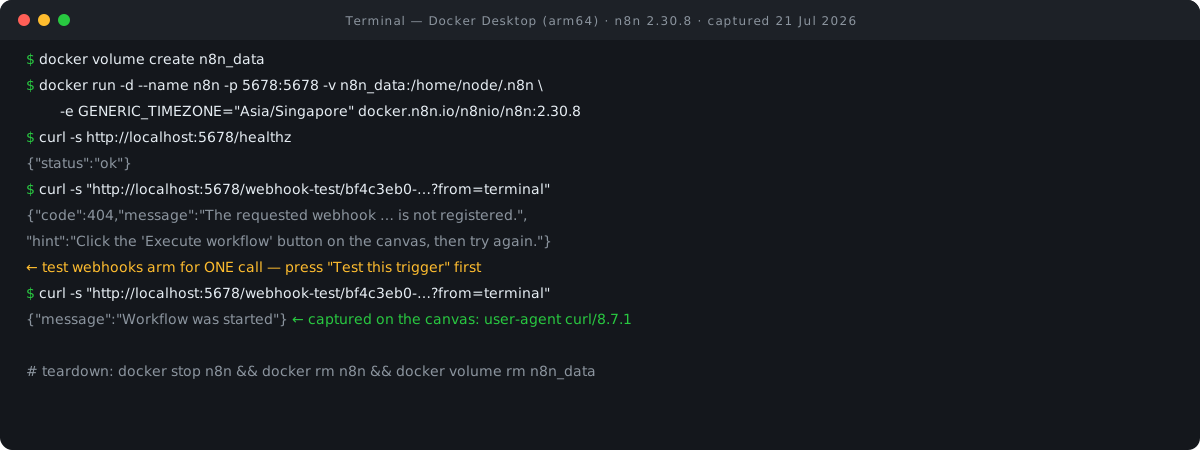
docker volume create n8n_data
n8n_data
docker run -d --name n8n -p 5678:5678 -v n8n_data:/home/node/.n8n -e GENERIC_TIMEZONE="Asia/Singapore" -e TZ="Asia/Singapore" docker.n8n.io/n8nio/n8n:2.30.8
a053b2cc39862a81dc4a13aa2eaa3584058d145fea87fc247aec11bb53456d0d
What each flag does, per the n8n install docs:
-p 5678:5678— n8n serves everything on port 5678; this publishes it tohttp://localhost:5678.-v n8n_data:/home/node/.n8n— the persistence mount described above. Lose this volume and you lose the encryption key with it, which orphans any saved credentials.GENERIC_TIMEZONE— per the docs, "sets the correct timezone for schedule-oriented nodes" like the Schedule Trigger. We setAsia/Singapore.TZ— sets the system timezone, controlling what commands likedatereturn inside the container.
We made two changes to the docs' reference command. The docs run interactively with -it --rm and an unpinned tag; we ran detached (-d) and pinned :2.30.8 so this article describes exactly one version. The docs' command also sets N8N_ENFORCE_SETTINGS_FILE_PERMISSIONS=true (tightens the settings file to owner-only 0600 permissions — worth adding on any instance you keep) and N8N_RUNNERS_ENABLED=true, which the same page says is deprecated and unneeded from v2.0 onward. Neither changes what you see in the rest of this tutorial. If you would rather keep this as a compose file than a long docker run line, our Docker Compose converter turns a run command into the equivalent YAML, ports, volumes and environment variables included.
Step 2: Verify it is up and healthy
n8n ships a health endpoint, so you do not need to guess from container status alone.
docker ps --filter name=n8n --format "{{.Names}}  {{.Status}}  {{.Ports}}"
n8n  Up 12 seconds  0.0.0.0:5678->5678/tcp, [::]:5678->5678/tcp
curl -s http://localhost:5678/healthz
{"status":"ok"}
The container reported Up 12 seconds when we checked, and /healthz answered {"status":"ok"}. That is the whole install.
Step 3: Create the owner account — and skip the license modal
The rest of the first run happens in the browser, so no terminal blocks here; this is what our session looked like at http://localhost:5678.
n8n greets a fresh instance with an owner-account setup screen: email, first and last name, and a password that — per the n8n user-management docs — must be at least eight characters including one number and one capital letter. This account exists only inside your container; nothing is registered with n8n the company at this step. A short optional survey follows; we skipped it.
Then comes the one screen worth pausing on: a modal titled "Get paid features for free (forever)". This is n8n's free registered-community license key. It is free and, per the community-edition docs, non-expiring once activated. It unlocks Folders, Debug in editor, and custom execution data. On an instance you plan to keep, entering an email here is a reasonable trade. For a disposable local trial it is unnecessary, so we clicked Skip — and everything in this tutorial works without it. No license key of any kind is required to run the community edition.
After that, the empty workspace greeted us by name: "What do you want to build, RECATOOLS".
Step 4: Your first webhook — and the one-shot arming gotcha
To prove the instance works, we built the smallest possible workflow, a single Webhook trigger node. On the canvas we added the node and its panel showed a generated Test URL, HTTP method GET, and Respond set to Immediately. Copy that test URL, go back to the terminal, and — if you are like us — walk straight into n8n's one genuine first-hour gotcha:
curl -s "http://localhost:5678/webhook-test/bf4c3eb0-babf-4cfd-bd17-f87024d04067?from=terminal"
{"code":404,"message":"The requested webhook \"bf4c3eb0-babf-4cfd-bd17-f87024d04067\" is not registered.","hint":"Click the 'Execute workflow' button on the canvas, then try again. (In test mode, the webhook only works for one call after you click this button)"}
This 404 is not a bug, and n8n's own hint in the response explains it: test webhook URLs are armed for exactly one call, and only after you click the execute/test button on the canvas. Nothing is listening until then. This trips up nearly everyone once.
So we clicked Test this trigger in the editor — the canvas switched to a listening state — and ran the identical curl again:
curl -s "http://localhost:5678/webhook-test/bf4c3eb0-babf-4cfd-bd17-f87024d04067?from=terminal"
{"message":"Workflow was started"}
Back in the browser, the node's OUTPUT panel had captured our request in full: headers showing host: localhost:5678, user-agent: curl/8.7.1 and accept: */*, plus the query parameter we tagged on — from=terminal — sitting there as structured data ready to feed the next node. The round trip from terminal to canvas confirms the instance is a working automation tool.
One localhost caveat, per the n8n docs: external services cannot reach webhooks on your laptop, which is expected and fine for a trial. The production answer is the WEBHOOK_URL environment variable behind a reverse proxy — see "Going further" below.
Step 5: Tear it all down
The pitch was that the whole trial is deletable, so we deleted it: stop and remove the container, remove the volume (this destroys the database and encryption key — only do this when you are actually done), remove the image, and count what is left.
docker stop n8n && docker rm n8n
n8n
n8n
docker volume rm n8n_data
n8n_data
docker rmi docker.n8n.io/n8nio/n8n:2.30.8
Untagged: docker.n8n.io/n8nio/n8n:2.30.8
Deleted: sha256:11524034450080bd0032754892b23ff20be43d72cf320ce75640f7c5475fdca8
docker ps -a | grep -c n8n
0
0
Zero n8n containers remaining. If you want to keep your instance instead, skip everything after docker stop — the volume holds all state, and docker start n8n brings it back.
Going further — per the docs
We did not execute any of the following; each is the documented path, cited to the current n8n docs (all accessed 21 Jul 2026).
- Pinning and updates. The default
docker pull docker.n8n.io/n8nio/n8ntracks stable, which the docs call the version "for production use"; you can pin a specific tag as we did, and:nextis beta and "may be unstable". To update:docker pull,docker stop,docker rm, then re-run with the same-v n8n_data:/home/node/.n8nflags — your data persists in the volume. n8n ships fast (six releases in the three days before our run, per the GitHub API), so check release notes for breaking changes before jumping versions. - Backups. The CLI exports everything:
n8n export:workflow --backup --output=backups/latest/and the same forexport:credentials, run inside the container viadocker exec -u node -it n8n. Backing up then8n_datavolume also preserves the encryption key, without which exported credentials cannot be decrypted. - Postgres. SQLite is the default and is fine for one person on one machine. For production or scaling, the docs document a Postgres backend via
DB_TYPE=postgresdbplus theDB_POSTGRESDB_*connection variables. - Real webhooks. Behind a reverse proxy, set
WEBHOOK_URL(docs example:https://n8n.example.com/) so n8n displays and registers correct public URLs instead of internal ones. The docs' Traefik-based Docker Compose recipe is the documented server setup with TLS. - Telemetry. Plainly: n8n enables telemetry by default on self-hosted instances, including an "instance pulse" every six hours; the privacy page lists what is collected (error codes, workflow graph shape, version, OS/RAM/CPU, IP — not your payload data). Disable it with
N8N_DIAGNOSTICS_ENABLED=false, and optionallyN8N_VERSION_NOTIFICATIONS_ENABLED=falseandN8N_TEMPLATES_ENABLED=false.
The license, honestly
n8n is source-available under the Sustainable Use License — fair-code, and explicitly not OSI-approved open source. The license permits use "only for your own internal business purposes or for non-commercial or personal use". n8n's own explainer says internal business automation, building nodes, running it on your own servers, and even paid n8n consulting are all fine; what is not allowed is white-labeling n8n for customers or hosting it and charging people for access. Files with .ee. in the name are under a separate Enterprise License. Paid tiers gate features like Environments (Git source control), SSO, Projects/RBAC, External Secrets, and Log Streaming — the community docs list no caps on workflows or executions for the edition you just ran.
| What you get | Community (no key) | Free registered key | Paid tiers |
|---|---|---|---|
| Workflows & executions | No documented caps | No documented caps | No documented caps |
| Folders / Debug in editor | No | Yes | Yes |
| Environments / SSO / Log Streaming | No | No | Yes |
| Sell hosted access to others | Not permitted | Not permitted | Enterprise terms |
For the fuller license discussion and how n8n compares on this point, see our n8n directory entry and the workflow-builders comparison.
The ASEAN angle
For readers in Singapore and the wider region, the case for self-hosting is data control. n8n Cloud is a good product, but its security page places platform data in the European Union with no APAC region offered as of 21 July 2026. PDPA does not flatly prohibit sending personal data offshore — it imposes transfer-limitation obligations you would need to satisfy. Self-hosting sidesteps that question entirely: workflow data, credentials, and execution logs stay on hardware you control, in-region, and the container you just ran is the same one you would run on a Singapore VPS.
Versions, limits & cleanup
- Pinned versions: n8n 2.30.8 (image
docker.n8n.io/n8nio/n8n:2.30.8), Docker Desktop for macOS on Apple Silicon (native arm64 image), executed 21 Jul 2026. n8n releases frequently; details will drift. - What we did not test: Postgres,
WEBHOOK_URLbehind a reverse proxy, the update procedure, queue mode, and the free registered-community key — all described above strictly per the docs. - Cleanup recap:
docker stop n8n,docker rm n8n,docker volume rm n8n_data(destroys all data and the encryption key),docker rmi docker.n8n.io/n8nio/n8n:2.30.8. Keep the volume if you want to keep the instance.
FAQ
Is n8n free and open source?
Free to self-host for internal business and personal use, and the source is public — but the Sustainable Use License is fair-code, not OSI open source. The commercial restriction bites only if you want to resell n8n or host it for paying customers. AI nodes are a separate cost line, though: those calls are billed by whichever model provider you connect, and our LLM cost calculator will estimate them from expected token volume.
Do I need a license key to self-host n8n?
No. The community edition runs with no key at all, as our session showed. The optional free registered key (the "Get paid features for free (forever)" modal we skipped) is non-expiring and adds Folders, Debug in editor, and custom execution data.
Can self-hosted n8n run AI workflows?
Yes — n8n describes itself as an AI workflow automation platform, and agent-style nodes are part of the product. When a model node hands back JSON that will not parse — truncated, wrapped in code fences, trailing commas — our LLM JSON repair tool cleans it up so you can see what the node actually emitted. How it compares with Dify, Langflow, and Flowise on that front is the subject of our four-way comparison.
How much RAM does it need?
n8n publishes no minimum. The only current official datapoint is a throughput benchmark: up to 220 workflow executions per second on a single instance tested on a 4 GB machine. Our trial ran on Docker Desktop's default resources with no tuning flags at all, and the container came up healthy in seconds.
If you enjoyed running a real tool from a real transcript, the same treatment applied to a very different self-host is in our OpenClaw Docker tutorial, and the rest of the series lives at RECATOOLS Guides.
- Install n8n with Docker — n8n Docs (accessed 21 Jul 2026)
- Community edition features — n8n Docs (accessed 21 Jul 2026)
- User management — n8n Docs (accessed 21 Jul 2026)
- Control telemetry — n8n Docs (accessed 21 Jul 2026)
- Privacy — n8n Docs (accessed 21 Jul 2026)
- Measure performance — n8n Docs (accessed 21 Jul 2026)
- Update n8n — n8n Docs (accessed 21 Jul 2026)
- CLI export/import commands — n8n Docs (accessed 21 Jul 2026)
- Choose n8n's database — n8n Docs (accessed 21 Jul 2026)
- Configure webhook URLs with a reverse proxy — n8n Docs (accessed 21 Jul 2026)
- Sustainable Use License explained — n8n Docs (accessed 21 Jul 2026)
- LICENSE.md — n8n-io/n8n GitHub (accessed 21 Jul 2026)
- Security — n8n.io (accessed 21 Jul 2026)
- Latest release [email protected] — GitHub API (accessed 21 Jul 2026)
- Integrations counter — n8n.io (accessed 21 Jul 2026)

View author profile → · Editorial policy