Firecrawl describes itself as "The API to search, scrape, and interact with the web at scale" — you point it at a URL and it hands back clean, LLM-ready markdown instead of a tangle of HTML. It sits at ★151.4k GitHub stars in our records, #7 on our traction sort (RECATOOLS traction data, 21 Jul 2026), and the entire scraping engine is open source under AGPL-3.0. That combination raises an obvious question: can you skip the cloud subscription and run the whole thing on your own machine?
It worked for us on the first try, but the self-hosted build is deliberately weaker than the paid cloud service. You do not get Fire-engine, Firecrawl's anti-bot and IP-rotation layer, and several endpoints need an LLM key you bring yourself. What you get for free is a private scraper that turns pages into markdown, keeping your URLs, jobs, and scraped output off anyone else's cloud.
This is an executed tutorial: on 21 July 2026 we cloned Firecrawl at tag v2.11.0 on Docker Desktop for macOS (Apple Silicon), built the stack, scraped our own site through both API versions — the homepage via /v1, our guides index via /v2 — and tore everything down. Every terminal block below is pasted from that session, truncated only with an honest ellipsis.
What you need
Firecrawl's own self-hosting guide lists exactly one dependency: Docker. Everything else — Redis, RabbitMQ, a Postgres queue backend, a Playwright browser service — is pulled in and wired up by the project's compose file. (If you are going the other way — turning a docker run line of your own into compose YAML to sit beside it — our Docker Compose converter does that translation.) Here is the shape of the run before we start:
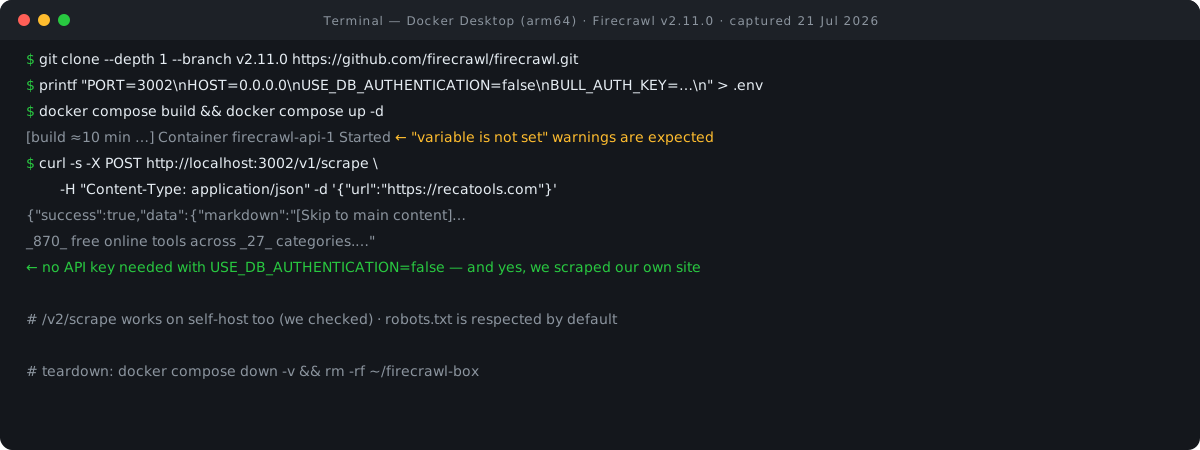
Step 1: Clone at v2.11.0 and write a minimal .env
SELF_HOST.md never actually prints a clone command — it assumes you already have the repo. So the clone line below is our construction, verified by running it: a shallow clone pinned to the v2.11.0 tag, which is the release current at the time of writing (published 19 June 2026). Pinning matters; "whatever main was that day" is not a reproducible tutorial.
The .env goes in the repo root — not in apps/api — and the template marks exactly three variables as required: PORT, HOST, and USE_DB_AUTHENTICATION. Setting the last one to false is what lets you use the API without any key: database authentication needs Supabase, which the docs say cannot be configured on self-hosted instances anyway. We add BULL_AUTH_KEY because the template ships it uncommented and it becomes part of the queue-admin URL; the docs tell you to make it "a strong secret" on any deployment reachable from untrusted networks. Ours is a throwaway local box, so a throwaway value is fine — do better if your instance faces a network.
mkdir ~/firecrawl-box && cd ~/firecrawl-box
git clone --depth 1 --branch v2.11.0 https://github.com/firecrawl/firecrawl.git
Cloning into 'firecrawl'...
Note: switching to 'ef12eb36b2f3382838dfe0a0c1a5add3d5df7fe5'.
cd firecrawl
printf "PORT=3002
HOST=0.0.0.0
USE_DB_AUTHENTICATION=false
BULL_AUTH_KEY=wave7local
" > .env
PORT=3002
HOST=0.0.0.0
USE_DB_AUTHENTICATION=false
BULL_AUTH_KEY=wave7local
Notice what is not in that file. The template's Redis and Playwright URLs are commented out with the note that they are "now autoconfigured by the docker-compose.yaml" — the compose file defaults them to the right container hostnames. Four lines is the documented minimum, plus one security key.
Step 2: Build the images and start the stack
The docs' run sequence is exactly two commands: docker compose build then docker compose up (their one troubleshooting note: use docker compose, not the old hyphenated docker-compose). Be prepared for the build time. The standard path compiles the API and the Playwright service from source, which on our Mac took roughly ten minutes. This is normal. The compose file does mention optional prebuilt images on ghcr.io you can switch to by editing it, but the default is a local build, so budget the coffee break.
docker compose build
[build output omitted — ~10 minutes on our machine …]
docker compose up -d
 Container firecrawl-api-1 Created
 Container firecrawl-foundationdb-1 Started
 Container firecrawl-rabbitmq-1 Started
 Container firecrawl-redis-1 Started
 Container firecrawl-nuq-postgres-1 Started
 Container firecrawl-playwright-service-1 Started
 Container firecrawl-foundationdb-init-1 Started
 Container firecrawl-api-1 Started
Seven services come up: the api container (which also runs the workers internally — more on that below), the playwright-service browser renderer, redis, rabbitmq, nuq-postgres (the Postgres-backed job queue, deliberately not exposed to the host), and a foundationdb pair that belongs to an experimental alternative queue backend — it starts anyway because the compose file assigns no profiles, and it sits idle unless you opt in.
Step 3: Check the services — and do not panic at the warnings
Any compose command against this stack prints a wall of warnings first. Here is our service check, warnings included:
docker compose ps --format "{{.Name}}  {{.Status}}"
time="2026-07-21T13:40:05+08:00" level=warning msg="The \"PROXY_SERVER\" variable is not set. Defaulting to a blank string."
time="2026-07-21T13:40:05+08:00" level=warning msg="The \"PROXY_USERNAME\" variable is not set. Defaulting to a blank string."
time="2026-07-21T13:40:05+08:00" level=warning msg="The \"PROXY_PASSWORD\" variable is not set. Defaulting to a blank string."
time="2026-07-21T13:40:05+08:00" level=warning msg="The \"ALLOW_LOCAL_WEBHOOKS\" variable is not set. Defaulting to a blank string."
time="2026-07-21T13:40:05+08:00" level=warning msg="The \"BLOCK_MEDIA\" variable is not set. Defaulting to a blank string."
… (40 more "variable is not set" warnings in the same pattern)
firecrawl-api-1  Up 15 seconds
firecrawl-foundationdb-1  Up 20 seconds
firecrawl-nuq-postgres-1  Up 20 seconds
firecrawl-playwright-service-1  Up 20 seconds
firecrawl-rabbitmq-1  Up 20 seconds (healthy)
firecrawl-redis-1  Up 20 seconds
The 45 warning lines look alarming but are benign. Every one names a variable you do not need for a minimal run — proxy credentials, an OpenAI key for the AI endpoints, Supabase tokens, SearXNG search settings, webhook URLs — most of them straight from the template's optional sections, a couple of them internal knobs the docs never document.
One structural note worth knowing, because older write-ups get it wrong: at v2.11.0 there is no separate worker container. The api container's harness process (node dist/src/harness.js --start-docker) runs the API server and the scrape workers inside one container. If you go looking for a firecrawl-worker-1 that never appears, nothing is broken.
Step 4: The payoff — scrape a page into markdown, no API key
Now to scrape a page. On self-host with authentication off, the docs are explicit: "API keys are only required when connecting to the cloud service" — so there is no Authorization header anywhere in this request. We pointed the scraper at recatools.com, our own homepage, deliberately: the responsible way to demo a scraper is against a site you own or have permission to scrape, and there is something quietly satisfying about a self-hosted crawler reading the very site that published its tutorial.
curl -s -X POST http://localhost:3002/v1/scrape -H "Content-Type: application/json" -d "{\"url\":\"https://recatools.com\"}"
{"success":true,"data":{"markdown":"[Skip to main content](https://recatools.com/#main-content)\n\nLive Updated _43 minutes ago_ · 3 guides today\n\n_870_ free online tools across _27_ categories.\n===============================================\n\nFree calculators, converters, and generators that run entirely in your browser — plus [verified how-to guides](https://recatools.com/guides/)\n, an …
success: true, and the data.markdown field is our homepage rendered as clean markdown — headings, link syntax, emphasis, all correctly reconstructed from the live page (the response continues well past what fits above; we truncated it). That is the whole pitch of the product working locally on the first request: HTML in, LLM-ready markdown out, on hardware you control. "LLM-ready" still has a size, of course — paste a scraped page into our token counter and you will know whether it fits the prompt you had in mind before you send it.
Two defaults worth naming. First, per the API reference, formats defaults to ["markdown"] and onlyMainContent defaults to true, which is why a body containing nothing but a URL produces exactly this output. Second, robots.txt is respected by default — the crawl API's ignoreRobotsTxt flag defaults to false and is gated as Enterprise-only even on the paid cloud. We left all of that at defaults, and you should too: scrape sites you own or have permission for, and let the polite behaviour stand.
Step 5: The same trick through /v2 — both API versions work
Our run settled an ambiguity in the official material. The repo's SELF_HOST.md tests the API with a /v1 endpoint, while the docs-site version of the same guide tests /v2 — and neither says outright whether a self-hosted v2.11.0 instance serves both. Ours does. Same instance, no restart, this time scraping our guides index through v2:
curl -s -X POST http://localhost:3002/v2/scrape -H "Content-Type: application/json" -d "{\"url\":\"https://recatools.com/guides/\"}"
{"success":true,"data":{"markdown":"[Skip to main content](https://recatools.com/guides/#main-content)\n\nAdvertisement\n\n[\\\n\\\nAI & ML 14 …success: true again — image alt text, ad-slot placeholders and category labels all faithfully captured. So state it as our live finding, not a docs claim: on self-hosted v2.11.0, both /v1/scrape and /v2/scrape answer successfully with no auth header. If you are writing new integrations, /v2 is what the current API reference documents; /v1 is what the repo's own self-host test still uses.
What self-hosting does not get you
The gap between self-hosted and cloud Firecrawl is real and documented by the project itself. SELF_HOST.md, verbatim: "Currently, self-hosted instances of Firecrawl do not have access to Fire-engine, which includes advanced features for handling IP blocks, robot detection mechanisms, and more. This means that while you can manage basic scraping tasks, more complex scenarios might require additional configuration or might not be supported."
In practice that splits the product like this:
| Capability | Self-hosted v2.11.0 | Cloud |
|---|---|---|
| Scrape / crawl to markdown | Yes — verified in this run | Yes |
| Fire-engine (anti-bot, IP rotation) | No | Included |
| JSON format, /extract, summaries, change tracking | Needs your own LLM key | Built in (uses credits) |
| Supabase-backed auth & logging | Not configurable | Yes |
| Cost | $0 + your hardware | Free tier, then paid |
On the LLM-dependent row: the docs list "JSON formatting, /extract API, summary/branding formats, and change tracking" as the features that need a language-model provider. Self-hosted, that means supplying an OPENAI_API_KEY, or using the .env template's explicitly experimental alternatives — an OLLAMA_BASE_URL for local models or an OPENAI_BASE_URL for any OpenAI-compatible endpoint. Plain markdown scraping, the thing most people self-host for, needs none of this — our entire run used zero AI keys. If you do plan to wire a key in for the extraction features, our LLM cost calculator will turn pages-per-month into a rough monthly bill before you commit.
And to repeat the scraping ethic once, plainly: we scraped our own property. Firecrawl respects robots.txt by default and even the cloud product only lets Enterprise customers turn that off. Point your instance at sites you own or have permission to scrape, keep request rates civil, and you inherit the tool's polite defaults instead of fighting them.
License honesty: AGPL-3.0, with MIT carve-outs
Firecrawl's core is licensed AGPL-3.0, copyright Sideguide Technologies Inc. The README states the split precisely: "This project is primarily licensed under the GNU Affero General Public License v3.0 (AGPL-3.0). The SDKs and some UI components are licensed under the MIT License. See the LICENSE files in specific directories for details." We verified the JS and Python SDK directories both carry MIT license files.
What AGPL-3.0 means here, neutrally: the license extends copyleft to network services — if you modify Firecrawl and let others use your modified version over a network, you must offer them your modified source. Running the unmodified code for your own scraping, as in this tutorial, imposes no such offer on you.
For the project's traction history, live stats and our full entry, see Firecrawl in the RECATOOLS AI directory.
Going further — per the docs
We only executed single-page scrapes. The following is what the official documentation says about the next steps up, quoted as documentation — we did not run these, so treat the shapes as docs-blessed rather than RECATOOLS-verified.
Async crawls. The repo's own self-host test command starts a whole-site crawl:
curl -X POST http://localhost:3002/v1/crawl \
  -H 'Content-Type: application/json' \
  -d '{"url": "https://firecrawl.dev"}'
Per the API reference, a crawl request returns immediately with {"success": true, "id": "<crawl-id>", "url": "<status-url>"}, and you poll GET /v2/crawl/{id} for a status of scraping, completed or failed plus the scraped pages in data. The reference also documents cloud-flavoured fields like creditsUsed and expiresAt; whether every field appears on self-host is not something we verified.
Queue dashboard. The Bull queue UI lives at http://localhost:3002/admin/<BULL_AUTH_KEY>/queues — which is exactly why that key should be a strong secret on anything network-reachable.
Sizing knobs. The compose file caps the api service at 4 CPUs / 8 GB and the Playwright service at 2 CPUs / 4 GB, with a comment inviting you to raise them; the .env template's MAX_CPU and MAX_RAM both default to 0.8, meaning workers reject new jobs past 80% utilisation. There is no documented hard minimum for the host, but those limits sketch what a comfortable box looks like.
If you outgrow self-hosting. The cloud tiers, as displayed on the pricing page on an annual-billing basis (monthly billing costs more): Free at $0 with 1,000 credits/month, Hobby at $16/month with 5,000 credits, Standard at $83/month with 100,000 pages, and Growth at $333/month with 500k credits. The cloud is also where Fire-engine lives — which is the honest reason the paid product exists alongside a capable free one.
For readers in Singapore and the wider ASEAN region, the practical appeal of the self-hosted path is data control rather than cost alone: scraped content, target URLs and job queues stay on infrastructure you run, which simplifies the conversation whenever internal data-handling policies apply to what your pipelines collect. That is our framing, not a Firecrawl regional feature — the product itself is identical wherever you run it.
Step 6: Tear it all down
A tutorial box should clean up after itself. docker compose down -v removes the containers, the network and the named volumes; deleting the clone directory removes the rest.
docker compose down -v
10
(containers/volumes/network removed)
rm -rf ~/firecrawl-box && docker ps -a | grep -c firecrawl
0
0
Ten Docker objects removed, zero firecrawl containers remaining, directory gone. The machine is exactly as it was before Step 1.
Versions, limits & cleanup
- Executed on: 21 July 2026, Docker Desktop for macOS (Apple Silicon, arm64), Firecrawl tag v2.11.0 (commit
ef12eb36, release published 19 Jun 2026). - What we verified: source build, all seven services starting, /v1/scrape and /v2/scrape succeeding without authentication, full teardown. The arm64 build worked from source; the optional prebuilt ghcr.io image also publishes an arm64 manifest, though we did not use it.
- What we did not test: crawl jobs and their status endpoints, /extract and other LLM-dependent features, the Playwright fallback under hostile pages, prebuilt images, and the Kubernetes/Helm paths the repo documents.
- Update path: Firecrawl documents no upgrade procedure for self-host. Our standard practice — not a docs quote — is
git fetch, check out the new tag, rebuild, anddocker compose up -dagain. - Cleanup: Step 6 above;
down -vdeletes the queue database and all state, so export anything you want to keep first.
If you liked this format, we have run the same executed-tutorial treatment on self-hosting n8n and self-hosting Dify.
FAQ
Is Firecrawl free?
The core engine is open source under AGPL-3.0 and costs nothing to self-host beyond your hardware; the SDKs are MIT-licensed. The managed cloud has a free tier (1,000 credits/month) and paid tiers from $16/month on annual billing, and is the only way to get Fire-engine.
Do I need an API key to self-host it?
No. With USE_DB_AUTHENTICATION=false — the documented self-host default — the API accepts requests with no Authorization header, and the docs confirm keys "are only required when connecting to the cloud service." A log warning about bypassing authentication is expected and benign.
Can the self-hosted version bypass bot protection?
No. Firecrawl's own docs state self-hosted instances "do not have access to Fire-engine, which includes advanced features for handling IP blocks, robot detection mechanisms, and more." Basic fetch and Playwright rendering are what you get; heavily defended sites may simply not scrape.
Does it respect robots.txt?
Yes, by default. The crawl API's ignoreRobotsTxt option defaults to false and is Enterprise-only to enable even on the cloud product. We left robots handling at defaults and scraped only our own site, which is the pattern we recommend.
- SELF_HOST.md @ v2.11.0 — Firecrawl (GitHub) (accessed 21 Jul 2026)
- docker-compose.yaml @ v2.11.0 — Firecrawl (GitHub) (accessed 21 Jul 2026)
- Self-hosting guide — Firecrawl Docs (accessed 21 Jul 2026)
- Scrape endpoint reference — Firecrawl Docs (accessed 21 Jul 2026)
- Crawl endpoint reference — Firecrawl Docs (accessed 21 Jul 2026)
- LICENSE (AGPL-3.0) — Firecrawl (GitHub) (accessed 21 Jul 2026)
- README — Firecrawl (GitHub) (accessed 21 Jul 2026)
- Pricing — Firecrawl (accessed 21 Jul 2026)
- Release v2.11.0 — GitHub releases API (accessed 21 Jul 2026)

View author profile → · Editorial policy