Ten minutes from now you can have a large language model running entirely on your Mac — no account, no API key, no subscription, and no prompt ever leaving your machine. Ollama makes this almost boring. One Homebrew install and one model download is all it takes to be chatting in your terminal, even with Wi-Fi switched off. If our self-host LLM roundup convinced you the idea is sound, this is the part where you actually do it.
The cost is zero. Ollama is open source, the models on its library are free to download, and the starter model we use here — qwen3:1.7b — is a 1.4 GB download that runs comfortably on any Apple Silicon Mac, including a base 8 GB MacBook Air. Ollama itself runs locally and, per its own documentation, doesn't see your prompts or data when you run it that way. That's the whole appeal: a private scratch model that works on a plane. If you're weighing that against a paid API or chatbot subscription, our LLM cost calculator does the arithmetic on what you'd otherwise be spending per month.
Everything below was executed, not paraphrased. Our tested configuration: macOS 26.5.1 on Apple Silicon (arm64), Ollama 0.32.0, run on 15 July 2026. Every command is copied from that session's transcript — including the part at the end where the model confidently got a fact wrong, because you should see that before you trust a 1.7B model with anything factual.
Step 1: Install
One command, assuming you have Homebrew:
brew install ollama
==> Pouring ollama--0.32.0.arm64_tahoe.bottle.tar.gz
To start ollama now and restart at login:
  brew services start ollama
The install finishes with a choice. Homebrew tells you that to start Ollama now and restart it at login, you run:
brew services start ollamaOr, if you don't want a background service, you can start the server manually whenever you need it. The exact manual command Homebrew printed in our session was:
OLLAMA_FLASH_ATTENTION="1" OLLAMA_KV_CACHE_TYPE="q8_0" /opt/homebrew/opt/ollama/bin/ollama serveWhich should you pick? If you expect to use local models daily, the brew services route is the low-friction one — the server is simply always there. If this is an experiment, run the server manually and close it when you're done; nothing lingers at login. The two environment variables in the manual command are memory optimisations Homebrew suggests: flash attention is a faster attention implementation, and the q8_0 setting quantises the key-value cache — the memory that holds your conversation context — to 8-bit, trimming RAM use with negligible quality impact. They're optional; a plain ollama serve works too, which is what we used.
Step 2: Start the server
Ollama is a client-server tool: a background server holds the models and does the inference, and the ollama command in your terminal is just a client talking to it on localhost:11434. This matters because of a warning that confuses almost everyone on first contact. We checked the version before starting the server, and got:
ollama --version
Warning: could not connect to a running Ollama instance
Warning: client version is 0.32.0
Nothing is broken. It means exactly what it says: the client is installed (version 0.32.0), but no server is running yet for it to talk to. Start one:
ollama serveThat terminal now belongs to the server — leave it running and open a second tab for the rest of the tutorial. (If you chose brew services start ollama in Step 1, the server is already running in the background and you can skip this command entirely; the version warning also disappears.)
Step 3: Pull a model
With the server up, download the starter model:
ollama pull qwen3:1.7b
pulling manifest
verifying sha256 digest
writing manifest
success
You'll see layer downloads, then verifying sha256 digest, writing manifest, and success. Confirm it landed:
ollama list
NAME          ID              SIZE      MODIFIED
qwen3:1.7b    8f68893c685c    1.4 GB    9 seconds ago
In our run that showed one model: qwen3:1.7b, ID 8f68893c685c, 1.4 GB, modified seconds ago.
Why a 1.7B model as the starter? Because it removes hardware from the equation. On Apple Silicon the model has to fit in unified memory alongside macOS and your other apps, and a 1.4 GB model leaves comfortable headroom on even an 8 GB machine. It's also fast enough to feel like a chat, not a typewriter. Once you've confirmed everything works, upgrade to whatever your RAM tier allows — bigger models are noticeably smarter. Sizes below are the current download sizes from the Ollama library:
| Your Mac's RAM | Sensible models | Download size |
|---|---|---|
| 8 GB | qwen3:1.7b · qwen3:4b · gemma3:4b | 1.4 GB · 2.5 GB · 3.3 GB |
| 16 GB | qwen3:8b · gemma3:12b | 5.2 GB · 8.1 GB |
| 32 GB+ | gemma3:27b · qwen3:30b · gpt-oss:20b | 17 GB · 19 GB · 14 GB |
A rule of thumb: leave at least a few gigabytes of headroom above the model's size for the context cache and macOS itself — and if you want a feel for how much conversation a given context window actually holds before that cache starts to matter, our context window visualizer shows it to scale. OpenAI's gpt-oss:20b is the interesting edge case — Ollama's library page says it runs "on systems with as little as 16GB memory" thanks to aggressive 4-bit quantisation, but at 14 GB on disk it will be tight on a 16 GB Mac with anything else open, which is why we've placed it in the 32 GB tier.
Step 4: Run it
The moment of truth. You can start an interactive chat with ollama run qwen3:1.7b, or pass a one-shot prompt directly, as we did:
ollama run qwen3:1.7b "In one sentence: what is EPF in Malaysia?"
…funded by employers and employees, typically at a rate of
10% of the employee’s salary.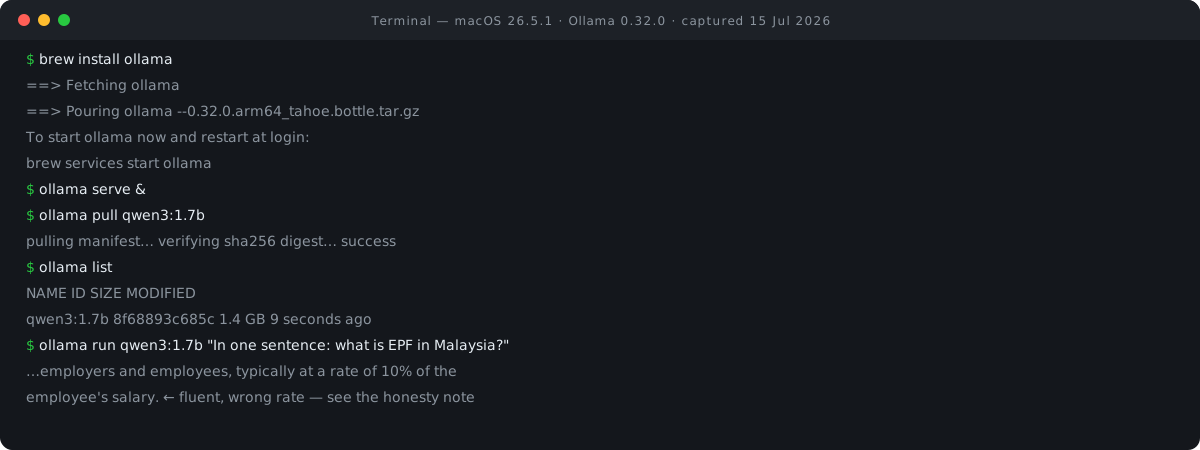
The answer correctly referenced employer and employee contributions, but then stated they run "typically at a rate of 10% of the employee's salary."
That number is wrong. The standard statutory rate is 11% from the employee, with employers contributing 12–13% on top. The model didn't hedge, didn't flag uncertainty — it produced a confident, specific, incorrect figure in an otherwise correct-sounding sentence. This is the single most important thing to understand about small local models: a 1.7B model will hallucinate facts, and it will do so fluently. It hasn't got the capacity to store the world's details reliably, so it fills gaps with plausible-sounding numbers.
So treat it accordingly. Local small models are excellent at working with text you give them — drafting, rewording, summarising a document that's in the prompt, explaining code that's on screen. If you're unsure whether a long document will fit in one go, our token counter tells you how many tokens it comes to before you paste it. They are not a reference. Don't ask a 1.7B model for statutory rates, medication doses, legal thresholds, or historical dates and act on the answer. Bigger local models hallucinate less, but the failure mode never fully disappears — it's the trade you're making for privacy and zero cost, and it's a fine trade as long as you know you're making it. If you want to see the other side of that trade priced out, our LLM price comparison lists what the hosted models charge per million tokens.
What to do with it
Three uses that play to a local model's actual strengths:
- Private drafting. Rough drafts of anything you'd hesitate to paste into a cloud chatbot — performance reviews, resignation letters, contract notes, medical questions you want to phrase before asking a professional. The text never leaves your Mac.
- Offline summarising. Paste in meeting notes, a long email thread, or an article and ask for the short version. Because the source material is in the prompt, the model is condensing, not recalling. This is exactly the mode where small models are trustworthy. Works at 11,000 metres with the Wi-Fi off.
- Plugging into local tools. Ollama exposes an OpenAI-compatible API on
localhost:11434, so anything that can point at a custom endpoint can use your local model — editors, scripts, coding agents. OpenCode, for instance, can drive Ollama-served models as a backend; if you followed our OpenCode tutorial, the two snap together on the same machine. For coding assistance you'll want at least the 16 GB-tier models — the 1.7B starter is too small to be a useful pair programmer.
Versions, limits & cleanup
Pinned versions. This tutorial was executed on macOS 26.5.1, Apple Silicon (arm64), with Ollama 0.32.0 installed via Homebrew and qwen3:1.7b (ID 8f68893c685c, 1.4 GB). All tutorial commands in Steps 1–4 verified by execution on 15 Jul 2026; the cleanup commands are the standard ones from the Homebrew and Ollama documentation. Ollama moves quickly; commands should hold across versions, but download sizes and library defaults will drift.
Cleanup. To remove the model: ollama rm qwen3:1.7b. Models live under ~/.ollama/models on macOS, so ollama list plus rm is how you claw disk space back. If you enabled the background service, stop it with brew services stop ollama. To remove Ollama entirely: brew uninstall ollama.
What this doesn't cover. This is a single-Mac tutorial. We don't cover GPU clusters, Linux servers, or serving models to other machines, and we deliberately skipped quantisation depth — Ollama's library tags (q4, q8, QAT variants and so on) are a topic of their own. We also tested one small model on one machine; your tokens-per-second will vary with chip generation and RAM. For choosing between local stacks, see our self-host LLM roundup; for what Ollama is and who's behind it, see Ollama's entry in our AI directory.
Sources. Verified against the official Ollama documentation and model library, 15 Jul 2026:
- Ollama FAQ — default port 11434, model storage location, local-privacy statement
- Ollama library: qwen3 — tag and download sizes (0.6b–235b)
- Ollama library: gemma3 — tag and download sizes
- Ollama library: gpt-oss — 20b size and 16 GB memory claim

View author profile → · Editorial policy