Whisper is OpenAI's speech-recognition model; whisper.cpp is Georgi Gerganov's rewrite of it in plain C and C++ — "Plain C/C++ implementation without dependencies", with explicit "Support for CPU-only inference" per the README. The model runs on your processor and the audio never leaves your machine. Docker is on the supported-platforms list, with a four-command workflow that looks like a ten-minute job.
It was not a ten-minute job. Our session on 22 July 2026 (Docker Desktop, Apple Silicon) hit three traps: a registry tag that contradicts the README, a prebuilt binary that died with an illegal-instruction signal, and a compiler mismatch midway through our from-source rescue. Every command and output line below is verbatim from that session, including the part where the model misspelled the Merlion.
You need Docker, about 150 MB of disk for the smallest sensible English model, and a 16 kHz WAV to feed it. We synthesized ours with macOS's built-in say — the full sentence we spoke was: “The Merlion stands at Merlion Park in Singapore. The original statue was sculpted by Lim Nang Seng and unveiled in nineteen seventy two.” (The terminal capture below shortens it to fit; substitute any sentence you like.) All inference then runs in disposable containers, teardown included, like our aider + Ollama run.
Step 1: Synthesize a clip in the format the README demands
whisper.cpp's README contradicts itself on input formats. The Quick start says: "Note that the whisper-cli example currently runs only with 16-bit WAV files, so make sure to convert your input before running the tool." But whisper-cli -h in the current build says "supported audio formats: flac, mp3, ogg, wav" — the examples now decode through the miniaudio library, so the WAV-only warning is the stale, conservative half. A 16 kHz mono 16-bit WAV file is the guaranteed path. Other formats are probably fine.
We took the guaranteed path by generating audio already in that exact format. macOS's say accepts a data-format flag: LEI16@16000 is little-endian Int16 at 16 kHz. The sentence we fed it names the Merlion, Merlion Park, sculptor Lim Nang Seng, and the year 1972 — deliberately loaded with proper nouns a small model might trip on. afinfo confirms the format landed.
say -o audios/merlion.wav --data-format=LEI16@16000 "The Merlion stands at Merlion Park in Singapore. …"
afinfo audios/merlion.wav | grep "Data format"
Data format:     1 ch,  16000 Hz, Int16
One channel, 16,000 Hz, Int16 — precisely what the strict reading of the README asks for. If your source is an MP3 or anything else, the README's documented conversion one-liner is in the reference section near the end of this guide, and the official image ships ffmpeg so you can run it inside the container.
Step 2: Trap #1 — the tag the README promises does not exist for your CPU
The README's Images list says the main image covers both architectures: "ghcr.io/ggml-org/whisper.cpp:main: This image includes the main executable file as well as curl and ffmpeg. (platforms: linux/amd64, linux/arm64)". We checked the registry before pulling, and the registry disagrees.
docker manifest inspect ghcr.io/ggml-org/whisper.cpp:main   # platforms:
  architecture: amd64 / os: linux
# ← the README says :main covers arm64; the registry disagrees. Apple Silicon needs :main-arm64:
docker pull ghcr.io/ggml-org/whisper.cpp:main-arm64
Digest: sha256:634a10bc07554b1e73050854383f473593366d31b5bd949a30277a04d12ed6f0
Status: Downloaded newer image for ghcr.io/ggml-org/whisper.cpp:main-arm64
The manifest for :main lists linux/amd64 only (its second entry is a buildkit attestation, not an architecture). arm64 lives under a separate tag, :main-arm64, which the README's Images list never mentions; on Apple Silicon, pulling :main gets you amd64 under emulation. The registry has no version-tagged images. Nothing matches v1.* among the 954 tags; main just tracks the master branch, so reproducible pulls mean pinning a main-<commit-sha> tag.
Step 3: Download base.en with the container's own script
The image bundles the repo's model-download script, and the script's second argument is the target directory: mount a host folder at /models, point the script there, and the model persists across runs. The container's entrypoint is bash -c, an image-specific detail that means the entire command must be one quoted string after the image name. Unquoted, only the first word reaches the shell.
docker run -it --rm -v $(pwd)/models:/models ghcr.io/ggml-org/whisper.cpp:main-arm64 "./models/download-ggml-model.sh base.en /models"
[curl progress … 141M downloaded in ~8s]
Done! Model 'base.en' saved in '/models/ggml-base.en.bin'
You can now use it like this:
  $ whisper-cli -m /models/ggml-base.en.bin -f samples/jfk.wav
ls -la models/
-rw-r--r--  1 jeffreytan  staff  147964211 Jul 22 08:02 ggml-base.en.bin
The script pulls from the project's Hugging Face repository (huggingface.co/ggerganov/whisper.cpp), and 147,964,211 bytes on disk matches the 141M the download reported. The .en suffix matters: per the models documentation, models are multilingual unless the name includes .en — base.en is English-only, which is exactly what our test clip needs.
Step 4: Trap #2 — exit 132 before a single line of output
With the model in place, the README's transcribe command should be the payoff. Instead, the arm64 image died instantly.
docker run -it --rm -v $(pwd)/models:/models -v $(pwd)/audios:/audios ghcr.io/ggml-org/whisper.cpp:main-arm64 \
    "whisper-cli -m /models/ggml-base.en.bin -f /audios/merlion.wav"
echo $?
132
# ← exit 132 = SIGILL (illegal instruction): the published arm64 image crashes before printing a
#   single line on our Docker Desktop VM. Prebuilt ggml binaries can target CPU features your
#   host lacks. The fix that always works: build from source, inside a container.
Exit code 132 is 128 + 4, and signal 4 is SIGILL: the binary executed an instruction the CPU (here, Docker Desktop's VM) refuses to run. Prebuilt native binaries are a liability in a project built for speed. `ggml` compiles hot loops against specific CPU features; if the build machine had an extension your runtime lacks, the binary is dead on arrival without an error message, log line, or workaround. The reliable fix is to compile whisper.cpp where it will run, which a throwaway container does for free.
Step 5: Build v1.9.1 from source in a disposable container
We started a plain debian:bookworm-slim container with the same two volume mounts, installed the toolchain, and cloned the repo at the pinned tag v1.9.1 — the current stable release, published 19 June 2026. Since the Docker registry offers no version tags, git is where reproducibility lives.
docker run -d --name whisper-build -v $(pwd)/models:/models -v $(pwd)/audios:/audios debian:bookworm-slim sleep 3600
docker exec whisper-build bash -c "apt-get update -qq && apt-get install -y -qq git cmake g++ make"
docker exec whisper-build git clone --depth 1 --branch v1.9.1 https://github.com/ggml-org/whisper.cpp.git /src
docker exec whisper-build bash -c "cd /src && cmake -B build -DCMAKE_BUILD_TYPE=Release && cmake --build build -j 4 --target whisper-cli"
error: inlining failed in call to 'always_inline' 'float16x8_t vfmaq_f16(float16x8_t, float16x8_t, float16x8_t)': target specific option mismatch
Trap #3: the default build compiles for the native CPU, and gcc 12's fp16 vector intrinsics misfire on this aarch64 VM — the compiler tries to inline a half-precision fused multiply-add it was not given the target options for. The escape hatch is ggml's own generic-build switch. -DGGML_NATIVE=OFF tells the build to stop chasing host-specific instructions, which is exactly the property we want after Step 4.
docker exec whisper-build bash -c "cd /src && rm -rf build && cmake -B build -DCMAKE_BUILD_TYPE=Release -DGGML_NATIVE=OFF && cmake --build build -j 4 --target whisper-cli"
BUILD-OK
-rwxr-xr-x 1 root root 931072 Jul 22 00:06 build/bin/whisper-cli
The result is a 931 KB binary, an inference engine smaller than most website homepages. All the intelligence is in the 141 MB model file; the C++ is just a fast way to run it.
Step 6: The transcription — 7.3 seconds of speech in 1.25 seconds
Same container, same mounts, our own binary.
docker exec whisper-build bash -c "cd /src && ./build/bin/whisper-cli -m /models/ggml-base.en.bin -f /audios/merlion.wav"
[00:00:00.000 --> 00:00:03.000]   The Merleion stands at Merleion Park in Singapore.
[00:00:03.000 --> 00:00:07.320]   The original statue was sculpted by Limnang Sang and unveiled in 1972.

whisper_print_timings:     load time =   214.32 ms
whisper_print_timings:     fallbacks =   0 p /   0 h
whisper_print_timings:      mel time =     3.86 ms
whisper_print_timings:   sample time =    30.75 ms /   166 runs (     0.19 ms per run)
whisper_print_timings:   encode time =   760.23 ms /     1 runs (   760.23 ms per run)
whisper_print_timings:   decode time =     7.95 ms /     2 runs (     3.97 ms per run)
whisper_print_timings:   batchd time =   189.10 ms /   160 runs (     1.18 ms per run)
whisper_print_timings:   prompt time =     0.00 ms /     1 runs (     0.00 ms per run)
whisper_print_timings:    total time =  1245.71 ms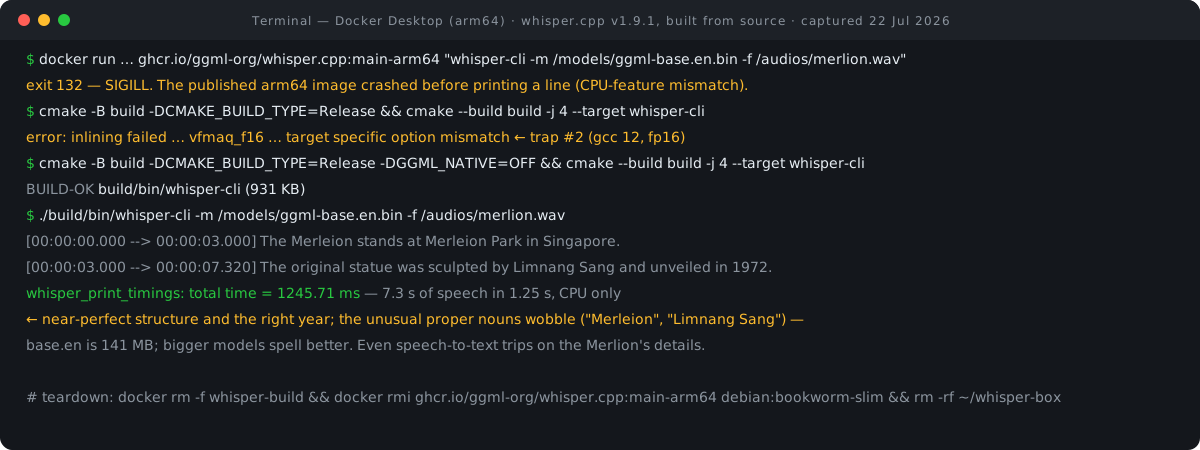
Total time 1,245.71 ms for a clip whose last segment ends at 7.32 seconds — CPU-only, on a build with native optimizations deliberately switched off, segment timestamps on by default. The speed was good. The transcript was not. We said: the Merlion, at Merlion Park, sculpted by Lim Nang Seng, unveiled in 1972. base.en got the sentence structure exactly right and nailed "1972" — and produced "Merleion" and "Limnang Sang" for the two proper nouns it had presumably rarely seen. Even speech-to-text trips on the Merlion's details. base.en is a 141 MB English model — the smallest sensible rung on a ladder that climbs to files twenty times that size (table below). We only tested this rung; if your audio is full of local names, the larger models are the obvious next experiment.
Which model should you pull?
The download script accepts any of these names in place of base.en. Disk sizes are from the models documentation; memory figures are the README's own self-reported table. Two naming rules cover most of the catalogue. Models are multilingual unless the name includes .en. Names ending in -q5_0, -q5_1 or -q8_0 are quantized for less memory and disk usage.
| Model | Disk | Memory (self-reported) | Notes |
|---|---|---|---|
| tiny / tiny.en | 75 MiB | ~273 MB | Smallest and fastest |
| base / base.en | 141 MB | ~388 MB | What we ran |
| small / small.en | 466 MiB | ~852 MB | The next rung up |
| medium / medium.en | 1.5 GiB | ~2.1 GB | Needs a container allowed 2 GB+ |
| large-v3 | 2.9 GiB | ~3.9 GB | Full-size flagship |
| large-v3-turbo | 1.5 GiB | — | Newer large variant; q5_0 quant is 547 MiB |
Choose by RAM, not ambition: memory scales with the model, and inside Docker the container has to be allowed that much. The project also ships a quantize tool if you want to shrink a model you already have.
What whisper.cpp is, and who owns what
whisper.cpp is OpenAI's Whisper ASR model reimplemented on the ggml machine-learning library, in the same GitHub organization that maintains llama.cpp (★121.2k) — llama.cpp is to LLMs what whisper.cpp is to speech recognition. The ggml model files are the original Whisper PyTorch weights from OpenAI, converted and mirrored on Hugging Face.
The licensing is clean for an AI project. Both the `whisper.cpp` code and the model weights are MIT-licensed, which OpenAI's own README confirms. No acceptable-use policy, no usage tiers, no commercial rider. You can ship this in a product. If that product then hands the transcripts to a hosted model for summarising or tagging, the second stage is the one with a bill attached, and our LLM cost calculator prices it from the token counts.
Beyond one clip: what the docs offer next
Everything below is from the project's documentation, not from our executed session — flags and services we read about but did not run this time.
# Convert anything to the guaranteed input format (README one-liner; ffmpeg is in the image):
ffmpeg -i input.mp3 -ar 16000 -ac 1 -c:a pcm_s16le output.wav

# Output formats — subtitles, JSON, CSV:
whisper-cli -m /models/ggml-base.en.bin -f /audios/clip.wav -otxt -osrt -ovtt -oj

# Language auto-detect, or translate any language to English:
whisper-cli -m /models/ggml-base.bin -f clip.wav -l auto
whisper-cli -m /models/ggml-base.bin -f clip.wav -tr

# Experimental word-level timestamps:
whisper-cli -m /models/ggml-base.en.bin -f clip.wav -ml 1

# HTTP transcription server from the same image (README example):
docker run -it --rm -v $(pwd)/models:/models -p "8080:8080" \
  ghcr.io/ggml-org/whisper.cpp:main "whisper-server --host 127.0.0.1 -m /models/ggml-base.bin"

# Optional Silero-VAD pass — transcribe only detected speech:
./models/download-vad-model.sh silero-v6.2.0
whisper-cli -m /models/ggml-base.en.bin -f clip.wav --vad -vm /models/<silero-v6.2.0 model>   # fetch with ./models/download-vad-model.sh silero-v6.2.0
Threads default to 4 (-t N); the README's own CPU examples bump to -t 8, and whisper-bench exists for tuning on your hardware. If you keep the transcription server up rather than firing one-shot containers, our Docker Compose converter turns a long docker run line like the ones in this guide — mounts, ports and all — into a docker-compose.yml you can commit alongside your code.
Versions, limits & cleanup
What we ran: whisper.cpp v1.9.1 (built from the git tag), the ghcr.io/ggml-org/whisper.cpp:main-arm64 image at digest 634a10bc… (pulled, crashed, kept for the record), debian:bookworm-slim as the build container, and the base.en model. Limits: the plain images are CPU-only inference — GPU-in-Docker means the separate main-cuda, main-musa or main-vulkan variants, all amd64; no version-pinned images exist, so reproducibility means a main-<sha> tag or a git-tag source build like ours; memory follows the model table above. Session footprint: two images, one container, one 141 MB model, one 931 KB binary — all removed below.
docker rm -f whisper-build && docker rmi ghcr.io/ggml-org/whisper.cpp:main-arm64 debian:bookworm-slim
whisper-build
…
cd ~ && rm -rf ~/whisper-box
The working folder (~/whisper-box, holding models/ and audios/) goes last. If you want to keep transcribing, keep the model — the 141 MB download is the only slow part of a rebuild.
FAQ
Do I need a GPU?
No. CPU-only inference is a headline feature, and our entire run — including the 1.25-second transcription — used no GPU. Inside a Linux container there is no Metal or Core ML regardless of your Mac's hardware; GPU acceleration in Docker means the separate main-cuda, main-musa and main-vulkan variants, all amd64-only.
Can whisper-cli read MP3s directly, or is WAV required?
The current CLI help lists flac, mp3, ogg and wav as supported, via the miniaudio decoder — despite the README quick-start still saying 16-bit WAV only. If a file misbehaves, the documented conversion is ffmpeg -i input.mp3 -ar 16000 -ac 1 -c:a pcm_s16le output.wav, and the official image includes ffmpeg so the conversion can run inside the container.
Does it tell me who is speaking?
Not really. There is no full speaker diarization: -di diarizes by stereo channel (useful only for two-channel recordings), and the experimental tinydiarize mode (-tdrz, with the English-only small.en-tdrz model) marks where the speaker changes without naming or counting speakers. If you need "Speaker 1 / Speaker 2" labels, you need a different tool on top.
Why did the published arm64 image crash when my machine is arm64?
An architecture match is not enough. ggml builds compile against specific CPU features, and a prebuilt binary can use an instruction your particular CPU or VM does not implement — the result is SIGILL (exit 132) with no output at all, which is exactly what we hit. Building from source with -DGGML_NATIVE=OFF produces a generic binary that trades a little speed for running anywhere; ours still finished our clip in 1.25 seconds.
- whisper.cpp README (Docker section, quick start, memory table) — ggml-org (accessed 22 Jul 2026)
- Model catalogue, sizes and naming rules — ggml-org/whisper.cpp models/README (accessed 22 Jul 2026)
- whisper-cli options reference — ggml-org/whisper.cpp examples/cli (accessed 22 Jul 2026)
- Official image build definition — ggml-org/whisper.cpp .devops/main.Dockerfile (accessed 22 Jul 2026)
- Model download script — ggml-org/whisper.cpp (accessed 22 Jul 2026)
- Release v1.9.1 (19 Jun 2026) — GitHub (accessed 22 Jul 2026)
- Container package and tags — ghcr.io/ggml-org/whisper.cpp (registry manifests inspected 22 Jul 2026)
- Whisper model weights license (MIT) — openai/whisper (accessed 22 Jul 2026)
- ggml model files — ggerganov/whisper.cpp on Hugging Face (accessed 22 Jul 2026)
More executed tutorials — every command run, every failure kept — live in the RECATOOLS guides hub.

View author profile → · Editorial policy