Langflow is the open-source, Python-based visual builder for agents and RAG apps that sits at the top of our most-starred AI directory sort, with ★151.9k GitHub stars in RECATOOLS traction data as of 21 July 2026. It is also, by a wide margin, the lightest self-host in our executed tutorial series. Dify needed a fifteen-container compose stack when we self-hosted it earlier in this series. Langflow needs exactly one container.
On 21 July 2026 we ran Langflow 1.10.2 on Docker Desktop for macOS (Apple Silicon, arm64 — the official image is multi-arch, so no emulation involved). Every command and every line of output below comes from that session, unedited. Our session told a story. We deliberately omitted the docs’ LANGFLOW_AUTO_LOGIN=true quickstart flag, and Langflow 1.10 refused to boot, failing closed until we provided a superuser password. That's the gotcha this guide is built around — and it's the good, security-positive kind. The fix is two environment variables, and it leaves you with a properly credentialed instance instead of an auto-signed-in one.
Who this is for: anyone who wants Langflow’s visual agent builder on hardware they control — a dev laptop, a homelab box, or a small VPS — with flows, credentials, and chat data staying local.
LANGFLOW_CONFIG_DIR); mount a volume here to persist flows and the SQLite DBStep 1: Create a volume and run the pinned image
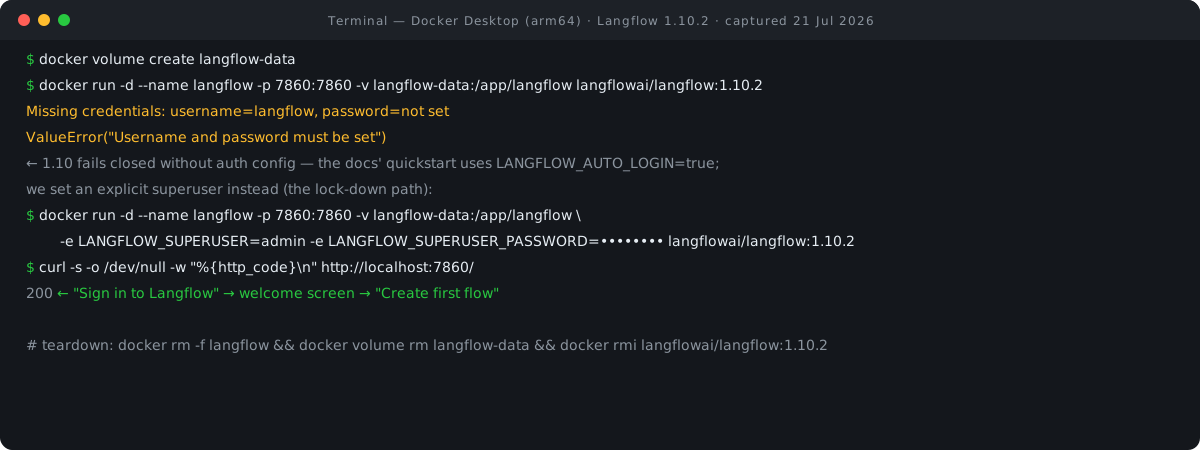
The docs’ quickstart is a one-liner: docker run -p 7860:7860 -e LANGFLOW_AUTO_LOGIN=true langflowai/langflow:latest, which the docs describe as starting “a pre-built Docker image with automatic login enabled for local development.” We changed three things, all deliberate. We pinned the tag to 1.10.2 instead of :latest (the docs’ own upgrade guidance pins version tags). We mounted a named volume at /app/langflow, the data path the docs’ persistence examples use, so flows survive container recreation. And we left out LANGFLOW_AUTO_LOGIN=true — because auto-signing every visitor into the editor as a superuser is a local-development convenience, not something we want to teach as the default habit.
docker volume create langflow-data
langflow-data
docker run -d --name langflow -p 7860:7860 -v langflow-data:/app/langflow langflowai/langflow:1.10.2
bc3f045442eddaef07abcad6185fa592c30cb28ce2793f3cf196038d5050ecc4
The container ID comes back, Docker reports nothing wrong, and if you stop here you would assume Langflow is coming up. It is not — and that is the whole point of the next two steps.
Step 2: Verify — the container is “Up”, but nothing answers
Thirty seconds in, docker ps says everything is fine. The HTTP check says otherwise: curl returns 000, meaning it could not complete a connection at all — nothing is listening yet on 7860.
docker ps --filter name=langflow --format "{{.Names}}  {{.Status}}"
langflow  Up 30 seconds
curl -s -o /dev/null -w "%{http_code}
" http://localhost:7860/
000
Langflow’s image is not small and its worker takes a while to boot, so a 000 in the first minute is not itself alarming. We waited and re-checked.
curl -s -o /dev/null -w "%{http_code}
" http://localhost:7860/   # ~1 min after start
000
Still 000. A slow boot should have resolved by now on this hardware. When a container is “Up” but the port never answers, the next stop is always the logs.
Step 3: The auth gotcha — Langflow 1.10 fails closed
The logs made it immediately clear. This is the single most searchable error in this guide, verbatim from our session:
docker logs langflow 2>&1 | grep -m1 -A1 "Missing credentials"
Missing credentials: username=langflow, password=not set
An error occurred during the session scope.  … ValueError("Username and password must be set")
It's worth understanding what's going on here, not just pasting the fix. Langflow’s auth documentation describes two modes. With LANGFLOW_AUTO_LOGIN=True — which the docs describe as the default, and which the quickstart command passes explicitly — “the visual editor automatically signs in all users as superusers” while API requests still require a Langflow API key. With LANGFLOW_AUTO_LOGIN=False, “you must explicitly set LANGFLOW_SUPERUSER_PASSWORD before startup.” The docs add two details that explain our exact error: LANGFLOW_SUPERUSER “is optional and defaults to langflow” — hence username=langflow in the log line — and the password “can’t use the legacy default value langflow; startup fails closed instead.”
Run the 1.10.2 image the way we did — without the quickstart’s auto-login flag and without credentials — and it lands in that fail-closed path: no silent fallback account, no guessable default password, no half-open editor. The worker throws ValueError("Username and password must be set") and the port never opens. If you came from an older Langflow, or you copied a compose file that predates the 1.5/1.6 auth tightening (1.5 was the first version that could enforce authentication for API requests at all, per the docs), this is the wall you will hit.
This is good default behaviour. A tool whose flows can hold provider API keys and execute code should not invent credentials for you. The quickstart’s LANGFLOW_AUTO_LOGIN=true is the convenience path for a laptop; explicit superuser credentials are the production-lean path, and that is what we set up next.
Step 4: Fix — recreate with explicit superuser credentials
The container is disposable and our data lives on the volume. The fix is to remove it and run the same command with two environment variables added. We chose admin as the username rather than accepting the default langflow, and a throwaway password for this session — yours should come from a password manager.
docker rm -f langflow
langflow
docker run -d --name langflow -p 7860:7860 -v langflow-data:/app/langflow -e LANGFLOW_SUPERUSER=admin -e LANGFLOW_SUPERUSER_PASSWORD=Wave8Tutorial2026 langflowai/langflow:1.10.2
1e11f8282e18605b218d6b15c72a57cdc226a9dbcb20b3ab5e763e8e178b0328
Two notes before you copy this. First, passing a password as a plain -e flag puts it in your shell history and in docker inspect output; on a real server, put it in an .env file or your secret store instead. Second, the docs’ hardened server example goes further than we did here: LANGFLOW_AUTO_LOGIN=False set explicitly, a non-default LANGFLOW_SECRET_KEY, LANGFLOW_NEW_USER_IS_ACTIVE=False, and LANGFLOW_ENABLE_SUPERUSER_CLI=False, which the docs recommend “to prevent unrestricted superuser creation.” For anything beyond localhost, use that shape.
Step 5: Verify — 200
curl -s -o /dev/null -w "%{http_code}
" http://localhost:7860/
200
Same curl, different answer. Langflow is up, and this time it is up with a named superuser instead of an auto-login account.
Step 6: First look in the browser
At http://localhost:7860/ the browser session (also 21 July 2026) opened not on the editor but on a “Sign in to Langflow” page — Username and Password fields, a Sign In button, and a Sign Up link. That sign-in wall is the visible proof of our configuration. With auto-login off, nobody gets the editor without credentials.
Signing in as admin landed on a welcome screen: “Welcome to Langflow” over the tagline “Your new favorite way to ship Agents”, with community chips showing GitHub 152k and Discord 25k — the on-screen GitHub chip corroborating the traction figure we lead with — and a “Create first flow” button. Clicking it brought up a “Let us set things up first” screen with a “Configure Model Providers” button and starter templates including “Simple Agent” and “Vector Store RAG”. We stopped the session there, without pasting a provider key or running a flow.
Going further — per the docs
Everything in this section is from Langflow’s documentation (all pages accessed 21 July 2026, docs version banner 1.10.x); we did not execute these variants in our session, so they appear as documentation commands, not transcript.
The quickstart, as documented. If you just want a local scratchpad and accept auto-login, use the docs’ own command:
docker run -p 7860:7860 -e LANGFLOW_AUTO_LOGIN=true langflowai/langflow:latest
Compose with Postgres. The docs’ featured compose setup clones the repo, enters docker_example/, writes LANGFLOW_SUPERUSER_PASSWORD into an .env file, and runs docker compose up; it swaps the default SQLite for a persistent PostgreSQL service. Notably, the docs pin the database image as postgres:16-trixie, with a comment explaining the pin: a rolling postgres:16 tag can silently change its Debian base and trigger a glibc collation mismatch warning on existing volumes (repo issue #9608). Pin your Postgres like they do. If you would rather build the compose file yourself from the docker run line in Step 4, our Docker Compose converter does that translation — ports, volumes and env flags included.
Persistence. The data path is governed by LANGFLOW_CONFIG_DIR; the Docker examples consistently set it to /app/langflow, and LANGFLOW_SAVE_DB_IN_CONFIG_DIR=True keeps the SQLite database inside that directory — which is why our single volume mount at /app/langflowThe documented docker-run persistence form (the docs pin an older tag as a placeholder; substitute the current one) is:
docker run -p 7860:7860 -v langflow-data:/app/langflow -e LANGFLOW_SUPERUSER_PASSWORD=replace-with-a-strong-password langflowai/langflow:<tag>
Bring your own model keys. Langflow ships no model and requires none in particular — the docs are explicit that it “doesn’t require you to use specific large language models (LLMs) or vector stores.” Keys go in via two documented mechanisms: the Model Providers pane (Settings → Model Providers → paste key → enable models; one key per provider), or Global Variables of type Credential, which are masked in the editor and stored encrypted in Langflow’s internal database. The docs name OpenAI, Anthropic, and Ollama (for local models) as examples; other providers arrive via component bundles. Whichever one you wire in, the settings you end up tuning afterwards use the same vocabulary across providers — our sampling parameters cheat sheet explains what temperature, top-p, top-k and the penalties actually do, with typical ranges for each.
MCP, both directions. Langflow integrates with the Model Context Protocol as both server and client: each project can expose its flows as MCP tools over streamable HTTP (with SSE fallback), and the MCP Tools component lets your agents call external MCP servers. With auth enabled, the project MCP server auto-configures API-key auth.
Telemetry opt-out. Langflow “uses anonymous telemetry to collect statistics about feature usage and performance.” The documented opt-out is one environment variable — and note it carries no LANGFLOW_ prefix:
DO_NOT_TRACK=True
Updating. The documented upgrade path is exactly why we mounted a volume in Step 1: keep data on persistent volumes, bump the image tag, docker pull langflowai/langflow:<tag>, and restart — “The same volumes will be reattached, so your database and flows are preserved.” The docs also note Podman works for every command shown.
Security: why “run the current version” is the whole lesson
Langflow’s recent release history is the strongest argument for update discipline we have seen in this series. The v1.10.1 changelog (23 June 2026) lists 17+ fix(security) entries with GHSA and CWE identifiers, including code-injection and missing-authentication classes — among them, verbatim: “fix(security): do not execute code in validate_code (GHSA-2wcq-pvw2-xh7v)”, “fix(security): block code injection via the Tweaks API (CWE-94)”, “fix(security): require authentication for POST /api/v2/registration/ (CWE-306)”, and “fix(security): stop issuing 365-day superuser token via auto_login (GHSA-fjgc-vj2f-77hm)”. Two weeks later, v1.10.2 carried more of the same class: “fix: remove hardcoded default superuser password”, “fix: block public builds of code execution agents”, “fix: restrict log retrieval to superusers”. Two consecutive security-bearing releases, roughly a fortnight apart. If you self-host Langflow, the version you run matters, this month and every month.
The docs are plain about exposure risks: “Never expose Langflow ports directly to the internet without proper security measures. Set LANGFLOW_AUTO_LOGIN=False, use a non-default LANGFLOW_SECRET_KEY, and deploy your Langflow server behind a reverse proxy with authentication enabled.” Port 7860 on a public IP with auto-login on is a visual code-execution environment handed to the internet. Keep it on localhost or a private network, put a reverse proxy with auth in front of anything reachable, and run the current release.
Who owns Langflow, and what does the license say?
The license is the easy half: MIT, read directly from the repo’s LICENSE file (“Copyright (c) 2024 Langflow”), which GitHub’s API confirms as SPDX MIT. That means self-hosting, modifying, and commercial use are all permitted with attribution — no open-core tier gymnastics.
Ownership has more moving parts. Langflow was built by DataStax, and on 25 February 2025 IBM’s newsroom announced its intent to acquire DataStax, identifying it as the creator of “Langflow, the open-source tool and community for low-code AI application development” and stating that IBM “will continue to support, engage, and innovate with” the Langflow open-source community, among others. The original DataStax press pages now redirect to an IBM product page. For a self-hoster, the practical read: an MIT-licensed codebase with 152k stars and a fortnightly-to-monthly release cadence, now in IBM’s orbit. Our Langflow directory entry tracks the traction data, and our four-way comparison covers how it sits against its neighbours.
The ASEAN angle: one container, your hardware, your data
For teams in Singapore, Malaysia, Indonesia and the wider region working under PDPA-style data-protection regimes, Langflow is a clean self-hosting option. Flows, provider credentials (encrypted in Langflow’s own database), and chat data all stay on infrastructure you control, the license is MIT, and telemetry switches off with a single documented env var. The resource bar is low, too — Langflow’s documented minimum is a dual-core CPU and 2 GB RAM, with a multi-core CPU and at least 4 GB recommended (those figures sit under the Python-package install prerequisites; the Docker docs state no separate number). That is small-VPS territory from any regional provider, which makes “keep the agent builder in-country” a budget decision rather than an architecture project. The other half of that budget is model spend, since Langflow calls providers rather than bundling one: our LLM cost calculator turns expected token volumes into a per-request and monthly figure.
Versions, limits & cleanup
What we ran, so you can reproduce or diverge deliberately: Docker Desktop on macOS (Apple Silicon, arm64), image langflowai/langflow:1.10.2 (released 7 July 2026; multi-arch, arm64 layer ~1.08 GB), default SQLite database on a named volume at /app/langflow, session date 21 July 2026. Limits of this tutorial: single-host only, no Postgres, no reverse proxy configured, no model provider wired, no flow executed; the “Going further” section is documentation, not transcript. Nightly 1.11.0.devNN tags land on Docker Hub daily — pin stable tags, not :latest and never a dev tag, for anything you care about.
Teardown was part of the session too — container, volume, and image all removed, with a final check that nothing was left behind:
docker rm -f langflow && docker volume rm langflow-data
langflow
langflow-data
docker rmi langflowai/langflow:1.10.2
Deleted: sha256:ae6f9afd03bc032dc2989ece49791fcf83871230aff9d6e485c8e1ebada1e70f
docker ps -a | grep -c langflow
0
0
Zero Langflow containers remain, the volume is gone, and roughly a gigabyte of image space is reclaimed. Note the volume removal deletes your flows and SQLite database — skip docker volume rm langflow-data if you intend to come back.
FAQ
Is Langflow free to self-host?
Yes. Langflow is MIT-licensed (verified directly against the repo’s LICENSE file, accessed 21 July 2026), which permits commercial use, modification, and self-hosting with attribution. The Docker image is the official langflowai/langflow repository on Docker Hub.
Why won’t Langflow boot? My logs say “Missing credentials: username=langflow, password=not set”
You started Langflow 1.10 without the quickstart’s LANGFLOW_AUTO_LOGIN=true flag and without superuser credentials, so it failed closed — the container shows “Up” but port 7860 never answers, and the logs end in ValueError("Username and password must be set"). Fix: recreate the container with -e LANGFLOW_SUPERUSER=<name> -e LANGFLOW_SUPERUSER_PASSWORD=<strong-password> (the password must not be the legacy default langflow). That is the exact error and exact fix from our executed session in Steps 3 and 4 above.
Do I need an API key?
Two different kinds, per the docs. For models, Langflow is bring-your-own-key: you add provider keys (OpenAI, Anthropic, or a local Ollama endpoint are the docs’ named examples) in the Model Providers pane or as encrypted Credential global variables — no key, no model calls. Separately, Langflow’s own API requires Langflow API keys: since the 1.5/1.6 auth changes, API requests require authentication even when the editor auto-signs users in.
Langflow vs Dify vs n8n — which one?
Langflow is the Python-native visual builder for agents and RAG with the lightest self-host footprint of the three we have executed; Dify is a fuller LLM-app platform whose self-host is a much heavier fifteen-container stack; n8n is general workflow automation where AI nodes are one part of a broader integration toolkit. Our n8n vs Dify vs Langflow vs Flowise comparison works through the trade-offs in detail, and the rest of the series lives under our guides index.
- Deploy Langflow with Docker — Langflow docs (accessed 21 Jul 2026)
- API keys and authentication — Langflow docs (accessed 21 Jul 2026)
- Environment variables — Langflow docs (accessed 21 Jul 2026)
- Install Langflow — Langflow docs (accessed 21 Jul 2026)
- Quickstart — Langflow docs (accessed 21 Jul 2026)
- Global variables — Langflow docs (accessed 21 Jul 2026)
- Telemetry — Langflow docs (accessed 21 Jul 2026)
- Langflow as an MCP server — Langflow docs (accessed 21 Jul 2026)
- Use Langflow as an MCP client — Langflow docs (accessed 21 Jul 2026)
- Release 1.10.2 — langflow-ai/langflow, GitHub (accessed 21 Jul 2026)
- Release 1.10.1 (security fixes) — langflow-ai/langflow, GitHub (accessed 21 Jul 2026)
- LICENSE (MIT) — langflow-ai/langflow, GitHub (accessed 21 Jul 2026)
- langflowai/langflow — Docker Hub (accessed 21 Jul 2026)
- IBM to acquire DataStax — IBM Newsroom, 25 Feb 2025 (accessed 21 Jul 2026)

View author profile → · Editorial policy