AutoGPT carries 185,630 GitHub stars — checked against the GitHub API on 21 July 2026 — and in 2026 the name no longer means the 2023 experiment most people remember. The repo's centre of gravity is the AutoGPT Platform: a visual agent builder with a marketplace, a block library, and a hosted paid service, announced on the official blog on 24 September 2024 by founder Toran Bruce Richards. The original agent still lives in classic/, but the docs are blunt: "AutoGPT Classic is not supported from a security perspective. Dependencies will not be updated, nor will issues be fixed." The platform is the thing worth self-hosting; its profile lives in our AI directory.
The self-hosting docs carry a warning in bold capitals: "DO NOT FOLLOW ANY OUTSIDE TUTORIALS AS THEY WILL LIKELY BE OUT OF DATE". We handle this the same way as every tutorial on our guides hub: follow the official steps exactly, pin to a release (autogpt-platform-beta-v0.6.68, published 17 July 2026), and add what the docs don't cover. That means real-world port collisions, on-disk size, and what you can build before handing over an API key. Every terminal block was executed on a Docker Desktop Mac (Apple Silicon) on 21 July 2026 and is reproduced verbatim; anything we did not run is labelled docs-only.
docker compose ps, 21 Jul 2026masterWhat you need before you start
The official prerequisites are software only: Node.js with npm, Docker with Docker Compose, and Git — verify with node -v, npm -v, docker -v and docker compose -v. The docs list no hardware requirements at all; the only platform notes are Windows (pick WSL 2 over Hyper-V) and Raspberry Pi 5 (a 16K-page-size kernel workaround). Our run gives a better sense of the hardware needed: expect seventeen running containers and multi-gigabyte images. If you followed our n8n tutorial, recalibrate — that was one container; this is a full platform with its own Supabase sub-stack, a three-shard Redis cluster, RabbitMQ, a graph database, and an antivirus daemon.
The docs also offer a one-line installer, which we did not use — the manual path keeps every step inspectable. For the record (docs-only, not executed by us):
curl -fsSL https://setup.agpt.co/install.sh -o install.sh && bash install.sh
Step 1: Clone the repo at the pinned release tag
The docs say to clone the repo and enter autogpt_platform. We add two flags: --depth 1 to skip 46,000-fork-project history, and --branch to pin the exact release this guide was verified against. Everything lands in a single disposable folder, ~/autogpt-box, so teardown at the end is one rm -rf.
mkdir ~/autogpt-box && cd ~/autogpt-box
git clone --depth 1 --branch autogpt-platform-beta-v0.6.68 https://github.com/Significant-Gravitas/AutoGPT.git
Cloning into 'AutoGPT'...
Note: switching to 'f244390da74f4087ad94f34de3b938639b31d6c3'.
cd AutoGPT/autogpt_platform
Step 2: One env file, not two
At v0.6.68 the setup is a single copy: autogpt_platform/.env.default becomes .env. If a tutorial tells you to copy separate .env.example files into backend/ and frontend/, it predates this tag — exactly the staleness the docs' warning is about. (A backend/.env.default still exists; it is where provider API keys go later, and Docker reads it as shipped for now.)
cp .env.default .envThe default env files ship with committed secrets. You get a working
ENCRYPTION_KEY, a defaultJWT_SECRET, a Postgres password of "your-super-secret-and-long-postgres-password", and a Supabase dashboard password that is, literally, "this_password_is_insecure_and_should_be_updated". For a throwaway localhost experiment like this run, fine. For anything that survives the afternoon, rotate all four — the docs show generating a fresh encryption key with Python'scryptography.fernetorpoetry run cli gen-encrypt-key.
Step 3: First launch — and the first port collision
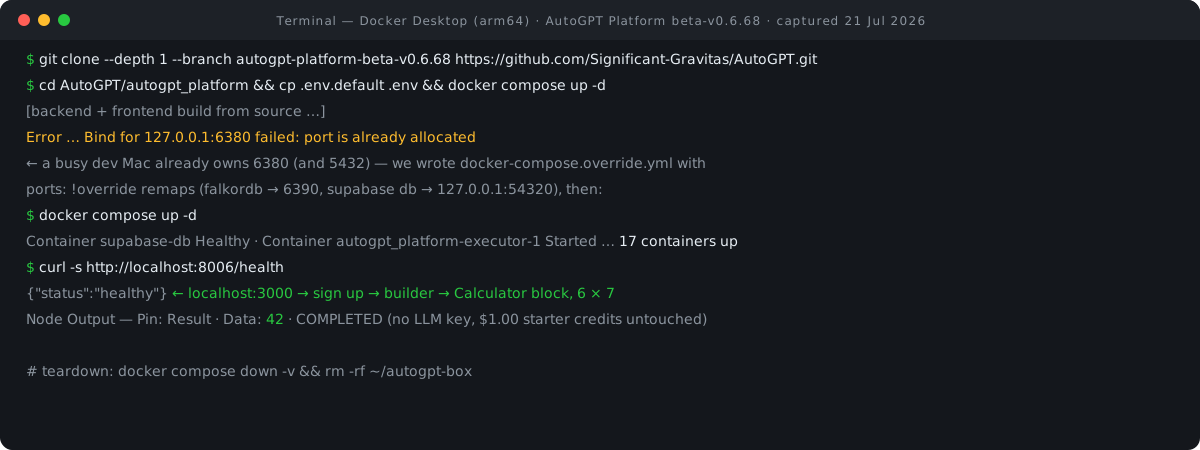
The docs' launch command is docker compose up -d. On a first run, Docker builds the backend and frontend from source, since the project publishes no prebuilt AutoGPT images (an open issue, #10948, requests them). This means a native arm64 build on Apple Silicon, but a long wait. On our dev Mac, this immediately caused a port collision, because the machine already runs a Redis on 6380.
docker compose up -d
Container autogpt_platform-clamav-1 Started
Container autogpt_platform-redis-0-1 Started
Container autogpt_platform-redis-2-1 Started
Container rabbitmq Started
Container autogpt_platform-redis-1-1 Started
Container supabase-kong Started
Error response from daemon: failed to set up container networking: driver failed programming external connectivity on endpoint autogpt_platform-falkordb-1 (904c1630c9b2f777c6cb351f66862a5be35e66344e9630af212ca4f3b322c32e): Bind for 127.0.0.1:6380 failed: port is already allocated
The stack claims a lot of host ports: 3000 (frontend), 8000 (Supabase's Kong gateway), 8006 (REST API) and a run of neighbouring 800x service ports, 5432 (Postgres), 5672 (RabbitMQ), 17000–17002 (the Redis cluster), 6380 (FalkorDB) and 3310 (ClamAV). On a machine that already does development work, some of those are taken. Ours had two conflicts; yours may have none, or different ones.
Step 4: Fix collisions the durable way — docker-compose.override.yml
Don't edit the shipped compose file. Your changes will be overwritten on the next git pull or tag checkout. Docker Compose automatically merges a file named docker-compose.override.yml over the shipped configuration, and the !override tag on ports: replaces the original list instead of appending a second binding. The override file is yours, untracked, and survives updates — this pattern is the single most reusable thing in this guide. If you are writing that YAML from a working docker run line instead — the Ollama container further down is one example — our Docker Compose converter turns the command into the equivalent service block.
Honest detail from our session: we wrote the override file mapping FalkorDB to host port 6381 — and 6381 was also taken, by a different project's container. Busy dev machines are like that.
docker compose up -d
Container autogpt_platform-redis-init-1 Started
Container rabbitmq Healthy
Error response from daemon: failed to set up container networking: driver failed programming external connectivity on endpoint autogpt_platform-falkordb-1 (fdb21ddb2ab49f78cc802e743972554d0012e72405180c414ce420d28f607c70): Bind for 0.0.0.0:6381 failed: port is already allocatedlsof -nP -iTCP:6381 -sTCP:LISTEN # taken too (another dev container) — pick a free one
sed -i "" "s/6381/6390/" docker-compose.override.yml
docker compose up -d
Container autogpt_platform-falkordb-1 Started
Container autogpt_platform-redis-init-1 Started
Container rabbitmq Healthy
Error response from daemon: failed to set up container networking: driver failed programming external connectivity on endpoint supabase-db (c9d709b68bf7c557ccd03cb1f72bf2243bff8d0814dcd4f94ac9fb24c82100a0): Bind for 127.0.0.1:5432 failed: port is already allocatedFalkorDB is up on 6390 — and the next collision surfaces immediately: Supabase's Postgres wants host port 5432, which another Postgres on this Mac already holds. Same fix, same file.
Step 5: Remap Postgres too, then the full stack comes up
The final override file remaps both services. Binding the database to 127.0.0.1:54320 keeps it loopback-only — no reason to expose Postgres to the network. Note that host-side remaps change nothing inside the Compose network: containers still talk to db:5432 and falkordb:6379 internally, which is why the platform needs no reconfiguration.
cat docker-compose.override.yml
services:
  falkordb:
    ports: !override
      - "6390:6379"
  db:
    ports: !override
      - "127.0.0.1:54320:5432"
docker compose up -d
Container autogpt_platform-migrate-1 Waiting
Container supabase-db Waiting
…
Container autogpt_platform-frontend-1 Started
Container autogpt_platform-rest_server-1 Started
Container supabase-db Healthy
Container rabbitmq Healthy
Container autogpt_platform-notification_server-1 Started
Container autogpt_platform-copilot_executor-1 Started
Container autogpt_platform-executor-1 Started
Container autogpt_platform-websocket_server-1 Started
Container autogpt_platform-scheduler_server-1 Started
Step 6: Verify — 17 containers, two health checks
The docs' verification step is one line: "You can check if the server is running by visiting http://localhost:3000 in your browser." We checked that, plus the REST API's health endpoint on 8006, plus a full container roster so you know what a healthy stack looks like.
docker compose ps --format "{{.Name}}  {{.Status}}" | sort
autogpt_platform-clamav-1  Up 3 minutes (healthy)
autogpt_platform-copilot_executor-1  Up About a minute
autogpt_platform-database_manager-1  Up About a minute
autogpt_platform-executor-1  Up About a minute
autogpt_platform-falkordb-1  Up 2 minutes (healthy)
autogpt_platform-frontend-1  Up About a minute
autogpt_platform-notification_server-1  Up About a minute
autogpt_platform-redis-0-1  Up 3 minutes (healthy)
autogpt_platform-redis-1-1  Up 3 minutes
autogpt_platform-redis-2-1  Up 3 minutes
autogpt_platform-rest_server-1  Up About a minute
autogpt_platform-scheduler_server-1  Up About a minute
autogpt_platform-websocket_server-1  Up About a minute
rabbitmq  Up 3 minutes (healthy)
supabase-auth  Up About a minute (healthy)
supabase-db  Up 2 minutes (healthy)
supabase-kong  Up 3 minutes (healthy)
curl -s -o /dev/null -w "%{http_code}
" http://localhost:3000/
200
curl -s http://localhost:8006/health
{"status":"healthy"}
Step 7: First run in the browser — zero keys required
Everything here was performed and observed in our live browser session against localhost:3000 on 21 July 2026. The login page greets you with "Log in to your account to continue". Two things surprised us. First, the cookie banner exists even on self-host: "We use cookies — AutoGPT uses essential cookies for login and optional cookies for analytics and error tracking". We clicked Reject All. Second, signup — email, password, confirm, and an "I agree to the Terms of Use and Privacy Policy" checkbox whose links point at agpt.co's legal pages — created the account instantly, with no email verification: the local Supabase GoTrue auth service auto-confirms.
A three-step onboarding wizard follows: "Welcome to AutoGPT — Let's personalize your experience so AutoPilot can start saving you time" asks "What should I call you?" (we answered "Reca"), then eight role cards, then nine task cards with "Pick up to 3 to start". You land on Home, an AutoPilot copilot chat — "Hey, Reca — Tell me about your work — I'll find what to automate." — under a nav of Home, Agents, Marketplace and Build, with a header chip reading "Earn credits $1.00".
Step 8: The payoff — a working agent with no LLM key
With any self-hosted AI platform, the first question is what works before you hand over a key. For AutoGPT, it is the entire builder. The Build canvas (a React Flow graph editor) opens a block panel whose counts read "All blocks 100+", 22 input blocks, and "Integrations 100+". Searching "calculator" surfaces "Calculator — Performs a mathematical operation on two numbers." — and, tellingly, some blocks such as Airtable's carry per-run prices like "$0.01 /run", where the platform's metering shows through even locally.
We added one Calculator block, set Operation to Multiply with A=6 and B=7, saved the agent as "Six Times Seven", and ran it. The node output showed the input {"a": 6, "b": 7, "operation": "Multiply", "round_result": false}, then Pin: Result, Data: 42, status COMPLETED. No LLM key, no credits consumed — the "$1.00" balance never moved. The executor container's log confirms the round trip:
executor-1  | 2026-07-21 09:47:03,991 INFO  [ExecutionManager|uid:009309e9-28c6-47aa-89b8-b4ece44df5ef|gid:871ed93e-9a36-447b-a81b-aea39b6f9605|nid:4744f5c2-e059-4b49-a832-b9a8c1be2b01]|geid:28ec3115-8bcb-452f-9557-0cabde0f4ad8|neid:c6720984-40e4-4349-b2b1-6734ac7b994c|CalculatorBlock] Finished node execution c6720984-40e4-4349-b2b1-6734ac7b994c
…
executor-1  | 2026-07-21 09:47:04,220 INFO  [GraphExecutor] [ExecutionManager] Run completed for 28ec3115-8bcb-452f-9557-0cabde0f4ad8
executor-1  | 2026-07-21 09:47:04,222 INFO  [GraphExecutor] [ExecutionManager] ✅ Cleaned up completed run 28ec3115-8bcb-452f-9557-0cabde0f4ad8
A multiplication is a deliberately small payoff, but it proves the pipeline works end to end—frontend, REST server, RabbitMQ, executor, database—with no external dependencies. The official first-agent tutorial's Q&A example (Input → AI Text Generator → Output) is the same graph shape with an LLM block in the middle; the docs themselves note the calculator variant works "without AI". If your agent work also spans Claude's Agent Skills — a different ecosystem, same instinct of keeping the definition in a file you own — our Agent Skill Scaffolder generates a valid SKILL.md to start from.
Where the platform expects money or keys
We hit two limitations, both of which are documented. First, the Marketplace on self-host is an empty shell: "Explore AI agents built for you by the community" renders over "No agents found" — the community catalog is cloud-only. The documented workaround is file-based: download an agent file from the cloud marketplace, then load it via the Monitor tab's "Import from File"; the docs concede "The interface will differ from the cloud-hosted platform".
Second, AI blocks need keys you bring. The /profile/integrations page — "Connections & Credentials", an empty Provider/Name/Actions table on a fresh install — is where per-provider credentials land, and the backend's .env.default at this tag ships empty slots for eight named providers (OpenAI, Anthropic, Groq, Llama, AIML, V0, OpenRouter, NVIDIA) plus a local-LLM path. For a no-key setup, the official Ollama page has one gotcha worth memorising: because AutoGPT runs in containers, the Ollama host field needs "your host machine's IP address instead of localhost or 127.0.0.1". Docs-only, not executed by us:
docker run -d -v ollama:/root/.ollama -p 11434:11434 --name ollama ollama/ollama
What it costs: disk, licence, and the hosted alternative
Building from source costs you disk space. Every one of the seven backend service images weighs 3.44 GB — though as variants of one build they should share most of their layers (our inference from the identical sizes), keeping the true on-disk total well below 7 × 3.44 GB — and Supabase's Postgres image alone is 2.89 GB.
docker compose ps --format "{{.Name}}" | wc -l
17
docker images --format "{{.Repository}}:{{.Tag}}  {{.Size}}" | grep -E "autogpt|supabase|falkor|rabbit|kong|clamav" | sort
autogpt_platform-copilot_executor:latest  3.44GB
autogpt_platform-database_manager:latest  3.44GB
autogpt_platform-executor:latest  3.44GB
autogpt_platform-frontend:latest  456MB
autogpt_platform-migrate:latest  524MB
autogpt_platform-notification_server:latest  3.44GB
autogpt_platform-rest_server:latest  3.44GB
autogpt_platform-scheduler_server:latest  3.44GB
autogpt_platform-websocket_server:latest  3.44GB
clamav/clamav-debian:latest  566MB
falkordb/falkordb:latest  622MB
kong:2.8.1  212MB
rabbitmq:4.1.4  398MB
supabase/gotrue:v2.170.0  69.9MB
supabase/postgres:15.8.1.049 2.89GBLicence — read this before you build on it. The root LICENSE file specifies a dual licence: "Everything inside the autogpt_platform folder is under the Polyform Shield License. Everything outside the autogpt_platform folder is under the MIT License." The PolyForm Shield 1.0.0 noncompete clause is short enough to quote whole: "Any purpose is a permitted purpose, except for providing any product that competes with the software or any product the licensor or any of its affiliates provides using the software." — and goods and services compete "even when they provide functionality through different kinds of interfaces or for different technical platforms." In the README's plain language: free for personal and internal business use; it cannot be sold as a competing hosted service. Self-hosting as in this guide is squarely permitted; launching a rival agent-platform product on it is not.
The publicly priced hosted alternative has no free tier. The Pro plan is "$42.50/ month billed annually" for 1x usage. The Max plan is "$272.00/ month billed annually" for 8.5x usage, 5x file storage, and priority support. A Team tier is "Coming soon", and annual billing gets a "Save 15%" discount. Hosted credits are consumed "on a per-block-run basis", AI blocks bill flat per model rather than per token, and at a zero balance "Running agents will stop executing." One caution: the credits documentation still describes a "pre-release beta" with no subscription fees while the pricing page sells subscriptions — trust the pricing page for money figures. Self-hosting trades that subscription for provider bills you pay directly, so if you want a like-for-like comparison, our LLM cost calculator turns expected token volumes into a monthly figure to hold up against those tiers. How AutoGPT stacks up as a framework is a separate question — see our four-way agent comparison.
Versions, limits & cleanup
This guide is pinned to autogpt-platform-beta-v0.6.68, executed on 21 July 2026 — per the project's own warning, treat any tutorial without a pinned version and date, including ours as it ages, with suspicion. Known limits: no documented hardware requirements; no official update or backup procedure at this tag (the standard Docker mechanic — check out a newer tag, rebuild — is our inference, not official guidance); and an open issue reports supabase-db occasionally coming up unhealthy and blocking the stack, with no maintainer-confirmed fix. On telemetry, the shipped env defaults leave Sentry and PostHog unconfigured — an observation about defaults, not a documented privacy guarantee.
docker compose stop      # pause the stack, keep state
docker compose ps        # what's running
docker compose down      # remove containers, keep volumes
Our teardown was the full-wipe variant: down -v also deletes the named volumes (database, workspace, ClamAV signatures, FalkorDB data), and in our session the removal output ran to 52 lines of deleted containers, networks and volumes. The clone folder goes last.
docker compose down -v
…
docker compose ps -a --format "{{.Name}}" | wc -l
0
cd ~ && rm -rf ~/autogpt-box
FAQ
Do I need an OpenAI or Anthropic key to try it?
No. Signup, onboarding, the build canvas and non-LLM blocks all work with no keys and no credits — our Calculator agent ran to COMPLETED with the credit balance untouched. AI blocks need a key from one of the eight providers wired into the backend env (or a local model via the Ollama path, using your host machine's IP rather than localhost).
Does it run on Apple Silicon Macs?
Yes, natively — that is what we ran. Because there are no prebuilt AutoGPT images, the backend and frontend compile from source as arm64 on your machine, and the pulled infrastructure images (Redis, RabbitMQ, FalkorDB, ClamAV, Supabase) all ran without platform overrides in our session. Budget real time and disk for the first build.
Why is my self-hosted Marketplace empty?
Expected: ours showed "No agents found" too. The community catalog lives on the cloud platform; the documented local route is downloading an agent file from the cloud marketplace and importing it via the Monitor tab's "Import from File".
Can I use the self-hosted platform at work — or resell it?
Internal business use is fine; reselling is where the line sits. The autogpt_platform folder is PolyForm Shield 1.0.0, which permits any purpose "except for providing any product that competes with the software" or with the licensor's products built on it. Everything outside that folder, including AutoGPT Classic, is MIT — though Classic is explicitly unsupported "from a security perspective".
What if a port in the stack collides with something on my machine?
Create a docker-compose.override.yml next to the shipped compose file and remap only the colliding service's ports: with the !override tag, as in Step 4. Internal container-to-container traffic is unaffected, and the file survives future git pulls. We needed two remaps on a busy dev Mac (FalkorDB and Postgres); a clean machine may need none.
- AutoGPT Platform v0.6.68 release — GitHub, Significant-Gravitas/AutoGPT (accessed 21 Jul 2026)
- Self-hosting: Getting Started — AutoGPT docs (agpt.co) (accessed 21 Jul 2026)
- Significant-Gravitas/AutoGPT repository (stars, forks via GitHub API) — GitHub (accessed 21 Jul 2026)
- Root LICENSE (dual-licence statement) at tag v0.6.68 — GitHub (accessed 21 Jul 2026)
- PolyForm Shield License 1.0.0, autogpt_platform/LICENSE.md at tag v0.6.68 — GitHub (accessed 21 Jul 2026)
- AutoGPT Platform pricing — agpt.co (accessed 21 Jul 2026)
- Credits and billing — AutoGPT docs (agpt.co) (accessed 21 Jul 2026)
- Download an agent from the marketplace (local) — AutoGPT docs (agpt.co) (accessed 21 Jul 2026)
- Using Ollama with AutoGPT — AutoGPT docs (agpt.co) (accessed 21 Jul 2026)
- AutoGPT Classic introduction (support status) — AutoGPT docs (agpt.co) (accessed 21 Jul 2026)
- Issue #10948: publish prebuilt platform containers — GitHub (accessed 21 Jul 2026)
- Issue #9846: supabase-db unhealthy blocks stack startup — GitHub (accessed 21 Jul 2026)
- Introducing the AutoGPT Platform — official AutoGPT blog (published 24 Sep 2024, accessed 21 Jul 2026)

View author profile → · Editorial policy