In an earlier execution in this series, the tiny qwen3:0.6b — the exact model we use again below — confidently told us, ungrounded, that Singapore's Merlion statue “is from New York City”. That blunder is why this tutorial exists. We are going to fix it with retrieval-augmented generation (RAG), which feeds a model your own documents and makes it cite them. AnythingLLM, a 63,000-star open-source app, is built for exactly that (RECATOOLS traction data, 21 Jul 2026).
AnythingLLM, by Mintplex Labs Inc., describes itself as "The all-in-one AI application for everyone" — "Any LLM, any document, any agent, fully private." On 21 July 2026 we self-hosted version 1.15.0 with Docker on an Apple Silicon Mac, wired it to an Ollama container running a tiny qwen3:0.6b model, uploaded a five-sentence fact sheet through its Developer API, and asked the same model the same kind of Merlion question it had flunked without grounding. This time the answer came back correct, cited, and fully local.
Every command and output below is verbatim from that captured session, including the part where the docs' own tag naming would have failed the pull, and the full teardown at the end. Commands that come from the docs rather than our terminal are marked as untested guidance.
v prefix (release 25 Jun 2026)What you need
Docker Desktop (or Docker Engine — the repo guide's floor is v18.03+ on Windows/Mac, v20.10+ on Linux), roughly 12 GB of free disk for the two images, and about fifteen minutes. The official minimum is modest — 2 GB RAM, any 2-core CPU, 5 GB storage; the docs claim it runs on "the smallest machines - even Raspberry Pis!" because the default embedder is CPU-only. No account, email, or third-party API key required: the whole stack runs on your machine. That also keeps embedding free at the point of use — if you would rather send embeddings to a hosted provider for a large corpus, our embedding cost calculator prices that job across OpenAI, Google, Voyage, Cohere and Mistral before you commit.
The image is multi-arch: latest, 1.15.0 and 1.15 publish amd64 and arm64 manifests, so M-series Macs pull a native image; only the render/railway platform tags are amd64-only.
Step 1: Create a network and start Ollama
The Docker version of AnythingLLM ships no model of its own; you bring the LLM provider. We used Ollama, containerised, on a shared Docker network so the two containers find each other by name; the named volume keeps downloaded models across restarts.
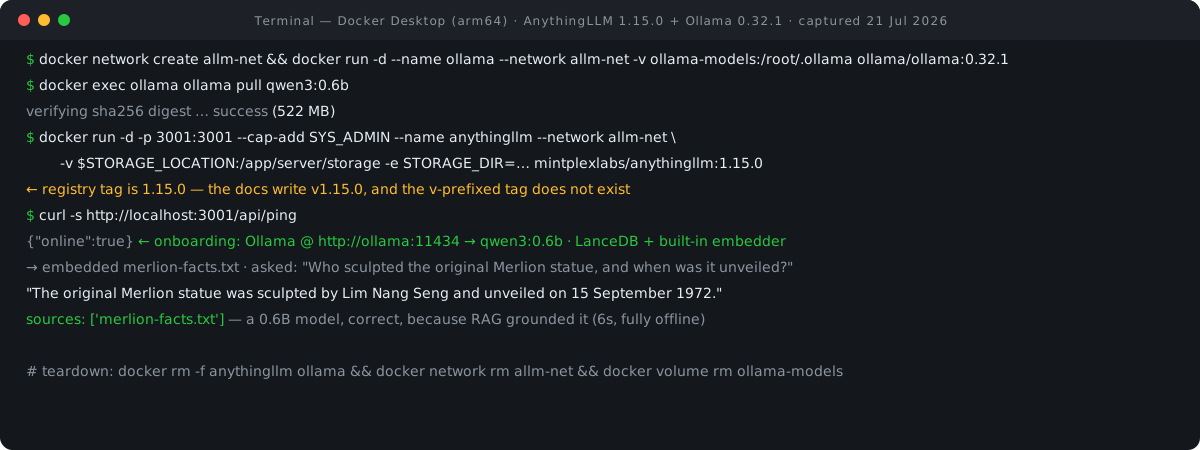
docker network create allm-net
cb590fe730c5
docker run -d --name ollama --network allm-net -v ollama-models:/root/.ollama ollama/ollama:0.32.1
2ef47535c9d2
docker exec ollama ollama pull qwen3:0.6b
pulling manifest
verifying sha256 digest
success
The docker run pulled the pinned ollama/ollama:0.32.1 image automatically — our captured pull log ends "Status: Downloaded newer image for ollama/ollama:0.32.1". We chose qwen3:0.6b, a 0.6-billion-parameter model, to make the RAG point later as starkly as possible. If you run Ollama on the host instead, note the docs' warning that ollama run model-name alone does not start the server; in a container, the server is the default process.
Step 2: The image tag footgun — pin 1.15.0, not v1.15.0
Here is the first footgun. The GitHub release is named v1.15.0, and the docs write the pinned-tag scheme as v*.*.* — but the actual Docker Hub tags carry no leading v: the 25 June 2026 release is tagged 1.15.0 and 1.15 (plus pg-/railway-/render- variants). Copy the scheme literally and the pull fails:
# docs write the scheme as v*.*.* — this tag does not exist on Docker Hub:
docker pull mintplexlabs/anythingllm:v1.15.0
# the real pinned tag has no v prefix:
docker pull mintplexlabs/anythingllm:1.15.0
Why pin at all? Because latest tracks every commit to master — updated "near-daily", per the docs — exactly what you do not want under a box holding your embedded documents. Our session pre-pulled the pinned image; the captured log closes with "Digest: sha256:df8a540a06079c42c0835b40002e708bea895b5ab3c631d723c276a378a2857f" and "Status: Downloaded newer image for mintplexlabs/anythingllm:1.15.0". Skip the explicit pull if you like — the pinned docker run in the next step fetches the same image.
Step 3: Run AnythingLLM
This is the docs' official Linux/Mac run command, but with two changes—we pinned the tag and added --network allm-net so the container shares a network with Ollama. Everything else — port, SYS_ADMIN capability, storage volume, mounted .env, STORAGE_DIR — is as documented. The docs are blunt about the volume: "If you do not use the command below - all of your data will be lost when the container is restarted!" As for --cap-add SYS_ADMIN, it appears in every official run command; the docs give no rationale, so we will not invent one — but you are granting the container a broad Linux capability. If you would rather keep both containers in one file than run two docker run lines, our Docker Compose converter turns each command here into the equivalent compose service, ports, volumes and network included.
export STORAGE_LOCATION=$HOME/anythingllm-box/storage
mkdir -p $STORAGE_LOCATION && touch "$STORAGE_LOCATION/.env"
docker run -d -p 3001:3001 --cap-add SYS_ADMIN --name anythingllm --network allm-net \
    -v ${STORAGE_LOCATION}:/app/server/storage -v ${STORAGE_LOCATION}/.env:/app/server/.env \
    -e STORAGE_DIR="/app/server/storage" mintplexlabs/anythingllm:1.15.0
d97f9c60368d
One documented gotcha we did not hit: the container defaults to UID/GID 1000, and per the docs, "If there is a mismatch between your host user UID and GID and what is set in the .env file, you may experience permission issues" on the storage directory. On a default single-user Linux install or macOS via Docker Desktop this just works.
Step 4: Verify it is up
docker ps --filter name=anythingllm --format "{{.Names}}  {{.Status}}"
anythingllm  Up 8 seconds (healthy)
curl -s -o /dev/null -w "%{http_code}
" http://localhost:3001/
200
curl -s http://localhost:3001/api/ping
{"online":true}
Healthy on the first boot, eight seconds in. That was the entire installation. Open http://localhost:3001 in a browser for the part no command line can show you.
Step 5: Onboarding — a short wizard, no signup
The welcome screen is just an AnythingLLM wordmark, a "Welcome", and a "Get Started" button. No signup, no email field—a rare sight in 2026.
The first real step is "LLM Preference": "AnythingLLM can work with many LLM providers. This will be the service which handles chatting." A search box sits over provider cards — the first shown are OpenAI ("The standard option for most non-commercial use."), Azure OpenAI, Anthropic, Gemini, and NVIDIA NIM. We searched "ollama" and picked the card reading "Ollama — Run LLMs locally on your own machine." The "Ollama Model" dropdown initially reads "Enter Ollama URL first"; advanced settings expose the "Ollama Base URL" (placeholder http://127.0.0.1:11434), a 5-minute "Ollama Keep Alive", an automatically managed context window, and an "Authentication Token" field.
The base URL is where most Docker installs go wrong, and the docs have a dedicated page for it: "When running AnythingLLM in Docker, the localhost, 127.0.0.1, or 0.0.0.0 addresses do not exist in the container!" If Ollama runs on your host, the documented fix is http://host.docker.internal:11434 on Windows/macOS or http://172.17.0.1:11434 on Linux. Ours is the third option the docs' rule implies but does not spell out — Ollama in its own container on the same network, reachable by name. We typed http://ollama:11434 and the model dropdown immediately auto-loaded and selected qwen3:0.6b. If that dropdown stays empty, your URL is wrong — the troubleshooting page treats a bad URL as effectively the only cause. That automatically managed context window is worth understanding rather than ignoring: our context window visualizer shows what share of a given model's window a piece of text fills, which is the constraint every retrieved chunk competes for.
"User Setup — How many users will be using this instance?" offers "Just me" or "My team". We chose Just me, and answered No to "Would you like to set up a password?" — this is a throwaway box; the security section below covers anything longer-lived. Next comes a screen worth pausing on, "Data Handling & Privacy — We are committed to transparency and control when it comes to your personal data.", which states the pipeline's locality in three lines: for the LLM, "Your model and chats are only accessible on the machine running Ollama models."; for embeddings, "AnythingLLM Embedder — Your document text is embedded privately on this instance of AnythingLLM."; for the vector store, "LanceDB — Your vectors and document text are stored privately on this instance". A final optional survey asks for an email, a use-case radio and a "How did you hear" box; we clicked "Skip Survey".
That lands you in an auto-created "My Workspace": a chat pane asking "How can I help you today?", suggestion chips for Create an Agent, Edit Workspace and Upload a Document.
Step 6: The Developer API — upload a document, embed it
You could drag and drop a file into the chat, but we wanted the path an integrator would use. Under Settings → Tools → Developer API, "Generate New API Key" opens a confirmation modal, and the new key appears in a keys table in the format XXXXXXX-XXXXXXX-XXXXXXX-XXXXXXX. That bearer key unlocks a REST API on the same port.
Our test document was merlion.txt, five factual sentences: designed by Alec Fraser-Brunner in 1964 as the Singapore Tourism Board logo; the 8.6 m statue sculpted by Lim Nang Seng; unveiled on 15 September 1972 by Lee Kuan Yew; the lion head from Sang Nila Utama's lion; the fish tail for the fishing village of Temasek.
Honesty note: the upload and embed ran via a 10-line Python helper rather than raw curl — shell-escaping a paragraph into JSON is fiddly. The helper handled the upload, the embed and the first query; the follow-up query ran as the curl below. All captured:
POST /api/v1/document/raw-textwith{"textContent": ..., "metadata": {"title": "merlion-facts.txt"}}— returnedupload success: Trueand a stored location ofcustom-documents/raw-merlion-facts-cea6484b-17d5-4421-9e47-01d2e8a0e17d.json.POST /api/v1/workspace/my-workspace/update-embeddingswith that location in"adds"— returned 200. The embedding ran on the built-in local embedder, so no text left the machine.
The Payoff: A 0.6B Model Gets the Merlion Right
First RAG query, via the same helper: "Who sculpted the original Merlion statue, and when was it unveiled?" in "mode": "query". About six seconds later — after qwen3:0.6b thinks out loud in a <think> block — the response arrived:
"The original Merlion statue was sculpted by Lim Nang Seng and unveiled on 15 September 1972."
sources: ['merlion-facts.txt']
The second query we ran as plain curl, exactly as captured:
curl -s -X POST http://localhost:3001/api/v1/workspace/my-workspace/chat \
    -H "Authorization: Bearer ••••••••" -H "Content-Type: application/json" \
    -d '{"message":"Which fishing village does the Merlion'\''s fish tail represent?","mode":"query"}'
The Merlion's fish tail represents Singapore's fishing village of Temasek.
sources: ['merlion-facts.txt']
Both answers are correct, both cite the source document, and the exchange ran offline on CPU. A model under a billion parameters—one we watched invent a New York Merlion when asked cold—answered precisely because retrieval put the right five sentences in front of it. The grounding, not the model size, made the difference, demonstrating the entire pitch for this category of software. Real corpora are larger than five sentences, of course, and how much text retrieval packs into each prompt is worth watching — our token counter gives an exact count for any chunk you plan to feed in.
Back in the browser, the workspace thread "default" showed the API conversation too: the question bubble, qwen3:0.6b's reasoning bubble ("Okay, the user is asking which fishing v…"), the answer ("The Merlion's fish tail represents Singapore's fishing villag…"), and two "Sources" chips — citations render in the UI even for API-driven chats.
Security, passwords and multi-user mode
Understand what you just deployed. By default, there is no authentication at all. The docs frame password protection as opt-in — anyone with the password, "if set", can use the instance. Fine for a localhost box torn down after an afternoon; for anything reachable by other machines, set the instance-wide password (the choice the wizard offered) or enable multi-user mode. Multi-user is Docker-only — the docs flag it "DOCKER VERSION ONLY!" — with a first admin plus per-user logins in three roles: Admin (everything), Manager (all workspaces, but not LLM/embedder/vector settings), Default (only assigned workspaces). One warning deserves bold type, straight from the docs: "Once in multi-user mode, you cannot revert back to single-user mode." Decide before you flip it.
On telemetry: AnythingLLM ships with PostHog telemetry, which the README says collects "No IP or other identifying information". To opt out, "Set DISABLE_TELEMETRY in your server or docker .env settings to \"true\"" — the .env mounted in Step 3 is the place — or use the in-app sidebar under Privacy. Even with telemetry off, the README lists other outbound connections: configured provider APIs, cdn.anythingllm.com for model mirrors, GitHub-hosted flat files for context-window caching. Fully local inference does not mean a fully silent box.
Footprint, license and pricing
Call it 12 GB of images for the pair, against a working data directory that stays tiny — the SQLite database, LanceDB vectors and parsed documents for our whole session fit in 23 MB. The code is MIT-licensed and self-hosting is free; the pricing page's own words are "Run via Docker for free". What Mintplex Labs sells is hosting, billed per instance rather than per seat:
| Option | Price | Notes |
|---|---|---|
| Self-hosted Docker | Free | MIT license; everything in this guide |
| Desktop app | Free | Docs call it "the easiest way to get started" if you do not need multi-user |
| Cloud Basic | $50/mo | Under 5 users, under 100 documents, private instance |
| Cloud Pro | $99/mo | Larger teams, 72-hour support SLA |
| Enterprise | Custom | On-premise install, custom SLA/domain/integrations |
The docs' own guidance suggests the Desktop app is the right choice for most, unless you need Docker-only features like multi-user access, password protection, embeddable chat widgets, white-labeling, or browser access for a team. And if what you want is a chat UI over Ollama rather than a document-grounded workspace, see our executed Open WebUI + Ollama tutorial — AnythingLLM's official materials make no comparison to Open WebUI, so we won't invent one. Its entry in our AI directory tracks traction data over time.
Beyond LanceDB: the pluggable vector database
Everything above used LanceDB because it is the built-in default. The docs title the card "LanceDB (Built-in)" and claim "the default LanceDB vector database can handle anything you can throw at it," and for a personal instance we found no reason to argue. But the vector layer is pluggable: Chroma and Milvus locally; Qdrant, Weaviate, Pinecone, Zilliz and AstraDB as external options; the README adds PGVector, with a dedicated pg image variant storing everything in PostgreSQL. Weighing those engines? Our Qdrant vs Weaviate vs Milvus vs Pinecone comparison covers the trade-offs. Two cautions from the docs: the setting is system-wide, not per-workspace, and there is no automatic migration between vector databases — switching means deleting and re-embedding per workspace. Pick once.
Versions, limits & cleanup
We ran mintplexlabs/anythingllm:1.15.0 (Docker Hub, pushed 25 June 2026, matching the GitHub release "AnythingLLM v1.15.0" — whose headline "Magic Features" are Desktop-focused and not part of this walkthrough) with ollama/ollama:0.32.1 and qwen3:0.6b, on Apple Silicon via native arm64 images.
Backup is one directory: the mounted storage location holds the SQLite database (anythingllm.db), the LanceDB vectors and your parsed documents, with the mounted .env alongside — copy ~/anythingllm-box and you have everything. Updating is the flip side of the same mount: pull a newer pinned tag and rerun the Step 3 command with the same volume flags; the docs promise "All your data and progress will persist between container rebuilds or pulls from Docker Hub". Docs-only — we did not exercise an upgrade:
# update path per docs — same mounts, newer pinned tag:
docker pull mintplexlabs/anythingllm:1.15
docker rm -f anythingllm
# then rerun the Step 3 docker run command against the new tagTeardown, exactly as we ran it. This removes everything including your embedded documents, so back up first if you want to keep them.
docker rm -f anythingllm ollama
anythingllm ollama
docker network rm allm-net && docker volume rm ollama-models
allm-net
ollama-models
docker rmi mintplexlabs/anythingllm:1.15.0 ollama/ollama:0.32.1
4
cd ~ && rm -rf ~/anythingllm-box
FAQ
Do I need a GPU?
Not for this walkthrough. The docs' minimum is 2 GB RAM and any 2-core CPU, the default embedder is explicitly CPU-only, and our cited RAG answers from qwen3:0.6b arrived in about six seconds on CPU. Larger models through Ollama will want more hardware; AnythingLLM itself adds little.
Should I use the Desktop app instead of Docker?
The docs themselves say yes for most single users — Desktop is "the easiest way to get started", with one-click install and a built-in LLM provider. Docker earns its keep when you need multi-user mode with roles, an instance password, embeddable chat widgets, white-labeling, or browser access for a team.
Is my data sent anywhere?
Chats, embeddings and vectors stay local in this setup — the onboarding privacy screen states each layer's locality. Two caveats: anonymous PostHog telemetry is on by default (disable via DISABLE_TELEMETRY or the in-app Privacy setting), and the README lists other outbound connections such as the cdn.anythingllm.com model mirror and GitHub-hosted flat files.
What is --cap-add SYS_ADMIN for?
It appears in every official run command, and the docs give no rationale — so we treat it as a requirement of the documented command rather than something to explain away. It is a broad Linux capability grant, one more reason to keep an unauthenticated instance off shared networks.
- Local Docker Installation — AnythingLLM docs, Mintplex Labs (accessed 21 Jul 2026)
- Available images & tags — AnythingLLM docs, Mintplex Labs (accessed 21 Jul 2026)
- System requirements — AnythingLLM docs, Mintplex Labs (accessed 21 Jul 2026)
- Ollama connection troubleshooting — AnythingLLM docs, Mintplex Labs (accessed 21 Jul 2026)
- Security & access — AnythingLLM docs, Mintplex Labs (accessed 21 Jul 2026)
- AnythingLLM v1.15.0 release — GitHub, Mintplex Labs (accessed 21 Jul 2026)
- mintplexlabs/anythingllm image tags — Docker Hub (accessed 21 Jul 2026)
- anything-llm README & MIT LICENSE — GitHub, Mintplex Labs (accessed 21 Jul 2026)
- AnythingLLM pricing — anythingllm.com, Mintplex Labs (accessed 21 Jul 2026)

View author profile → · Editorial policy