Open WebUI is a self-hosted chat interface that looks and behaves like ChatGPT, except the models answering you sit on your own disk and the conversation database lives in a Docker volume you control. Pair it with Ollama, the local model runtime, and you get a private chat stack: a browser tab at localhost:3000, models served from a container next door, and — once the images and models are downloaded — no prompt ever leaving your machine.
This is an executed tutorial. On 21 July 2026 we ran every command below on Docker Desktop for macOS (Apple Silicon, CPU-only), with both images pinned: ollama/ollama:0.32.1 and ghcr.io/open-webui/open-webui:v0.10.2. All terminal output is verbatim from that session, including the one error we hit and two confidently wrong answers from a 0.6-billion-parameter model. Where progress displays printed terminal control characters we cannot reproduce, we show the legible fragments and mark cuts with an honest ….
Where this fits among our guides: our Ollama-on-Mac guide covered running models natively with the Mac app, and our local-LLM app comparison weighed the interfaces against each other. This one wires the full private-chat stack in containers — which means the same seven steps work on any machine with Docker: Mac, Linux or Windows.
ollama list exactly in our runStep 1: Create a network and start Ollama — with no published port
Everything lives on one user-defined Docker network, which gives the containers DNS names for each other. Then Ollama starts with a named volume for its model store.
docker network create llm
d2c759aca0f7507ddf00c1e116b3c7771bd93bee4a7d11e9ab447b0403540c82
docker run -d --name ollama --network llm -v ollama:/root/.ollama ollama/ollama:0.32.1
d5d59a3f247dab1299ef80d6c508535c752c05012cccf65c45b04c99745ab175
One deliberate difference from the Ollama Docker docs: their command includes -p 11434:11434, which publishes the Ollama API to your host. We dropped it. Open WebUI reaches Ollama over the llm network by container name, so nothing outside Docker can talk to the model API directly — the chat UI is the only exposed surface, a security-positive default that costs nothing. If you need CLI access later, docker exec works, as Step 6 shows.
For reference, the docs' own command — which publishes the API to your host — is:
docker run -d -v ollama:/root/.ollama -p 11434:11434 --name ollama ollama/ollamaStep 2: Pull a small model
Ollama's Docker page documents docker exec -it ollama ollama run llama3.2; pull is the non-interactive equivalent, which suits a tutorial better. We chose gemma3:1b — the Ollama library lists it at 815 MB with a 32K context window, small enough to download in minutes and run on CPU.
docker exec ollama ollama pull gemma3:1b
pulling 120007c81bf8: 100% ▕██████████████████▏  492 B …
verifying sha256 digest …
writing manifest …
success …
docker exec ollama ollama list
NAME         ID              SIZE      MODIFIED
gemma3:1b    8648f39daa8f    815 MB    Less than a second ago
ollama list reporting 815 MB on disk — the exact figure on the library page — is a small but real verification that you pulled what you meant to pull.
Step 3: Start Open WebUI, flag by flag
docker run -d --name open-webui --network llm -p 3000:8080 -v open-webui:/app/backend/data -e OLLAMA_BASE_URL=http://ollama:11434 ghcr.io/open-webui/open-webui:v0.10.2
4f0f34725f4a16f96028f8e6a3a201343a63cd3e846446a4ba1f71cc1265405f
Each flag serves a purpose:
--network llm- Joins the same network as Ollama, so the hostname
ollamaresolves to the model container. -p 3000:8080- Open WebUI listens on 8080 inside the container; the docs' quick start maps it to 3000 on the host, and so do we. The UI ends up at
http://localhost:3000. -v open-webui:/app/backend/data- The named volume that holds everything that matters: the database of chats, users and settings, plus uploaded files. Per the docs' update guide, this is why you can delete and recreate the container without losing anything.
-e OLLAMA_BASE_URL=http://ollama:11434- Open WebUI's Docker default is
http://host.docker.internal:11434— built for Ollama installed on the host. Ours runs in a sibling container, so we point at the container name instead. The official docs never print this exact URL (their compose example has no Ollama service); it is standard Docker DNS, and our run confirmed it works. ghcr.io/open-webui/open-webui:v0.10.2- A pinned release tag, following the docs' own advice that the floating
:maintag "can include breaking changes without warning". Pinning also means this tutorial describes the exact build you would get.
One omission to note honestly: the documented commands include --restart always, which you want for a keeper installation. We left it off for a session we intended to tear down.
Step 4: The one-minute wait (don't panic at 000)
Immediately after starting, the container is up but not ready. Here is what our next ninety seconds actually looked like:
docker ps --format "{{.Names}}  {{.Status}}" | grep -E "ollama|open-webui"
open-webui  Up 20 seconds (health: starting)
ollama  Up About a minute
curl -s -o /dev/null -w "%{http_code}\n" http://localhost:3000/
000
docker ps --format "{{.Names}}  {{.Status}}" | grep open-webui
open-webui  Up 53 seconds (health: starting)
curl -s -o /dev/null -w "%{http_code}\n" http://localhost:3000/
000
docker ps --format "{{.Names}}  {{.Status}}" | grep open-webui
open-webui  Up About a minute (healthy)
curl -s -o /dev/null -w "%{http_code}\n" http://localhost:3000/
200
Why the wait? Our container logs showed Open WebUI downloading its RAG embedding model from Hugging Face on first boot — the model it uses for document search. The precise privacy note: it is a one-time outbound fetch; afterwards the file lives in your volume, so subsequent boots don't repeat it (the docs offer HF_HUB_OFFLINE=1 for air-gapped machines). Around the one-minute mark the health check flipped to healthy and curl returned 200.
Step 5: First login, first chat — and the one error we hit
Opening http://localhost:3000 in a browser, our session went: a "Get started" splash screen, then a Create Admin Account form — the docs are explicit that the first account created gets administrator privileges, and later signups land in a Pending state until that admin approves them. After signup, a release-notes modal for v0.10.2 appeared, confirming on screen the exact version we pinned in Step 3.
Then the snag. We picked gemma3:1b from the model selector, sent a message, and got an error instead of an answer:
registry.ollama.ai/library/gemma3:1b does not support tools
What happened: Open WebUI can send tool definitions along with your message, and gemma3:1b — a text-only model — has no tool support, so Ollama refuses the request. The fix is not a config hunt; it's a model choice. We pulled qwen3:0.6b, an even smaller model that does support tools (the library lists it at 523 MB; ollama list reported 522 MB on disk):
docker exec ollama ollama pull qwen3:0.6b
verifying sha256 digest …
writing manifest …
success …
docker exec ollama ollama list
NAME          ID              SIZE      MODIFIED
qwen3:0.6b    7df6b6e09427    522 MB    Less than a second ago
gemma3:1b     8648f39daa8f    815 MB    7 minutes ago
A fresh chat auto-selected qwen3:0.6b, and this time everything worked mechanically: a collapsible "Thought for 3 seconds" panel streamed the model's reasoning live — we watched it render — then the answer arrived. The answer was wrong. Asked about the Merlion, the model called it "a mythical creature from Filipino folklore". The Merlion is Singapore's national icon. Hold that thought for Step 6.
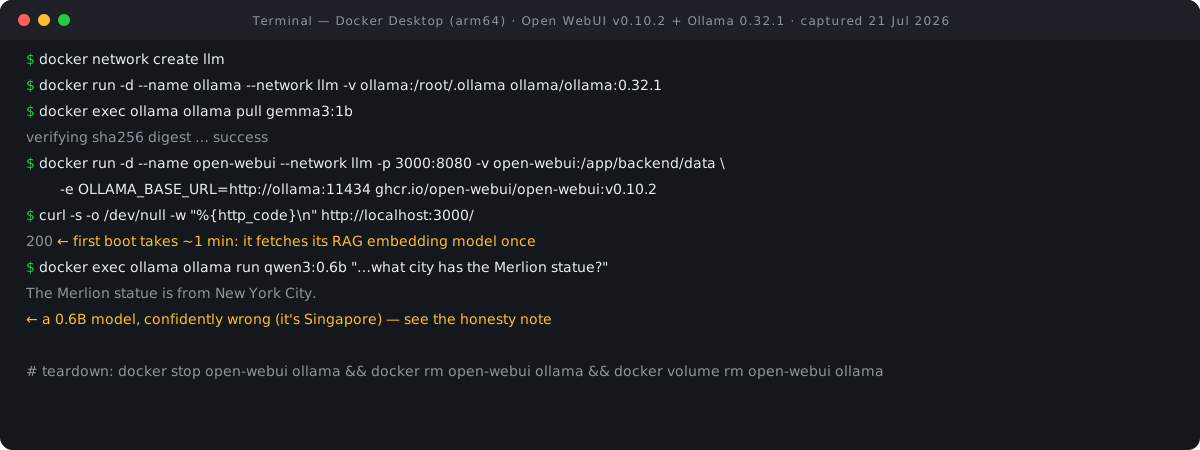
Step 6: A one-shot from the CLI — and why tiny models are for plumbing, not facts
You can also skip the browser entirely. This run streamed its output with terminal cursor-control characters we can't reproduce in HTML, so below are the legible fragments of the real output, cuts marked:
docker exec ollama ollama run qwen3:0.6b "Reply with one short sentence: what city has the Merlion statue?"
…done thinking.
The Merlion statue is from New York City. …
Two questions about the Merlion, two fluent and entirely wrong answers — Filipino folklore in the browser, New York City in the terminal. The correct answer is Singapore. The takeaway on sub-1B models is that they are superb for proving your plumbing works—network, volumes, UI wiring—but they are not a reliable reference source, no matter how polished the interface. Once the plumbing works, pull a larger model through the same flow (docker exec ollama ollama pull <model>, or type a name into Open WebUI's model selector and accept the download prompt). Larger models need real disk — Ollama's docs note model storage "can be tens to hundreds of GB" — and the current docs publish no RAM-per-model table, so we won't invent one: check each model's library page and try it on your hardware.
Step 7: Teardown — leave nothing behind
Naming the containers, volumes, network, and images makes removal exact:
docker stop open-webui ollama && docker rm open-webui ollama
open-webui
ollama
open-webui
ollama
docker volume rm open-webui ollama && docker network rm llm
open-webui
ollama
llm
docker rmi ghcr.io/open-webui/open-webui:v0.10.2 ollama/ollama:0.32.1
2
docker ps -a | grep -cE "ollama|open-webui"
0
0
Deleting the volumes deletes your chats, your admin account and the downloaded models — that's the point of a teardown, and the reason a keeper installation backs up the open-webui volume first (see the backup command below). The final count confirmed zero containers left.
Licenses, honestly
| Project | License | What it means for you |
|---|---|---|
| Open WebUI | Custom "Open WebUI License" — BSD-3-style clauses plus a branding clause since v0.6.6 (19 Apr 2025) | Free to use and self-host; you may not alter or remove the "Open WebUI" branding, with exceptions for deployments of 50 or fewer users in any rolling 30-day period, written permission, or an enterprise license. Code through v0.6.5 remains plain BSD-3 and can be forked without restriction. |
| Ollama | MIT License | Use, modify, redistribute — standard permissive terms. |
For a home or small-team install like this tutorial's, the branding clause changes nothing in practice — you fall under the 50-user exception anyway. It matters if you plan to white-label a deployment for a larger audience.
How private is it, really?
Open WebUI's documentation states that all data is stored locally and that it "does not make external requests by default." That "by default" qualifier is accurate; no independent audit is available to cite. Ollama's FAQ is similarly direct about local runs: "We don't see your prompts or data when you run locally."
Our session revealed a few asterisks to that claim. Pulling images and models is a network operation by definition. First boot fetched an embedding model from Hugging Face once — we saw it in the logs. And two documented features change the picture if you enable them: Ollama's cloud models send prompts to ollama.com (opt-in, and fully disableable via disable_ollama_cloud), and Open WebUI's web-search feature sends queries to whichever search provider you configure.
Our editorial framing, not a claim from either project's docs: for readers in Singapore and the wider region, a stack where prompts never leave the machine after setup maps naturally onto PDPA-style data-minimisation instincts — you cannot leak to a processor you never engaged. That is an architectural property of local inference, not a compliance certification, and neither project claims PDPA compliance.
Going further — per the docs
The features below are documented capabilities that we did not test in this session; the commands are from the official docs.
- Single-container variant. The docs' all-in-one option,
ghcr.io/open-webui/open-webui:ollama, bundles Ollama inside one container — onedocker runwith two volumes, plus--gpus=allon Nvidia hardware. - OpenAI-compatible APIs. Open WebUI can connect any OpenAI-compatible endpoint alongside local Ollama models — the README names LMStudio, GroqCloud, Mistral, OpenRouter and vLLM. Cloud keys mean cloud prompts, so this trades away the privacy story above.
- RAG and document chat. Load documents into a chat or pull them from your library with the
#command; web-search-for-RAG supports SearXNG, Google PSE, Brave, DuckDuckGo and others. - Multi-user with RBAC. First account is admin; later signups default to Pending, and the docs describe granular role-based access control and user groups — genuinely multi-user software.
- Updates. Remove the container, pull the new image, re-run with the same volume — "your data stays exactly where it is". One warning worth repeating from the docs: without a persistent
WEBUI_SECRET_KEY, every container recreation logs everyone out; generate one withopenssl rand -hex 32. - Backups. The docs say back up before every update, and give the command:
docker run --rm -v open-webui:/data -v $(pwd):/backup alpine tar czf /backup/openwebui-$(date +%Y%m%d).tar.gz /dataVersions, limits & cleanup
- Executed: 21 Jul 2026, Docker Desktop on macOS (Apple Silicon), CPU-only — Ollama's FAQ confirms Docker Desktop on macOS has no GPU passthrough. Linux + Nvidia can add
--gpus=all(NVIDIA Container Toolkit required). - Pinned versions: Open WebUI v0.10.2 (released 1 Jul 2026), Ollama 0.32.1 (released 16 Jul 2026). Later releases may change the UI flow and feature behaviour; the docs warn the floating
:maintag can break without warning, and database migrations are one-way — back up before updating. - Models used: gemma3:1b (815 MB, text-only, no tool support) and qwen3:0.6b (522 MB on disk, tools-capable). Both are demo-scale; expect confident errors.
- Cleanup: Step 7 removes both containers, both volumes, the network and both images — our final check counted zero remaining. Volume removal is permanent: chats, accounts and models go with it.
FAQ
Do I need a GPU?
Not for this tutorial — our whole session ran CPU-only on a Mac, and qwen3:0.6b answered in seconds. Docker Desktop on macOS cannot use the GPU at all, per Ollama's FAQ. For bigger models on Linux, the Docker docs cover Nvidia (--gpus=all) and AMD (ollama/ollama:rocm); the docs publish no sizing table, so test on your hardware.
Is it really private?
After setup, chats with local models stay on your machine — both projects document a local-by-default posture, and our network layout keeps Ollama's API off the host entirely. The outbound traffic that does happen: image pulls, model pulls, and a one-time embedding-model fetch on first boot that we observed in the logs. Optional features — Ollama's cloud models, Open WebUI's web search, any OpenAI-compatible API you add — send data out by design.
Can I use it with OpenAI or other cloud APIs?
Yes, per the docs: Open WebUI connects to any OpenAI-compatible endpoint alongside your local models — LMStudio, GroqCloud, Mistral, OpenRouter and vLLM are named in the README. Those chats go to the provider you configured, so keep local and cloud models mentally separate.
How do I add more models?
Two documented paths: from the terminal, docker exec ollama ollama pull <model> (as we did twice), or from the UI — type a model name into the Model Selector and Open WebUI offers to download it, or use Admin Settings → Connections → Ollama → Manage. Check the model's page on the Ollama library for its download size first.
- Open WebUI releases (v0.10.2, 1 Jul 2026) — GitHub (accessed 21 Jul 2026)
- Ollama releases (v0.32.1, 16 Jul 2026) — GitHub (accessed 21 Jul 2026)
- Quick Start (Docker setup, image variants, first login) — Open WebUI docs (accessed 21 Jul 2026)
- Environment configuration (OLLAMA_BASE_URL defaults) — Open WebUI docs source (accessed 21 Jul 2026)
- Updating, backup & WEBUI_SECRET_KEY — Open WebUI docs (accessed 21 Jul 2026)
- License history (branding clause since v0.6.6) — Open WebUI docs (accessed 21 Jul 2026)
- Open WebUI LICENSE file — GitHub (accessed 21 Jul 2026)
- FAQ (data storage, offline mode) — Open WebUI docs (accessed 21 Jul 2026)
- Ollama in Docker (CPU/GPU commands, run model) — Ollama docs (accessed 21 Jul 2026)
- Ollama FAQ (local privacy, macOS Docker GPU) — Ollama docs (accessed 21 Jul 2026)
- Ollama LICENSE file (MIT) — GitHub (accessed 21 Jul 2026)
- gemma3 model page (1b: 815 MB, text-only) — Ollama library (accessed 21 Jul 2026)
- qwen3 model page (0.6b: 523 MB) — Ollama library (accessed 21 Jul 2026)
Browse all our step-by-step, executed guides at RECATOOLS Guides.

View author profile → · Editorial policy