The warning arrives, you delete some things, and the number barely moves. Then you check a second time with a different tool and get a different figure entirely. At that point most people conclude something is broken.
Nothing is broken. All the numbers are correct; they disagree because they are measuring different things that all happen to be called "the disk".
The number most people check is measuring a volume you cannot write to
On the machine this was written on, the drive holds 494 gigabytes. A standard query on the root filesystem's fullness returns 6 per cent.
But the APFS container the drive is divided into reports 56.3 per cent full: 278.5 gigabytes in use, 215.9 not allocated.
Both figures are correct. Since APFS, a Mac's storage is a single container holding several volumes that share one pool of free space. The volume mounted at the root is the sealed, read-only system — a cryptographically signed snapshot you cannot add a single byte to. It is 13.0 gigabytes and it will stay roughly 13.0 gigabytes forever. That measurement tells you nothing about whether you can save a file.
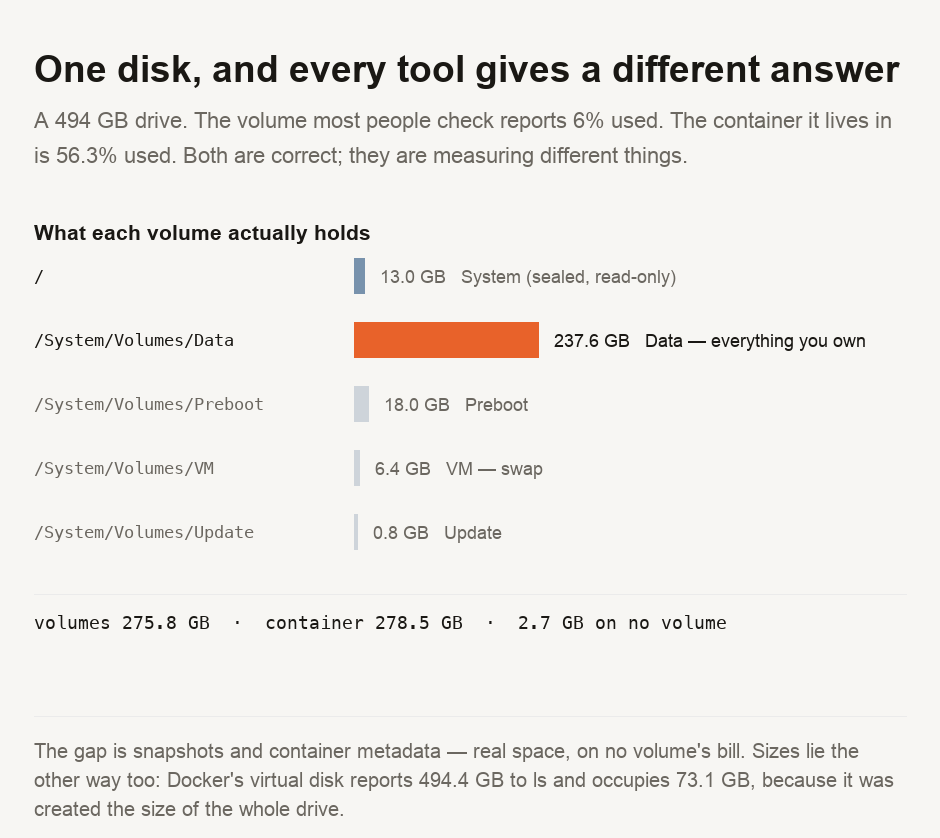
Everything you own is on a different volume, mounted at /System/Volumes/Data. That one holds 237.6 gigabytes and is 53 per cent full. This is the number that answers the question most people are actually asking.
Two of the volumes are things nobody mentions
The Preboot volume holds 18.0 gigabytes — more than the entire operating system sitting next to it. It carries the pieces needed to start and unlock each system version, and it accumulates them.
The VM volume holds 6.4 gigabytes of swap and sleep images. This is not waste; it is the file your machine writes memory into so it can keep running, and reclaiming that space is not up to you.
Neither is deletable in any useful sense, and between them they account for 24.4 gigabytes that no cleaning tool will ever offer to remove.
Then there is space that belongs to no volume at all
Add the five volumes together and you get 275.8 gigabytes. The container says 278.5. That difference of 2.7 gigabytes is in use, and appears on no volume's bill.
Most of it is snapshots. This machine is carrying 3 local APFS snapshots, which hold onto the old version of every block that has changed since they were taken. Delete a large file while a snapshot references it and the blocks cannot be released; the file disappears from your view and the space does not come back. This is why you see the most common complaint on the subject — I deleted things and nothing happened. It is not a bug. The snapshot is doing exactly its job, which is keeping the old blocks.
It is also why the free-space figure moves on its own later. The system releases snapshots under pressure, on its own schedule, without telling you.
File sizes are not measurements either
The confusion runs the other way too, and there is a spectacular example on this machine.
Docker keeps its Linux filesystem in a single file. The file reports its size as 494.4 gigabytes — larger than the drive it sits on, which is a clue. It actually occupies 73.1 gigabytes of allocated blocks. It is a sparse file, created at the maximum size it is allowed to reach but with real storage attached only where data has been written.
So one file reports 6.8 times its true footprint. Any tool that sums the sizes it is told will produce a total larger than the disk, and any tool that measures allocated blocks will not. Both are reading the same file.
Which makes "how full is my disk" the wrong question
There are at least four defensible answers for this machine, and you can pick whichever supports the point you wanted to make: 6 per cent, 53 per cent, 56.3 per cent, or something else again once snapshots are counted.
The useful question is can I write what I need to write? The only number that answers it is the free space on the container, which is the pool every volume draws from. Here it is 215.9 gigabytes, and no amount of deleting will change the fact that the root volume is 6 per cent full.
Check the free space on the container, not the percentage on the root volume — the root volume is the sealed system, cannot be written to, and its 6 per cent means nothing. Everything you own is on the Data volume, at 53 per cent here. If you deleted a lot and the number did not move, suspect a snapshot holding the old blocks rather than a bug; it will release on its own. And treat any file size over about a gigabyte with suspicion until you have checked allocated blocks, because a sparse file will happily tell you it is 494.4 gigabytes while occupying 73.1.
Reading your own numbers
Every figure here came from tools already on the machine — df per volume, diskutil apfs list for the container, tmutil listlocalsnapshots / for the snapshots, and stat for the difference between a file's size and its blocks. The measurement script is committed with this guide.
The unit confusion is a separate trap worth clearing while you are here: a drive sold as 500 GB is 500 billion bytes, which your operating system may report as roughly 466 GiB, and the missing 34 was never there. Our data storage converter handles that conversion, and the unit converter covers the rest of the base-2 against base-10 confusion this subject is full of. If you are working out how long moving all of it somewhere else would take, that same data storage converter shows the transfer time for a given quantity across a ladder of link rates, and our guide on where a page load's time goes explains why that estimate will be optimistic.
- Every figure is read from the operating system's own accounting on one machine —
df -kper volume,diskutil apfs listfor container capacity,tmutil listlocalsnapshots, andstatfor apparent size against allocated blocks. Nothing here is an estimate, and no third-party cleaning tool was consulted. - The volume figures and the container figure are reported separately and deliberately not reconciled by adjusting either. The 2.7 gigabyte gap between them is the finding, not an error to be tidied away.
- ⚠️ One Apple Silicon Mac running macOS 25.6 with a 494 GB container. The APFS container model, the sealed system volume, snapshot block retention and sparse files are all properties of the filesystem rather than of this machine, so the mechanism holds elsewhere. The specific gigabyte figures are this machine's.
- ⚠️ Windows and Linux divide storage differently and none of the specific numbers transfer. The general point — that a size and an allocation are different quantities, and that a mount point is not a disk — does.
Deleting system volumes, Preboot contents or snapshots by hand can leave a machine unable to start. Nothing above is an instruction to remove anything; it is an explanation of what the numbers are counting.

View author profile → · Editorial policy