Private browsing is the most widely used privacy feature ever shipped, and it is almost universally misunderstood. People open it to hide something — from a shared laptop, or from an advertiser, or from an employer — and only one of those three is a job it does.
The feature is honest about this. Every browser shows a paragraph on the new-tab page explaining the limits. Almost nobody reads it, and the name does most of the work instead.
What it does, precisely
A private window is a separate storage container that is destroyed when you close it. During the session it behaves normally: sites set cookies, write to local storage, and cache files. When the last private window closes, that container is discarded.
Five things go with it — the cookies set during the session, localStorage and sessionStorage, anything written to IndexedDB, the history entries for those tabs, and the cached files. That is the whole of the guarantee, and it is a useful one.
What those five have in common is that they are all data stored on your own device. Private browsing is a local-storage feature; it has no reach beyond your machine.
What leaves your machine anyway
A site does not need a cookie to know a great deal about the browser talking to it. We opened a page that set no cookie and asked for no permission, and read what was available with a single script.
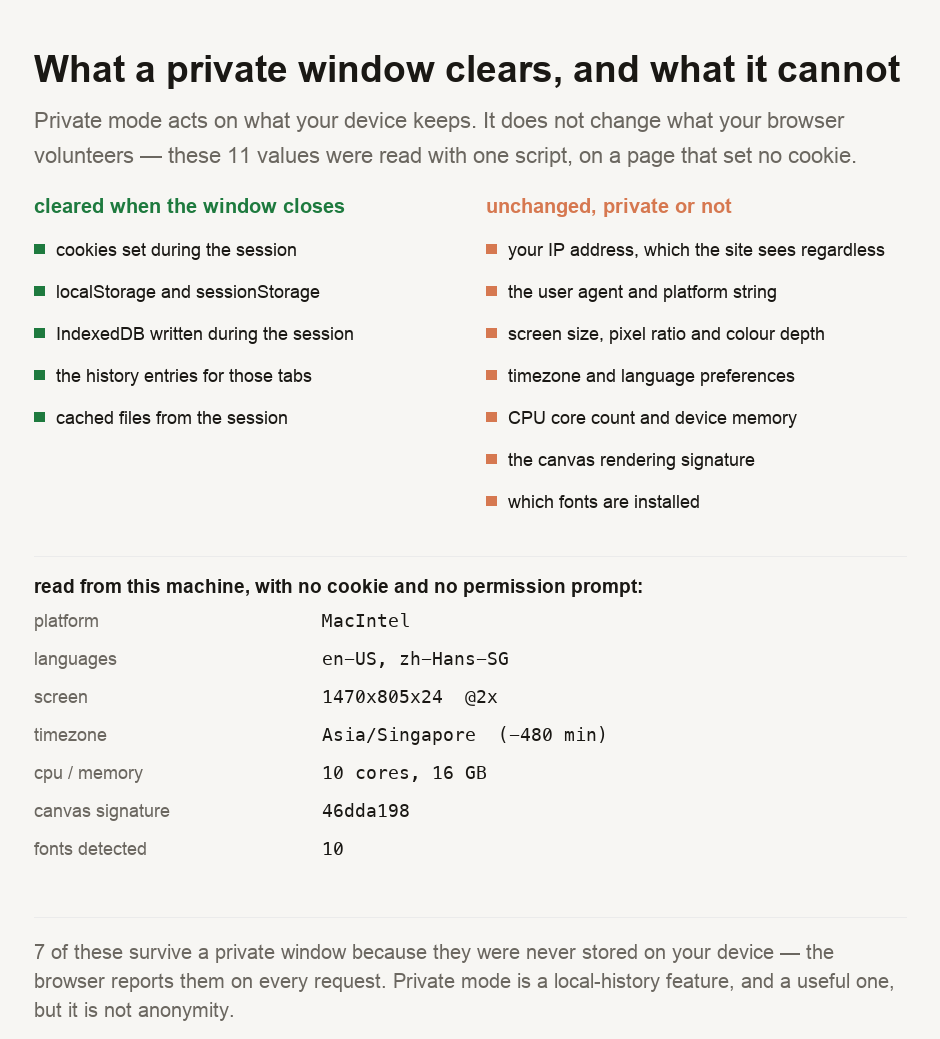
The machine reported its platform (MacIntel), screen (1470x805x24 at a pixel ratio of 2), 10 CPU cores and 16 GB of memory, and a timezone of Asia/Singapore. It also volunteered its language preferences, en-US and zh-Hans-SG, a canvas rendering signature of 46dda198, and confirmation that 10 of the fonts we asked about were installed.
None of that data came from storage; the browser volunteers it on request, or it emerges from how the machine draws. A private window cannot clear what was never stored.
Individually these are unremarkable — plenty of people are in Singapore, plenty have ten cores. Combined, they are considerably narrower, and the language pair in particular is a good deal more specific than either value alone. That combination is what fingerprinting means, and it is why "I cleared my cookies" and "they cannot recognise me" are different statements.
Who can still see what you are doing
This misunderstanding matters, because the parties most people are trying to avoid are unaffected.
The sites you visit see your IP address and everything above, in a private window exactly as in a normal one. If you sign in, you have of course told them who you are directly.
Your network — an employer, a school, a café — sees which sites you connected to. Private mode does not encrypt anything that was not already encrypted; our guide on encrypted DNS covers what that layer does and does not hide.
Your internet provider is in the same position, and in many jurisdictions retains those records for a fixed period regardless of your browser's settings.
The one party it reliably defeats is the next person to use the device. That is the exact job the feature was designed for: a shared family laptop, a library terminal, a hotel business centre.
Where the obligation actually sits
Under the PDPA in Singapore and the GDPR in the EU, a value that can single out an individual when combined with other information is personal data, and the test is about capability rather than intent. A fingerprint assembled from the values above is squarely inside that definition, and the fact that a visitor was in a private window changes nothing about the obligation.
For anyone operating a site, the consequence is plain: private browsing is not consent, and it is not a lawful basis. If your analytics identify returning visitors without a cookie, you are processing personal data and you owe the same answers you would owe for a cookie — a basis, a retention period, and a name for who can read it.
Use a private window to keep a session off a shared device — that is the job it does properly, and it does it well. It does not hide you from the sites you visit, your employer's network, or your internet provider. None of them are affected. A page that set no cookie still read this machine's platform, screen, timezone, language pair, core count, memory, fonts and a canvas signature. Closing a private window clears none of that, because none of it was ever stored. If what you need is that the network cannot see which sites you reach, that is a different tool and a different trust decision. And if you run a site, treat a private-mode visitor as a person with the same rights as any other, because the law does.
Seeing your own
Our IP lookup shows the address a site sees when you connect — open it in a private window and it will be the same one — and the user agent parser breaks down what the other half of every request discloses about your browser and device. If you are curious what a returning-visitor identifier can be built from without any cookie at all, our guide on what an IP address reveals covers the part of this that is hardest to change.
- The values were read from a real browser with one JavaScript call, on a page that set no cookie and requested no permission. They are quoted as returned. The list of what a private window clears is the documented behaviour of the storage container, common to current browsers.
- ⚠️ This measured the surface a site can read WITHOUT storage. It is not a test of a private window itself — we did not run the script in one and compare. That distinction matters, and the argument does not depend on the missing test: every value listed is reported by the browser on request or derived from rendering, so there is nothing stored for a private window to discard.
- ⚠️ One machine, one browser. Core count, memory, screen and fonts will differ on yours; the language pair and timezone are ours. What generalises is the category of value, not the specific readings.
- ⚠️ We did not measure how identifying this particular combination is. Claiming a uniqueness figure would need a population to compare against, which we do not have, so the guide says the combination is narrower than its parts and stops there.
This describes what private browsing does in ordinary use. It is not legal advice, and browser behaviour changes — several vendors have added protections against some of the techniques described, which vary by browser and by version.

View author profile → · Editorial policy