
Installing a browser extension takes one click and a dialogue nobody reads. The dialogue is not hiding anything — it says, in plain words, what the extension is about to be allowed to do. The vocabulary is precise, but it only acquires meaning once you have seen what each phrase authorises in practice.
So we read the manifests of the extensions installed on a real machine and wrote out what each permission grants.
A note on how this was measured
Reading a browser profile means reading which extensions a specific person chose to install. That is personal data, and a guide about privacy is the last place to publish it.
So the script records no name, no identifier, no author and no version — only the permissions, aggregated. Our first run failed that standard: it wrote host patterns like a vendor's own domain straight into the results, which identifies an extension precisely. Host access is now recorded as a category rather than quoted, and the specific patterns never reach disk.
What was actually requested
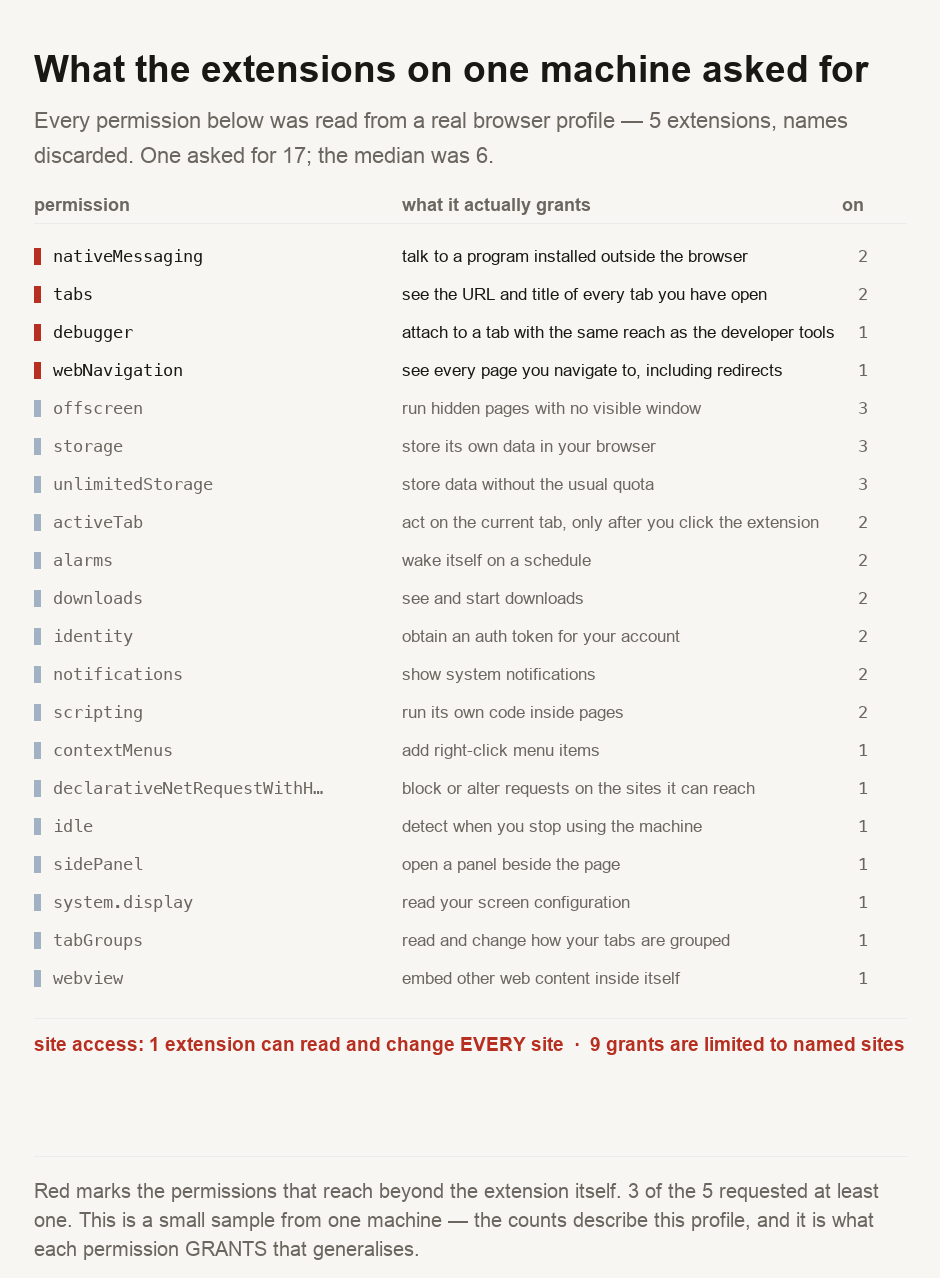
5 extensions, and the spread is wide: one asked for 17 distinct permissions, the median was 6, and the most modest asked for 2.
Four requests deserve reading slowly.
tabs, on two of them, means the extension can see the address and title of every tab you have open. Not the page you are looking at — all of them, continuously.
nativeMessaging, also on two, lets the extension exchange messages with a program installed on your computer outside the browser. Whatever boundary you imagine around a browser tab, this permission is a door through it.
webNavigation reports every page you navigate to, including the redirects you never see. That is a browsing history in real time rather than a stored list.
debugger is the one that stopped us. It attaches to a tab with the same reach the developer tools have: reading and altering page content, network traffic and stored data. It has legitimate uses, but it also grants something close to total control of any tab it attaches to.
The distinction that actually matters
Two permissions on that list are easy to confuse. activeTab grants access to the current tab, and only after you click the extension's button. Host access to every site grants it permanently, everywhere, without any further action from you.
On this machine, 1 extension holds the second kind, against 9 grants limited to named sites. That ratio is the reassuring part of the whole exercise — most requests here were scoped — and the one broad grant is worth more scrutiny than the nine narrow ones combined.
When you are deciding, that is the question to ask: does this need every site, or the site I am on when I ask it to work? A well-built extension usually wants access only to the current tab, and the dialogue tells you which one it chose.
Where the obligation sits
An extension that can read every page you visit is processing personal data by any reading of the PDPA or the GDPR, and it is doing so on your device rather than on a server you agreed terms with. The permission dialogue is the consent moment, and it is the only one you get.
That places a duty on the person installing as much as on the developer. Nobody else is positioned to notice that a screenshot tool asked for your browsing history. The risk is not static. An extension can change hands, and the new owner inherits every permission you granted the old one without asking you again.
The practical consequence is that a permission review is not a one-off. It is worth revisiting the list occasionally, and removing what you no longer use — an unused extension keeps every permission it was granted.
Read the dialogue for one distinction: whether the extension wants every site, or only the site you are on when you click it. On this machine one extension holds the broad grant and nine were scoped to named sites, so the narrow version is both common and sufficient. Treat four requests as worth a pause — reading every open tab, seeing every navigation including redirects, talking to a program outside the browser, and attaching a debugger to a tab. Each is legitimate for some tools and excessive for most. And review what you already have, because an extension you stopped using keeps everything you granted it, and one that changes owner takes your permissions with it.
Reading your own
The script is committed with this guide and reads manifests from a browser profile without recording anything identifying. Your browser also shows the same information: the extensions page lists what each one may access, and it is the same data the dialogue showed at install time. For what a site can learn about you without any extension at all, what incognito mode actually does measured the values a page reads with no cookie and no permission, and what an IP address reveals covers the part you cannot turn off. Our user agent parser shows what your browser volunteers on every request, and IP lookup shows the address that accompanies it.
- Permissions were read from the manifest of every extension installed in a real browser profile on this machine. The descriptions of what each permission grants are ours, written to be plain rather than to mirror any vendor's wording, and every permission observed is described — the first run left nine undescribed, which is not a state a guide should ship in.
- ⚠️ NO EXTENSION IS IDENTIFIED. No name, identifier, author or version was recorded, and host patterns are stored as a category rather than quoted, because a specific host pattern identifies an extension exactly. Our first run got this wrong and wrote vendor domains into the results; that was corrected before anything was published.
- ⚠️ FIVE EXTENSIONS IS A SMALL SAMPLE, from one profile on one machine. The counts describe this profile and nothing more — no claim is made about how common any permission is in general. What generalises is what each permission grants, which is a property of the browser rather than of this sample.
- ⚠️ A manifest states what an extension MAY do, not what it does. We did not observe any extension's behaviour, inspect its code, or verify that a granted permission is ever used. A broad permission is a capability, not an accusation.
This describes the permissions browser extensions request and what those permissions authorise. It is not an assessment of any particular extension, none of which is named, and it is not legal advice.

View author profile → · Editorial policy