Deleting a file is one of the few computer operations that feels final. The icon goes, the space comes back, and the machine offers no way to undo it. Whatever the file was, it is gone.
We wanted to know whether that is true at the level of the bytes, so we ran the experiment properly: write a file we could recognise, delete it, and then read the raw disk to see whether it was still there.
The instrument
The problem with searching a disk for a deleted file is knowing that you have found it. A common word would turn up by coincidence in a font, a log or a cached page, and a coincidence looks exactly like a recovery.
So the file we wrote contains one ordinary English sentence and 4,500 copies of a token that exists nowhere else in computing. If the token appears in the raw bytes of the disk, the data is on the disk. There is no other explanation available.
Everything ran inside a 40 MB disk image in a temporary directory — a real filesystem with a real volume, but not anyone's actual disk. A guide about deletion is a poor place to start deleting things.
What happened at each stage
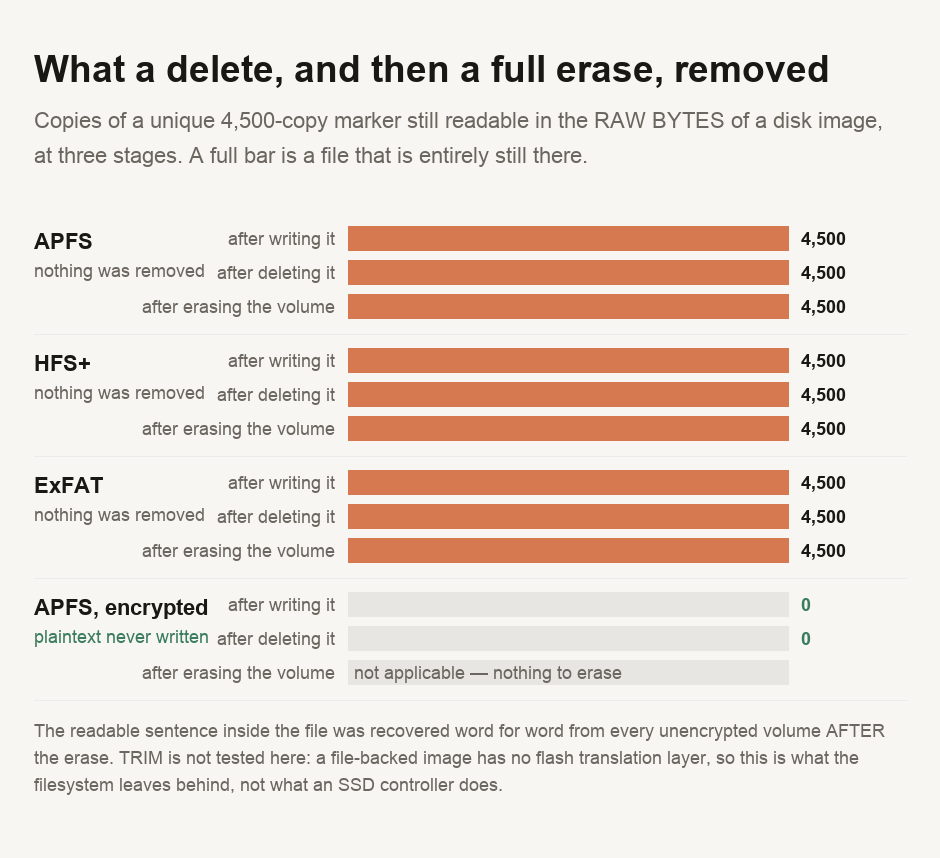
On all 3 unencrypted filesystems the file was written, deleted, and every one of the 4,500 copies stayed exactly where it was. Not most of them. All of them.
Then we did the thing people do when deleting is not enough: erased the entire volume, the way Disk Utility does it. The count after that was 4,500 again, on all three. And the ordinary sentence in the file came back word for word.
Why the count never moved
Because neither operation was ever about the data. A filesystem is an index and a heap of blocks, and deleting a file edits the index. The entry that says this name lives in these blocks is removed and the blocks are marked available. Nothing goes near the blocks themselves, because rewriting them would cost time for no benefit the filesystem cares about.
Erasing a volume is the same trick at a larger scale. It writes a fresh, empty index over the old one. The volume is empty by every measure the operating system uses, but the blocks underneath are untouched. A marker written before the erase survives it intact.
The blocks are reused eventually, when something else needs them. That overwriting is what actually makes the data disappear — a matter of luck and time, not a direct result of anything you did.
The volume where the search found nothing
The fourth volume was the same APFS, with encryption switched on. The marker count there was 0 — and, importantly, it was 0 before we deleted anything, while the file was sitting there openly and could be opened and read.
That single number explains the whole mechanism. Plaintext is never written to an encrypted volume, so there is none to find later. Deleting the file changed nothing, because there was nothing recoverable to change.
This reverses the usual advice. The important question is not how to delete a file at the moment you want it gone, but whether the disk was encrypted when the file was written. That earlier decision is the one that determined the outcome.
Where this stops
We measured what the filesystem leaves behind, for which a disk image is a fair instrument. It is not an SSD. A real solid-state drive has a controller between the filesystem and the flash, and a TRIM command telling it which blocks are free — and modern controllers do erase those blocks in their own time, which is why recovery from a healthy SSD is markedly less reliable than these results suggest.
We could not test that here, and we are not going to imply we did. The results establish a narrow but important point: neither the delete nor the erase removed the data. If data becomes unrecoverable on an SSD, it is because the drive's controller did the work on its own schedule, with no guarantee of when.
Encrypt the disk, and do it before there is anything on it worth worrying about. This was the only step in the experiment that produced a disk with nothing readable on it. The plaintext marker was absent from the encrypted volume from the first scan; on the unencrypted ones, deleting and erasing left all 4,500 copies in place. For a machine you are selling or returning, use the manufacturer's own erase for an encrypted disk, which discards the key rather than the data and is the reason it finishes in seconds. Treat any USB stick or memory card you have merely formatted as still carrying everything that was on it. And if it is your own file you want back, stop writing to that disk immediately: the data is still there until something else takes the space.
Trying this yourself
The script is committed with this guide and builds its own disk image, so it cannot touch anything of yours. If you want to understand the storage side of what it reports, our data storage converter and file size converter handle the unit arithmetic, and the hash generator is the quick way to check whether a recovered file is byte-for-byte the original. For what is left inside a file rather than on the disk around it, the image EXIF stripper removes the location and device data that photos carry invisibly. Two related guides: where your disk space actually went found 2.7 GB the operating system was not reporting, and which hash for what covers the cryptography this one leans on.
- Every figure comes from a script committed alongside this guide. Four 40 MB disk images, one file per image containing a readable sentence and 4,500 copies of a unique token, with the raw bytes of the image searched at three stages: after writing, after deleting, and after erasing the volume with
diskutil eraseVolume. - The token is a fixed random-looking string rather than a word. A common word would turn up in a font or a log by chance, and a coincidence is indistinguishable from a recovery.
- ⚠️ NOTHING OUTSIDE THE TEMPORARY IMAGES WAS TOUCHED. No real file was deleted and no real volume was erased. The images are destroyed when the script exits.
- ⚠️ TRIM WAS NOT TESTED, and it is the most important thing we did not measure. A file-backed disk image has no flash translation layer and receives no TRIM, so these results describe what the FILESYSTEM leaves behind. On a real SSD the controller may erase freed blocks on its own schedule, which makes recovery less reliable than this measurement implies.
- ⚠️ One operating system, one afternoon. The mechanism — an index edit rather than a data overwrite — is common to every mainstream filesystem, but the specific commands and their behaviour are macOS. We did not test Windows or Linux.
- ⚠️ We did not attempt to recover a file with recovery software, and this guide recommends none. Finding data in raw bytes with a known marker is a much easier problem than reconstructing an unknown file, and the results should not be read as a claim about how well any recovery product works.
This describes what deleting and erasing do to data on a disk, measured on disk images on one machine. It is not a recovery service, not a recommendation of any recovery software, and not advice about data that is subject to a legal hold or a retention obligation.

View author profile → · Editorial policy